
Last updated on
Oct 31, 2026

Get the free Parent Guardian Consent Release Form
We are not affiliated with any brand or entity on this form

Fill out
Complete the form online in a simple drag-and-drop editor.

eSign
Add your legally binding signature or send the form for signing.

Share
Share the form via a link, letting anyone fill it out from any device.

Export
Download, print, email, or move the form to your cloud storage.
Why pdfFiller is the best tool for your documents and forms


End-to-end document management
From editing and signing to collaboration and tracking, pdfFiller has everything you need to get your documents done quickly and efficiently.
Accessible from anywhere
pdfFiller is fully cloud-based. This means you can edit, sign, and share documents from anywhere using your computer, smartphone, or tablet.
Secure and compliant
pdfFiller lets you securely manage documents following global laws like ESIGN, CCPA, and GDPR. It's also HIPAA and SOC 2 compliant.
What is NCL Consent Form
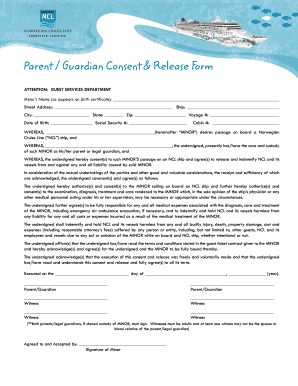
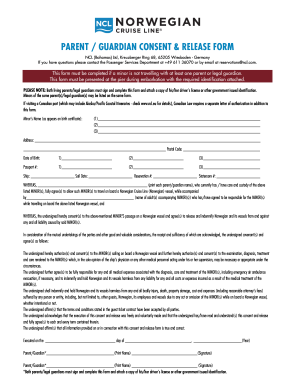
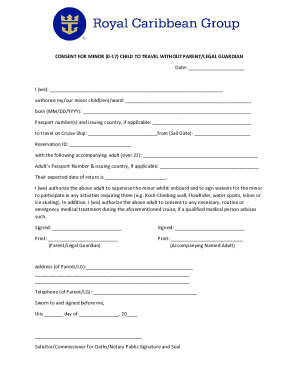
The Parent Guardian Consent Release Form is a legal document used by parents or guardians to grant permission for minors to travel on Norwegian Cruise Line vessels.
pdfFiller scores top ratings on review platforms




Who needs NCL Consent Form?
Explore how professionals across industries use pdfFiller.

NCL Consent Form is needed by:
-
Parents or legal guardians of minors traveling on cruises
-
Travel agents coordinating family trips
-
Notary Publics for document verification
-
Witnesses required for signature validation
-
Cruise line personnel at embarkation points
Comprehensive Guide to NCL Consent Form
What is the Parent Guardian Consent Release Form?
The Parent Guardian Consent Release Form is a legal document required by Norwegian Cruise Line for minors traveling on their vessels. This form serves to ensure that both parents or legal guardians give their consent for the minor to travel, offering essential protection and guidance for minors during their journey. It is crucial that the form is completed with dual parental consent, particularly in cases of shared custody, reflecting its legal significance and necessity. Utilizing this document confirms the minor's travel authorization while safeguarding the cruise line from potential liabilities.
Purpose and Benefits of the Parent Guardian Consent Release Form
The primary purpose of the Parent Guardian Consent Release Form is to facilitate safe travel for minors, ensuring they have the necessary permissions before embarking on their journey. By using this form, parents and guardians can gain peace of mind knowing that they are fulfilling legal obligations and protecting their child. The document also provides authorization for medical treatment in case of emergencies, which is vital during travel. Overall, this form enhances the safety and security of minors traveling with Norwegian Cruise Line.
Who Needs the Parent Guardian Consent Release Form?
This form is essential for any parent or guardian of a minor intending to travel, particularly in cases where custody arrangements exist. Both parents or all legal guardians must complete the document if they share custody, ensuring clarity and legal protection. Additionally, the consent form is required for minors traveling alone or with third parties, underlining its importance in various custodial situations. This ensures that only authorized individuals are responsible for the child's well-being during the cruise.
Eligibility Criteria for the Parent Guardian Consent Release Form
To complete the Parent Guardian Consent Release Form, specific eligibility criteria must be met. The individuals signing the form must be the legal parents or guardians of the minor, and certain conditions apply regarding custody status. For a valid document, a witness must be present during the signing, who is not a relative and has known the parent or guardian for at least four years. Furthermore, notarization is necessary to validate the form, ensuring that all permissions are legally binding.
How to Fill Out the Parent Guardian Consent Release Form Online
Completing the Parent Guardian Consent Release Form online can be done efficiently using pdfFiller. Follow these simple steps:
-
Create an account or log in to pdfFiller.
-
Select the Parent Guardian Consent Release Form from the template library.
-
Fill in the required fields, including the minor’s name, date of birth, and executed date.
-
Verify all information for accuracy before proceeding.
-
Save the completed form and prepare it for signature and notarization.
Common Errors and How to Avoid Them When Completing the Parent Guardian Consent Release Form
While filling out the Parent Guardian Consent Release Form, several common mistakes can occur, potentially leading to issues during submission. Frequent errors include incomplete fields, incorrect dates, or failing to secure the necessary signatures. To avoid these pitfalls, consider the following tips:
-
Double-check all entries for spelling and accuracy.
-
Ensure both parents or guardians have signed the form where required.
-
Review witness and notarization requirements carefully.
-
Keep copies of the completed form for your records.
How to Sign or Notarize the Parent Guardian Consent Release Form
Signing and notarizing the Parent Guardian Consent Release Form can be completed using different methods. Parents or guardians may choose to use a digital signature, which is convenient and efficient. However, a traditional wet signature is also acceptable and may be required in certain scenarios. It is crucial to understand that notarization ensures the form's legality and provides an additional layer of verification, making it more likely to be accepted by Norwegian Cruise Line and other authorities.
Submission Methods and Delivery of the Parent Guardian Consent Release Form
Once completed, the Parent Guardian Consent Release Form must be submitted according to specific guidelines set by Norwegian Cruise Line. The form should be delivered to designated personnel at the pier during embarkation. Be mindful of any deadlines for submission to ensure your form is processed in time for travel. Check Norwegian Cruise Line’s official requirements to avoid delays and ensure a smooth embarkation process.
Importance of Secure Documentation in the Parent Guardian Consent Release Form
When it comes to handling sensitive information, security is paramount. pdfFiller employs industry-standard security measures, including 256-bit encryption and compliance with GDPR and HIPAA regulations, to protect your personal data. Utilizing secure documentation practices ensures your details remain confidential and safeguarded during the entire form completion process.
Get Started with Your Parent Guardian Consent Release Form Using pdfFiller
To streamline your experience in completing the Parent Guardian Consent Release Form, consider utilizing pdfFiller. The platform provides features that simplify form filling, including the ability to edit text, add signatures, and securely share your documents. By choosing pdfFiller, users can efficiently complete their forms with peace of mind regarding the security of their information.
How to fill out the NCL Consent Form
-
1.Access the Parent Guardian Consent Release Form on pdfFiller by searching the title in the site's search bar or by using a direct link from your email or cruise line website.
-
2.Once opened, navigate through the document. You will find instructional fields clearly marked for inputting details about the minor.
-
3.Gather all necessary information before starting, including the minor's full name, address, date of birth, and the date of signing.
-
4.Start filling in the blank fields with the correct information. Use the text tool to type directly into the designated areas, ensuring accuracy and readability.
-
5.Review all content entered for completeness. Verify that the consent and liability release details meet the requirements outlined by the cruise line.
-
6.Locate the checkboxes within the form to confirm essential authorizations, making sure every required box is checked to avoid any issues.
-
7.Once you have filled in all the fields and confirmed their accuracy, save your progress on pdfFiller. Use the 'Save' option to keep the document in your account.
-
8.Finalize the form by downloading a copy or submitting it directly through pdfFiller, as required by the Norwegian Cruise Line.

Who is eligible to sign the Parent Guardian Consent Release Form?
Only the parent or legal guardian of the minor may sign the form. If custody is shared, both parents must consent and sign. A witness who has known the parent/guardian for at least four years is also required.
What documents do I need to complete this form?
You will need personal identification details for the minor, including their full name, address, and date of birth. It's also beneficial to have proof of custody arrangements if applicable.
Where do I submit the completed form?
The completed Parent Guardian Consent Release Form must be presented at the pier during embarkation. Ensure you have a printed version ready to show the cruise line personnel.
How should I fill out the form to avoid mistakes?
Be careful to read each instruction clearly and fill in all required fields accurately. Double-check names, dates, and any authorizations checked. Consider having another adult review your entries.
Is notarization required for the consent form?
Yes, the Parent Guardian Consent Release Form requires notarization. Make sure a Notary Public is present to witness and sign the document after it is filled out.
What if I can’t fill out the form before my trip?
It is crucial to complete the form before your trip, as you must present it during embarkation. If possible, fill it out and have it notarized before departure to avoid complications.
How long does it take to process this form?
The form typically does not require processing time if completed properly. The key is ensuring it is filled out, signed, and notarized before you arrive at the cruise terminal.
Related Content
Related Forms




Related Catalogs
Get the latest insights from our blog



If you believe that this page should be taken down, please follow our DMCA take down process
here
.
This form may include fields for payment information. Data entered in these fields is not covered by PCI DSS compliance.