
Last updated on
Oct 31, 2026

NY Glens Falls City School District Social History Form 2005 free printable template
pdfFiller is not affiliated with any government organization

Fill out
Complete the form online in a simple drag-and-drop editor.

eSign
Add your legally binding signature or send the form for signing.

Share
Share the form via a link, letting anyone fill it out from any device.

Export
Download, print, email, or move the form to your cloud storage.
Why pdfFiller is the best tool for your documents and forms


End-to-end document management
From editing and signing to collaboration and tracking, pdfFiller has everything you need to get your documents done quickly and efficiently.
Accessible from anywhere
pdfFiller is fully cloud-based. This means you can edit, sign, and share documents from anywhere using your computer, smartphone, or tablet.
Secure and compliant
pdfFiller lets you securely manage documents following global laws like ESIGN, CCPA, and GDPR. It's also HIPAA and SOC 2 compliant.
What is NY Glens Falls City School District Social History Form
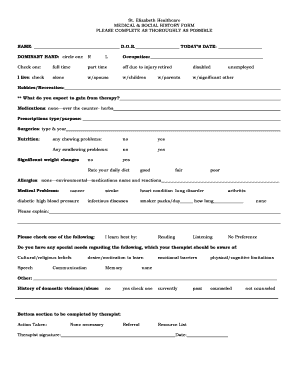
The Social History Form is a document used by Glens Falls City School District to collect essential background information on students from parents or guardians.
pdfFiller scores top ratings on review platforms




Works Great. Amazing product. Thank you!
So for I have had a great experience using it.Thanks Rick
Who needs NY Glens Falls City School District Social History Form?
Explore how professionals across industries use pdfFiller.

NY Glens Falls City School District Social History Form is needed by:
-
Parents or guardians looking to enroll their child in school.
-
School administrators needing comprehensive information for student registrations.
-
Educators assessing student backgrounds for health and development considerations.
-
Counselors supporting student mental health and well-being.
-
District officials analyzing student demographics and educational needs.
Comprehensive Guide to NY Glens Falls City School District Social History Form
What is the Social History Form?
The Social History Form is a crucial document for gathering essential background information about students enrolling in the Glens Falls City School District. Designed primarily for parents or guardians, this form helps schools understand the unique circumstances and needs of each student. By accurately completing this school enrollment form, parents provide key insights that assist in fostering a supportive educational environment.
Purpose and Benefits of the Social History Form
This important education form serves multiple purposes, notably in facilitating the integration of students into their new school environment. By collecting vital information, the form helps educators address students' educational journeys, health requirements, and any pertinent support they may need. Properly completing the form ultimately benefits both families and schools by enhancing communication and resource allocation.
-
Aids in tailored educational support.
-
Facilitates a better understanding of health considerations.
-
Promotes effective collaboration between parents and educators.
Key Features of the Social History Form
The Social History Form includes several important sections designed to capture comprehensive student data. Key features consist of areas for parent or guardian data, child health and development, and significant family events. The utilization of blank fields and checkboxes ensures users can provide detailed responses, ultimately enriching the information available for educational planning.
-
Parent/Guardian contact information.
-
Health and developmental history of the child.
-
Details on family events affecting the student.
Who Needs to Complete the Social History Form?
The responsibility for filling out the Social History Form falls to the parents or guardians of students entering the Glens Falls City School District. Situations such as a history of health issues or special education needs may require the completion of this student registration form. Guardians play an integral role in providing accurate and comprehensive data that informs the school about each child's unique needs.
How to Fill Out the Social History Form Online
To effectively complete the Social History Form using pdfFiller, follow these steps:
-
Access the form online through the pdfFiller platform.
-
Fill in the 'Date Completed' and 'Student' sections as required.
-
Provide detailed answers in all relevant sections.
-
Review the information for accuracy and thoroughness before submission.
Tips for ensuring accuracy include checking spelling and confirming that all required fields are filled.
Common Errors and How to Avoid Them
When completing the Social History Form, users often encounter several common pitfalls. These mistakes, such as missing signatures or incorrect data entries, can delay the enrollment process. Implementing a thorough double-checking approach can help avoid these issues.
-
Ensure all required fields are answered.
-
Confirm that signatures are provided where necessary.
A review checklist can streamline this process by outlining specific sections that must be completed.
How to Submit the Social History Form
Submitting the Social History Form can be done via various methods, including online or in-person options. Be sure to note any deadlines that may impact the submission process. To guarantee that your form is secured and acknowledged, following the outlined submission methods is crucial.
-
Submit the form online through pdfFiller.
-
Drop off a physical copy at the school's administration office.
Security and Privacy of the Social History Form
Concerns around handling sensitive information are addressed by pdfFiller’s stringent security measures. Utilizing 256-bit encryption and adhering to HIPAA and GDPR regulations ensures that user data is protected during and after submission. This attention to privacy reinforces the importance of secure management of personal information when filling out the form.
The Role of pdfFiller in Completing the Social History Form
pdfFiller plays an essential role in enhancing the process of completing the Social History Form. Users benefit from features such as text editing, eSigning, and form filling capabilities that simplify the experience. The convenience of a cloud-based platform further augments document management and ensures secure handling of forms.
Get Started with the Social History Form Today
Users are encouraged to begin filling out the Social History Form on pdfFiller's platform. Access to helpful resources and support facilitates the completion of the form. Utilizing pdfFiller not only ensures a smooth submission process but also enhances the overall experience of enrolling a student in the Glens Falls City School District.
How to fill out the NY Glens Falls City School District Social History Form
-
1.To access the Social History Form, navigate to the pdfFiller website and search for 'Social History Form' in the templates section.
-
2.Once you find the form, click on it to open in the pdfFiller interface for editing.
-
3.Review the sections and gather necessary information including parent/guardian details, student health history, and academic background before starting to fill in the form.
-
4.Use the provided fields to enter each piece of information accurately. Click on text boxes to type or check boxes using the mouse.
-
5.Ensure all required sections, such as family history and significant events, are fully completed to avoid delays in processing.
-
6.After filling out the form, carefully review each section for accuracy and completeness.
-
7.Make any necessary adjustments or corrections to ensure all data is correct.
-
8.Once finalized, you can save the form in various formats like PDF or print directly from pdfFiller.
-
9.If required, follow the prompts to download and submit your completed form online according to the school's submission guidelines.

What are the eligibility requirements for submitting the Social History Form?
The Social History Form must be completed by parents or guardians of students seeking enrollment within the Glens Falls City School District.
Is there a deadline for submitting the Social History Form?
Deadlines may vary by school year. It is recommended to submit the form as soon as possible to ensure timely enrollment processing.
How can I submit the Social History Form once completed?
You can submit the Social History Form through the school district's designated online portal or by printing and delivering it to the school administration office.
What supporting documents are required with the Social History Form?
Typically, additional documents might include proof of residence, previous school records, and relevant health records for the student.
What common mistakes should I avoid when filling out the Social History Form?
Ensure all sections are completed, avoid leaving fields blank, and double-check spelling of names and contact details to prevent processing delays.
How long does it take to process the Social History Form after submission?
Processing times can vary, but typically you can expect confirmation of enrollment within a few weeks after submission, depending on the district's workload.
What if I have questions while filling out the Social History Form?
For assistance, you can contact the school district's enrollment office directly, or refer to the school's website for additional resources and guidelines.
NY Glens Falls City School District Social History Form Form Versions
Related Content
Related Forms





Related Catalogs
Get the latest insights from our blog


If you believe that this page should be taken down, please follow our DMCA take down process
here
.
This form may include fields for payment information. Data entered in these fields is not covered by PCI DSS compliance.