
Last updated on
Nov 7, 2026
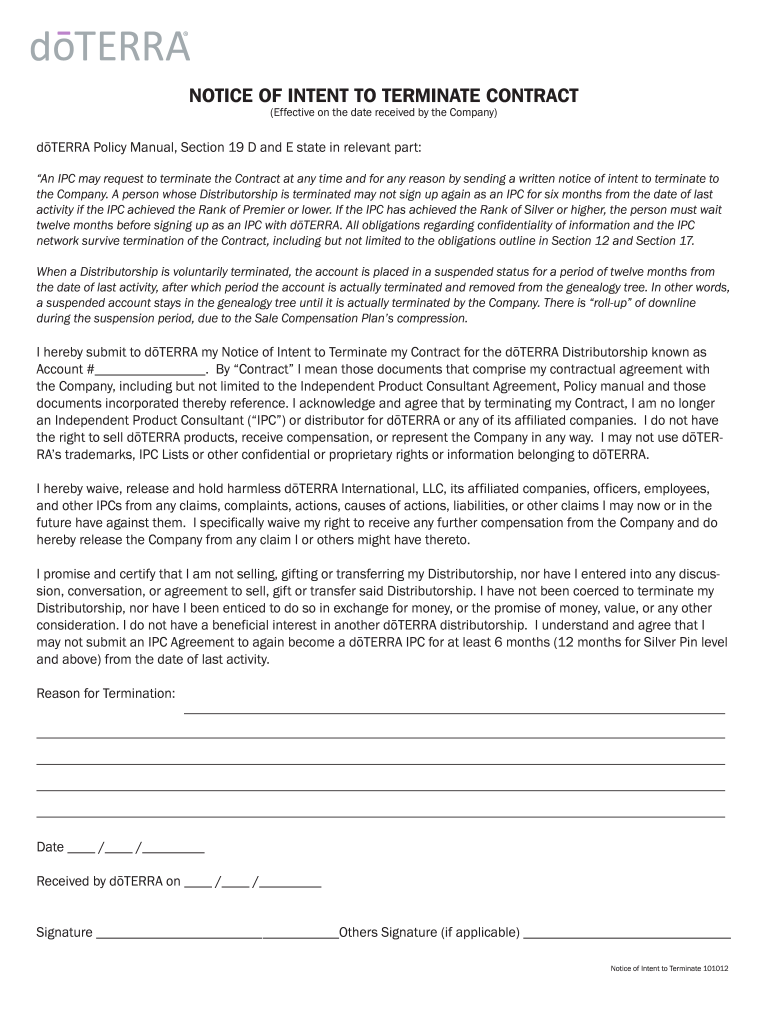
doTERRA Notice of Intent to Terminate Contract 2012 free printable template
We are not affiliated with any brand or entity on this form

Fill out
Complete the form online in a simple drag-and-drop editor.

eSign
Add your legally binding signature or send the form for signing.

Share
Share the form via a link, letting anyone fill it out from any device.

Export
Download, print, email, or move the form to your cloud storage.
Why pdfFiller is the best tool for your documents and forms


End-to-end document management
From editing and signing to collaboration and tracking, pdfFiller has everything you need to get your documents done quickly and efficiently.
Accessible from anywhere
pdfFiller is fully cloud-based. This means you can edit, sign, and share documents from anywhere using your computer, smartphone, or tablet.
Secure and compliant
pdfFiller lets you securely manage documents following global laws like ESIGN, CCPA, and GDPR. It's also HIPAA and SOC 2 compliant.
What is doTERRA Notice of Intent to Terminate Contract
The Notice of Intent to Terminate Contract is a business form used by Independent Product Consultants (IPCs) to formally end their contract with dōTERRA.
pdfFiller scores top ratings on review platforms




looking forward to using this in the future
1st time but seems pretty simple to figure things out
This has been a great service for me! As an independent consultant, I often have to forward W9s to organizations. It is great to know I have a secure way to do that.
Great tool for filling out forms. Too many surveys though on my experience.
Helpful when looking for fill in documents online
Still getting used to the whole idea. Now I realise i can achieve a lot more. This actually brilliant.
Who needs doTERRA Notice of Intent to Terminate Contract?
Explore how professionals across industries use pdfFiller.

DoTERRA Notice of Intent to Terminate Contract is needed by:
-
Independent Product Consultants (IPCs) seeking to terminate their contract.
-
Business professionals needing to handle contract termination with dōTERRA.
-
Legal advisors assisting clients with contract issues related to dōTERRA.
-
Distributors exploring options for terminating their distributorship agreement.
-
Anyone interested in understanding the termination process with dōTERRA.
Comprehensive Guide to doTERRA Notice of Intent to Terminate Contract
What is the Notice of Intent to Terminate Contract?
The Notice of Intent to Terminate Contract is a formal document utilized by Independent Product Consultants (IPCs) who are seeking to end their professional relationship with dōTERRA. This form serves as a foundation for initiating the termination process and ensures clarity and legal compliance. Understanding the implications of this contract termination is crucial for IPCs, as it outlines their responsibilities and the consequences of severing ties with the company.
For IPCs, the significance of this form lies in its ability to articulate their decision officially, ensuring that both parties are aware of the termination. It also protects the rights and interests of both IPCs and dōTERRA during this process.
Purpose and Benefits of the Notice of Intent to Terminate Contract
Independent Product Consultants may wish to terminate their contract with dōTERRA for several reasons. Common motivations include dissatisfaction with the business model, personal circumstances, or a desire to pursue different opportunities. By utilizing this termination form, IPCs can streamline their exit from the contract.
-
Provides clarity and structure to the termination process
-
Protects legal rights for both parties involved
-
Ensures documentation for future reference
Key Features of the Notice of Intent to Terminate Contract
The Notice of Intent to Terminate Contract contains specific components that are essential for a complete submission. These include several fillable fields that require the IPC to provide detailed information, such as their account number and reasons for termination.
Additionally, signatures are required from both the IPC and anyone else involved, ensuring that all parties acknowledge the termination. This multi-signatory requirement highlights the collaborative nature of the termination process.
Who Should Use the Notice of Intent to Terminate Contract?
This form is primarily designed for Independent Product Consultants (IPCs) who are looking to formally terminate their agreement with dōTERRA. It is essential to understand the specific circumstances that necessitate the use of this termination notice, which may include transitioning to another role or other personal decisions.
Both IPCs and any required signatories should be aware of their obligations while completing the form to ensure a smooth termination process.
How to Fill Out the Notice of Intent to Terminate Contract Online (Step-by-Step)
Filling out the Notice of Intent to Terminate Contract online is a straightforward process. Follow these detailed steps:
-
Access the termination form on the designated platform.
-
Enter your account number in the specified field.
-
Provide clear reasons for termination in the appropriate section.
-
Add the current date in the designated area.
-
Review all entered information for accuracy.
-
Sign the document as required.
Before submitting, ensure that all information is accurate to avoid delays or complications with your termination request.
Submission Methods and Delivery for the Notice of Intent to Terminate Contract
Once the Notice of Intent to Terminate Contract is filled out, it is important to submit it through the correct channels. IPCs can typically submit the completed form via email or postal service. Each method may have its timelines and expectations regarding processing.
-
Email submission is often quicker and allows for immediate confirmation.
-
Postal service may take longer but provides a physical record of submission.
Understanding these methods ensures that IPCs efficiently manage their contract termination process.
What Happens After You Submit the Notice of Intent to Terminate Contract?
Following the submission of the Notice of Intent to Terminate Contract, IPCs can expect a procedural follow-up. This may involve a waiting period during which the termination request is processed.
-
Potential outcomes may include confirmation of receipt or requests for additional information.
-
If there is no response within the expected timeline, IPCs should follow up to confirm their termination status.
Being proactive after submission helps IPCs reaffirm their decision and clarify any uncertainties regarding their termination.
Security and Compliance When Filling Out the Notice of Intent to Terminate Contract
Data security is paramount when completing the Notice of Intent to Terminate Contract. It is essential to handle this form in a secure environment to protect sensitive information. pdfFiller incorporates advanced security features to safeguard user data during online form completion.
Furthermore, the platform adheres to compliance regulations such as HIPAA, ensuring that users can fill out the form with confidence in the security of their information.
How to Correct or Amend the Notice of Intent to Terminate Contract
If errors are discovered after submission, IPCs should act swiftly to correct or amend the Notice of Intent to Terminate Contract. It is crucial to understand the process for making such corrections.
-
Contact the relevant department to report the discrepancy.
-
Provide necessary documentation or reasons for the correction.
Common reasons for needing corrections often stem from mistakes in personal information or changes in the reasons for termination. Ensuring accuracy from the start can minimize the need for future amendments.
Empower Your Contract Termination with pdfFiller
Utilizing pdfFiller enhances the experience of completing the Notice of Intent to Terminate Contract. The platform is designed for user-friendliness and efficiency, enabling IPCs to fill out forms with ease while maintaining high standards of security.
Independent Product Consultants are encouraged to leverage pdfFiller’s capabilities to ensure a smooth and successful contract termination process.
How to fill out the doTERRA Notice of Intent to Terminate Contract
-
1.To access the Notice of Intent to Terminate Contract on pdfFiller, navigate to the pdfFiller website and log in to your account.
-
2.Use the search bar to type in the form name and select it from the search results.
-
3.Once the form is loaded, review the fields that need to be completed. Begin by filling in your 'Account #' in the designated field.
-
4.Next, enter the 'Date' of the application's completion, ensuring the correct format is used.
-
5.Make sure to fill in the 'Received by dōTERRA on' date as well, if applicable.
-
6.Locate the signature section and digitally sign the form. If others are involved, have them sign where indicated.
-
7.Before finalizing, go back over the entire form to ensure all required fields are filled out accurately.
-
8.After reviewing, click on the save icon to keep a copy of the completed form on your device.
-
9.You can also choose to download a PDF version for your records or submit the form through pdfFiller as directed.
-
10.Follow any additional prompts for submission, ensuring all necessary information has been provided.

Who is eligible to use the Notice of Intent to Terminate Contract?
Independent Product Consultants (IPCs) who wish to terminate their contract with dōTERRA are eligible to use this form. It is specifically designed for their contractual needs.
What information do I need before starting the form?
Gather your dōTERRA account number and the reason for termination. You will also need to provide the date and signatures from any other involved parties, if applicable.
What are the submission methods for this form?
You can submit the Notice of Intent to Terminate Contract directly through pdfFiller by completing the online form and clicking 'Submit.' You may also download a completed PDF to send via email or postal mail.
Are there any common mistakes to avoid when filling out the form?
Ensure all required fields are filled out completely and accurately. Double-check your account number and signature sections, as incomplete forms may delay processing.
What happens after I submit the Notice of Intent to Terminate Contract?
After submission, dōTERRA will review your notice. You may receive confirmation or additional instructions. Be sure to check for any communications regarding your termination status.
Is there a waiting period before I can rejoin dōTERRA after termination?
Yes, the form outlines a waiting period before an IPC can rejoin dōTERRA. Make sure to read the terms related to rejoining carefully.
doTERRA Notice of Intent to Terminate Contract Form Versions
Related Forms

Related Catalogs
Get the latest insights from our blog


If you believe that this page should be taken down, please follow our DMCA take down process
here
.
This form may include fields for payment information. Data entered in these fields is not covered by PCI DSS compliance.