
Last updated on
Nov 6, 2026

CVS Pharmacy D14222RX18 2018-2026 free printable template
pdfFiller is not affiliated with any government organization

Fill out
Complete the form online in a simple drag-and-drop editor.

eSign
Add your legally binding signature or send the form for signing.

Share
Share the form via a link, letting anyone fill it out from any device.

Export
Download, print, email, or move the form to your cloud storage.
Why pdfFiller is the best tool for your documents and forms


End-to-end document management
From editing and signing to collaboration and tracking, pdfFiller has everything you need to get your documents done quickly and efficiently.
Accessible from anywhere
pdfFiller is fully cloud-based. This means you can edit, sign, and share documents from anywhere using your computer, smartphone, or tablet.
Secure and compliant
pdfFiller lets you securely manage documents following global laws like ESIGN, CCPA, and GDPR. It's also HIPAA and SOC 2 compliant.
What is CVS Pharmacy D14222RX18
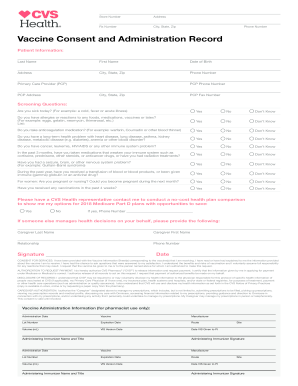
The Vaccine Consent and Administration Record is a healthcare form used by patients and caregivers to document consent for vaccine administration and related health information.
pdfFiller scores top ratings on review platforms




Who needs CVS Pharmacy D14222RX18?
Explore how professionals across industries use pdfFiller.

CVS Pharmacy D14222RX18 is needed by:
-
Patients receiving vaccinations
-
Caregivers or guardians of patients
-
Healthcare providers administering vaccines
-
Medical offices handling patient records
-
Insurance companies for coverage verification
Comprehensive Guide to CVS Pharmacy D14222RX18
What is the Vaccine Consent and Administration Record?
The Vaccine Consent and Administration Record is a critical document in the healthcare process, particularly for vaccinations. This form serves as a formal acknowledgment of patient consent for vaccine administration. By providing essential information, it plays a vital role in ensuring that patients fully understand the vaccination they are receiving.
The record captures key details, such as the patient's personal information, vaccine preferences, and necessary health screening questions. It is a crucial aspect of patient documentation in healthcare settings, where clarity and consent are paramount.
Purpose and Benefits of the Vaccine Consent and Administration Record
The Vaccine Consent and Administration Record is essential for both patients and healthcare providers as it formalizes the consent process. This patient consent form contributes significantly to legal protection for all parties involved and facilitates clear communication about the vaccination process.
-
Provides legal safeguards for healthcare providers against liability.
-
Enhances communication between patients and providers regarding vaccination details.
-
Acts as a record-keeping instrument for tracking vaccinations.
Key Features of the Vaccine Consent and Administration Record
The Vaccine Consent and Administration Record is designed to be comprehensive and user-friendly, ensuring ease of use for all parties. Key features include:
-
Multiple fillable fields to capture diverse patient information.
-
Health screening questions that assess vaccine eligibility.
-
Signature requirements for each involved party to confirm consent.
These elements together create a robust medical consent form that efficiently serves its purpose in vaccination settings.
Who Needs the Vaccine Consent and Administration Record?
This form is necessary for several parties involved in the vaccination process. Key roles include:
-
Patients who provide consent for their vaccinations.
-
Caregivers or financially responsible parties who may sign on behalf of the patient.
-
Administering immunizers who need to document the vaccination accurately.
Each signatory has a responsibility to ensure that the information entered is accurate and that consent is appropriately granted.
How to Fill Out the Vaccine Consent and Administration Record Online
Filling out the Vaccine Consent and Administration Record is straightforward with pdfFiller. Here are the steps to complete the form online:
-
Access the form through pdfFiller's platform.
-
Edit the fields as required, including personal details and vaccination preferences.
-
Utilize the eSigning feature to ensure all signatures are collected digitally.
This process enhances the efficiency of handling the vaccine record template, making it readily available for both healthcare providers and patients.
Field-by-Field Instructions for Completing the Vaccine Consent and Administration Record
To ensure accuracy when filling out the Vaccine Consent and Administration Record, pay close attention to each field:
-
Personal details: Include patient's name, date of birth, and contact information.
-
Vaccination preferences: Specify which vaccine the patient is receiving.
-
Health screenings: Answer the questions related to medical history and eligibility.
Completing these sections accurately is crucial for a valid vaccine administration record.
Common Errors and How to Avoid Them When Completing the Vaccine Consent and Administration Record
When filling out the Vaccine Consent and Administration Record, there are frequent mistakes to be mindful of, including:
-
Omitting required fields, which can lead to delays in processing.
-
Incorrectly filling out personal details, affecting patient identification.
Always double-check each entry before submission to avoid these common errors and ensure smooth processing of the vaccine consent form.
Security and Compliance for the Vaccine Consent and Administration Record
Security is an essential consideration when managing sensitive documents like the Vaccine Consent and Administration Record. Ensuring compliance with regulations protects patient data. pdfFiller employs top-notch security features, including:
-
256-bit encryption to protect sensitive information.
-
Compliance with HIPAA and GDPR to safeguard patient privacy.
These features ensure that all data handled within the form is secure and compliant with necessary laws.
What Happens After You Submit the Vaccine Consent and Administration Record?
Once you submit the Vaccine Consent and Administration Record, several steps follow:
-
Confirmation of receipt will typically be provided by the healthcare provider.
-
You may have the option to track the status of your vaccination.
-
Response times vary depending on the immunization process at the healthcare facility.
Understanding the post-submission process is essential for both patients and healthcare providers.
Using pdfFiller to Create Your Vaccine Consent and Administration Record
pdfFiller offers a variety of tools that facilitate the creation and management of the Vaccine Consent and Administration Record. The platform is designed for ease of use, allowing users to edit the form seamlessly and utilize eSigning options as needed. Start creating your vaccine consent form today to streamline your vaccination processes with pdfFiller.
How to fill out the CVS Pharmacy D14222RX18
-
1.Begin by accessing the Vaccine Consent and Administration Record on pdfFiller by searching for the document name in the pdfFiller interface.
-
2.Once opened, you'll see a series of fillable fields and checkboxes. Navigate through the document using your mouse or keyboard arrows to scroll through each section.
-
3.Before starting to fill out the form, ensure you have all necessary personal information ready: patient name, contact details, health screening answers, and caregiver or responsible party details.
-
4.Fill in the required fields with accurate information. Use the text box for names, contact details, and any medical history required. Select options using checkboxes where applicable.
-
5.After completing the patient information, move on to specify vaccine preferences and respond to any health screening questions to ensure readiness for vaccination.
-
6.You must gather signatures from the patient, caregiver, and administering immunizer. Use the signature tool in pdfFiller for electronic signatures or print if necessary.
-
7.Once all fields are filled and signatures obtained, thoroughly review the completed form to check for any missing information or errors.
-
8.To finalize, save your work by clicking the save button. You can choose to download the completed document as a PDF to your device, or submit directly through pdfFiller options as indicated.

Who is eligible to use the Vaccine Consent and Administration Record?
This form is intended for patients receiving vaccines, their caregivers or responsible parties, and healthcare providers administering the vaccines.
Are there any specific deadlines for submitting this form?
While there is no general deadline for submission, it is advisable to complete and submit it at least a day before the scheduled vaccination appointment.
How can I submit the Vaccine Consent and Administration Record?
You can submit the completed form electronically through pdfFiller, print it out for in-person submission, or provide a copy to your healthcare provider as per their guidance.
What supporting documents do I need to complete this form?
Generally, no additional documents are required; however, having the patient's insurance details and vaccination history may streamline the process.
What are common mistakes to avoid when filling out this form?
Common mistakes include leaving fields blank, incorrect selection of vaccine preferences, and missing signatures from required parties. Double-check all entries before finalizing.
How long does it take to process the Vaccine Consent and Administration Record?
Processing times can vary; however, the form is typically reviewed upon submission at the vaccination site. Ensure quick review by accurately completing all sections.
What should I do if I encounter issues while filling out the form on pdfFiller?
If you experience technical difficulties, pdfFiller offers support resources. You can consult their help section or contact customer support for assistance.
Related Forms



Related Catalogs
Get the latest insights from our blog


If you believe that this page should be taken down, please follow our DMCA take down process
here
.
This form may include fields for payment information. Data entered in these fields is not covered by PCI DSS compliance.