
Last updated on
Nov 6, 2026

Get the free Colorado Medical Leave Form
We are not affiliated with any brand or entity on this form

Fill out
Complete the form online in a simple drag-and-drop editor.

eSign
Add your legally binding signature or send the form for signing.

Share
Share the form via a link, letting anyone fill it out from any device.

Export
Download, print, email, or move the form to your cloud storage.
Why pdfFiller is the best tool for your documents and forms


End-to-end document management
From editing and signing to collaboration and tracking, pdfFiller has everything you need to get your documents done quickly and efficiently.
Accessible from anywhere
pdfFiller is fully cloud-based. This means you can edit, sign, and share documents from anywhere using your computer, smartphone, or tablet.
Secure and compliant
pdfFiller lets you securely manage documents following global laws like ESIGN, CCPA, and GDPR. It's also HIPAA and SOC 2 compliant.
What is CO Medical Leave
The Colorado Medical Leave Form is a medical leave document used by employees in Colorado to request non-FMLA sick leave for more than three consecutive workdays.
pdfFiller scores top ratings on review platforms




PDF Filler is everything I hoped it would be. Made this job very easy.
I appreciated the ease and speed, just a few little glitches here and there when entering data and printing. Dealing with IRS docs, so need to do it correctly and quickly. Thanks!
Who needs CO Medical Leave?
Explore how professionals across industries use pdfFiller.

CO Medical Leave is needed by:
-
Employees in Colorado seeking medical leave
-
Health care providers completing the form
-
HR departments managing employee leave requests
-
Employers ensuring compliance with leave regulations
-
Legal advisors interpreting leave laws
Comprehensive Guide to CO Medical Leave
What is the Colorado Medical Leave Form?
The Colorado Medical Leave Form is a vital document that enables employees in Colorado to formally request non-FMLA sick leave when absences exceed three consecutive workdays. This form not only outlines the purpose of the leave but also highlights its significance in protecting employee rights. Additionally, it provides insights into non-FMLA sick leave eligibility and the specific requirements that must be met to qualify.
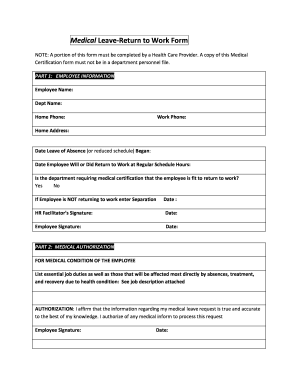
The form consists of key sections that include important details such as the employee's name, patient's name, and the examination date. Understanding each section's significance is crucial for proper completion and submission.
Benefits of Using the Colorado Medical Leave Form
Completing the Colorado Medical Leave Form offers several benefits for employees seeking necessary leave. Primarily, the form acts as a safeguard for securing authorized time away from work, ensuring that employees can attend to their health rather than face potential job-related repercussions.
Having the form completed by a healthcare provider not only validates the request but also enhances the credibility of the submission. Furthermore, the legal protections afforded under this process help ensure compliance with industry regulations and support employee rights.
Key Features of the Colorado Medical Leave Form
The essential fields included in the Colorado Medical Leave Form are designed for clarity and precision. Key sections include the employee's name, patient's name, and exam date, along with a requirement for a signature from a qualified healthcare provider.
-
Employee's Name
-
Patient's Name
-
Exam Date
-
Required Signature Section
Additionally, the form assures secure handling of sensitive information in accordance with the Genetic Information Nondiscrimination Act (GINA), which protects against discrimination based on genetic information.
Who Needs the Colorado Medical Leave Form?
Various scenarios necessitate the use of the Colorado Medical Leave Form, especially for employees requiring non-FMLA sick leave. It is essential for individuals who need to formally document their absence due to medical reasons.
This form is particularly relevant to categories such as full-time employees, part-time workers, and those in non-traditional employment arrangements who may require a structured approach to manage their sick leave effectively.
How to Fill Out the Colorado Medical Leave Form Online (Step-by-Step)
Filling out the Colorado Medical Leave Form can be streamlined by following these detailed, step-by-step instructions using pdfFiller:
-
Navigate to the Colorado Medical Leave Form on pdfFiller.
-
Download the form or use the fillable online version.
-
Input the necessary information including the employee’s and patient’s names.
-
Ensure to select the exam date and other required fields.
-
Have the form signed by the healthcare provider.
Before starting the form, it's beneficial to gather all required information to avoid confusion. Commonly misunderstood fields can be easily clarified by reviewing the form beforehand.
Review and Validate Your Colorado Medical Leave Form
Before submitting the Colorado Medical Leave Form, it is imperative to conduct a thorough review. Here is a checklist to ensure everything is accurate:
-
Verify all personal and medical information.
-
Check for the healthcare provider's signature.
-
Ensure any necessary attachments are included.
Avoidance of common errors during this review process can prevent unnecessary delays in approval, emphasizing the critical nature of a meticulously completed form.
Submission Process for the Colorado Medical Leave Form
The Colorado Medical Leave Form can be submitted through various methods, including online platforms and traditional mail. Understanding the specific submission channels available is key to ensuring timely processing.
-
Choose the submission method: online or via mail.
-
Note the expected timeline for form approval.
-
Maintain records of your submission for future reference.
Proper record-keeping following submission is crucial for tracking the approval process and addressing any issues that may arise.
What Happens After Submitting the Colorado Medical Leave Form?
After submission, it is essential to be aware of the follow-up process. Employees should know how to track their form submissions effectively and what possible outcomes they may encounter.
-
Follow up for confirmation of receipt of your form.
-
Monitor for any requests for additional information.
-
Understand how to handle potential rejections of the request.
A proactive approach to managing follow-ups enhances the likelihood of a smooth approval process.
Privacy and Security Considerations for the Colorado Medical Leave Form
When using the Colorado Medical Leave Form, especially on platforms like pdfFiller, understanding privacy and security measures is crucial. pdfFiller implements robust protections for sensitive data in compliance with HIPAA and GINA regulations.
Employers and employees should prioritize using secure platforms to manage medical information, thereby ensuring that all personal data remains protected throughout the submission process.
Effortlessly Complete Your Colorado Medical Leave Form with pdfFiller
Utilizing pdfFiller simplifies the process of completing the Colorado Medical Leave Form. With features such as fillable forms and electronic signatures, users benefit from an efficient approach to form submission.
In addition, pdfFiller offers advantages in cloud-based document management, making it easier to organize and access important forms while maintaining top security standards.
How to fill out the CO Medical Leave
-
1.Access the Colorado Medical Leave Form on pdfFiller by searching for it in the template section.
-
2.Once you find the form, click on it to open it in the pdfFiller interface.
-
3.Prior to filling out the form, gather necessary details such as the employee's name, patient's name, exam date, and the healthcare provider's information.
-
4.Begin by entering the employee's name in the designated field followed by the patient's name.
-
5.Fill out the exam date, ensuring it reflects the actual date of the medical evaluation.
-
6.Complete the section detailing the patient's treatment and incapacity period accurately by providing all pertinent details.
-
7.If there are any work restrictions, tick the relevant checkboxes and provide specifics in the additional comments section.
-
8.After filling in all required fields, review the form for accuracy before proceeding to sign.
-
9.To finalize the form, click on the signature field and electronically sign it as the healthcare provider.
-
10.Once completed, save your work by clicking on the save button, or download the form in your desired file format for submission.

Who is eligible to use the Colorado Medical Leave Form?
Employees working in Colorado who need to request non-FMLA qualifying sick leave for more than three consecutive days are eligible to use this form.
What information do I need to gather before filling out the form?
Before completing the form, gather details like the employee's name, patient's name, exam date, treatment details, incapacity period, and any work restrictions from the healthcare provider.
How can I submit the completed Colorado Medical Leave Form?
Once the form is completed and signed, you can submit it to your employer's HR department, ensuring you follow any specific submission guidelines they may have.
Are there specific deadlines for filing this form?
While the Colorado Medical Leave Form itself does not have a specific deadline, it should be submitted as soon as possible to ensure proper processing and to adhere to your employer’s leave policies.
What are common mistakes to avoid when completing this form?
Avoid leaving any required fields blank, and double-check all entered information for accuracy before submission. Ensure the healthcare provider's signature is included; without it, the form may be deemed invalid.
How long does it take for the leave request to be processed?
Processing times for the leave request may vary by employer, but typically it should be reviewed within a week of submission.
Do I need supporting documents when submitting the form?
No additional supporting documents are required beyond the completed Colorado Medical Leave Form itself, although your employer may request additional information.
Related Content
Related Forms



Related Catalogs
Get the latest insights from our blog


If you believe that this page should be taken down, please follow our DMCA take down process
here
.
This form may include fields for payment information. Data entered in these fields is not covered by PCI DSS compliance.