
Last updated on
Oct 31, 2026

Get the free British Columbia Claim Form
We are not affiliated with any brand or entity on this form

Fill out
Complete the form online in a simple drag-and-drop editor.

eSign
Add your legally binding signature or send the form for signing.

Share
Share the form via a link, letting anyone fill it out from any device.

Export
Download, print, email, or move the form to your cloud storage.
Why pdfFiller is the best tool for your documents and forms


End-to-end document management
From editing and signing to collaboration and tracking, pdfFiller has everything you need to get your documents done quickly and efficiently.
Accessible from anywhere
pdfFiller is fully cloud-based. This means you can edit, sign, and share documents from anywhere using your computer, smartphone, or tablet.
Secure and compliant
pdfFiller lets you securely manage documents following global laws like ESIGN, CCPA, and GDPR. It's also HIPAA and SOC 2 compliant.
What is BC Claim Form
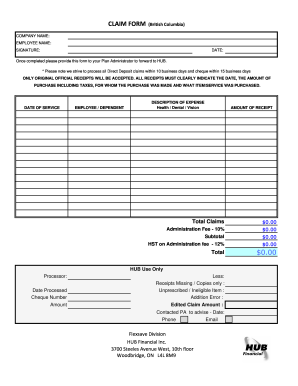
The British Columbia Claim Form is a health insurance claim document used by employees to submit healthcare expense claims for reimbursement from their Plan Administrator.
pdfFiller scores top ratings on review platforms




Who needs BC Claim Form?
Explore how professionals across industries use pdfFiller.

BC Claim Form is needed by:
-
Employees of British Columbia companies seeking reimbursement for healthcare expenses
-
Plan Administrators managing employee healthcare claims
-
Healthcare providers submitting claims on behalf of patients
-
HR departments processing reimbursement requests
-
Insurance adjusters reviewing expense claims
-
Tax professionals assisting with healthcare-related filings
Comprehensive Guide to BC Claim Form
What is the British Columbia Claim Form?
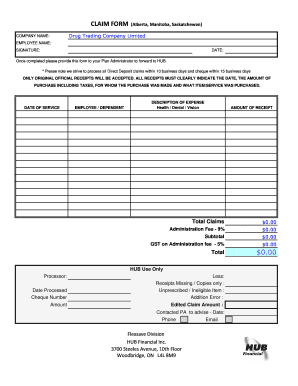
The British Columbia Claim Form is a crucial document designed for employees in British Columbia to submit healthcare expense claims. This form facilitates the reimbursement process for healthcare services incurred, ensuring that employees can reclaim their medical expenses efficiently. It is specifically processed by HUB Financial Inc., which acts as the Plan Administrator managing these claims.
Understanding the British Columbia Claim Form can simplify the reimbursement experience for employees, allowing them to manage healthcare finances effectively.
Purpose and Benefits of Submitting the British Columbia Claim Form
Completing the British Columbia Claim Form provides several benefits to employees, primarily facilitating timely reimbursement for healthcare expenses. Submitting claims promptly not only ensures that employees maintain financial stability but also streamlines their interaction with healthcare providers.
Proper documentation is vital, as it supports compliance with regulations, mitigating potential delays in processing. Benefits specific to employees in British Columbia include access to province-specific health services and plans that enhance their healthcare experience.
Who Needs the British Columbia Claim Form?
This form is intended for use by employees who have incurred healthcare expenses that are eligible for reimbursement. Understanding who qualifies to submit claims is essential to avoid unnecessary delays or complications.
Eligible individuals include employees enrolled in applicable insurance plans and those who have received healthcare services covered under these plans. Situations where this claim form is relevant typically involve out-of-pocket expenses for treatments or services covered by the employee's health insurance plan.
Key Features of the British Columbia Claim Form
The British Columbia Claim Form contains several key features that facilitate its completion and processing. These elements include various fillable fields, such as:
-
Expense description
-
Date of service
-
Type of service
-
Amount claimed
Moreover, the form requires original receipts and calculations for fees, including Goods and Services Tax (GST). Additionally, it offers user-friendly instructions that guide employees through the completion process.
How to Fill Out the British Columbia Claim Form Online (Step-by-Step)
Filling out the British Columbia Claim Form online involves several straightforward steps to ensure accuracy and compliance. Follow these instructions carefully:
-
Access the online form through the designated platform.
-
Complete each fillable field with accurate information regarding personal details and healthcare expenses.
-
Attach the required original receipts electronically.
-
Review all entries for accuracy before submission.
-
Submit the completed form following the platform's submission guidelines.
Double-checking the information before submission is crucial to prevent delays in processing and to ensure a smooth reimbursement experience.
Submission Methods and Required Documents for the British Columbia Claim Form
Submitting the completed British Columbia Claim Form can be done through various methods, each with specific requirements. Employees can choose between digital submission options or physical mailing, depending on their preferences and the platform's capabilities.
Required documents for submission include:
-
The completed British Columbia Claim Form
-
Original receipts for all claimed expenses
-
Any additional supporting materials as specified in the submission guidelines
Understanding these requirements is essential for ensuring a successful submission process.
Payment Methods, Fees, and Processing Time
When submitting the British Columbia Claim Form, it's important to be aware of potential fees associated with claims processing. Employees should familiarize themselves with the accepted payment methods for any applicable fees, which may vary based on the claim's specifics.
The timeline for processing claims can also differ, typically ranging from a few business days to several weeks, depending on various factors such as completeness and accuracy of the submission.
What Happens After You Submit the British Columbia Claim Form?
After submitting the British Columbia Claim Form, employees can expect a defined process regarding their claims. Initially, the claim undergoes a review by HUB Financial Inc. to confirm compliance and accuracy.
Employees are encouraged to track the status of their claims, which can be done through necessary communication channels. They should look out for confirmation details and be prepared for potential outcomes, which include approval, requests for additional information, or claim rejections.
Security and Compliance in Handling the British Columbia Claim Form
Data sensitivity is a significant consideration in handling the British Columbia Claim Form. Secure data handling and privacy are prioritized to protect personal and financial information submitted within the form.
pdfFiller incorporates robust security features, including 256-bit encryption and adherence to HIPAA compliance standards, to ensure the safe processing of sensitive information. To further protect personal data, employees are advised to follow security best practices during form submission.
Maximize Your Experience with pdfFiller for the British Columbia Claim Form
Using pdfFiller for filling out the British Columbia Claim Form enhances the overall experience by simplifying the process. This cloud-based platform allows users to manage their forms effortlessly, making it convenient to fill out and eSign directly online.
Accessibility features offered by pdfFiller ensure that employees can complete their forms from any location, streamlining the healthcare reimbursement process.
How to fill out the BC Claim Form
-
1.To access the British Columbia Claim Form on pdfFiller, visit the pdfFiller website and use the search bar to locate the form by entering its name.
-
2.Once you find the form, click on it to open it in the pdfFiller editor where you can fill it out directly.
-
3.Before starting, gather all required information, including original receipts, dates of expenses, types of healthcare services received, and amounts charged to ensure the completion of the form without errors.
-
4.Begin filling in your personal details in the designated fields, and make sure to input accurate information as per your receipts.
-
5.Carefully fill out each section regarding your healthcare expenses, ensuring all necessary fields such as expense description, date, type, and amount are accurately completed.
-
6.Be aware of any additional fees, such as administration and GST, and include those amounts as well.
-
7.Review your filled-out form thoroughly to check for any mistakes or missing information before finalizing it.
-
8.Once you are satisfied that the form is complete, save your progress or download a copy for your records directly from pdfFiller.
-
9.To submit the completed form, follow the instructions provided in pdfFiller for electronic submission, or print it if physical submission is required.

Who is eligible to use the British Columbia Claim Form?
Employees of companies operating in British Columbia who incur healthcare expenses are eligible to complete the British Columbia Claim Form for reimbursement.
What supporting documents do I need to submit with my claim?
You must submit original receipts detailing the healthcare services received, including dates, types of services, amounts paid, as well as any additional fees required.
How do I submit my completed claim form?
You can submit your completed claim form electronically through pdfFiller or print it out and send it via mail to your Plan Administrator as per their specific submission procedures.
What are common mistakes to avoid when filling out the form?
Common mistakes include failing to sign the form, leaving required fields blank, or submitting incomplete receipts. Ensure all necessary information is accurate before submission.
What are the processing times for claims filed with this form?
Processing times can vary but usually take several weeks. It's advisable to check with your Plan Administrator for specific timelines for reviews and reimbursements.
Is there a deadline for submitting the British Columbia Claim Form?
While specific deadlines may vary by employer, it is best to submit your claims as soon as possible to avoid any potential delays in reimbursement.
What happens if I submit an incomplete form?
If the form is incomplete, it may lead to delays in processing or even rejection. Always double-check your entries against the instructions provided before submission.
Related Forms


Get the latest insights from our blog


If you believe that this page should be taken down, please follow our DMCA take down process
here
.
This form may include fields for payment information. Data entered in these fields is not covered by PCI DSS compliance.