
Last updated on
Oct 31, 2026
Get the free Referee Payroll Sheet
We are not affiliated with any brand or entity on this form

Fill out
Complete the form online in a simple drag-and-drop editor.

eSign
Add your legally binding signature or send the form for signing.

Share
Share the form via a link, letting anyone fill it out from any device.

Export
Download, print, email, or move the form to your cloud storage.
Why pdfFiller is the best tool for your documents and forms


End-to-end document management
From editing and signing to collaboration and tracking, pdfFiller has everything you need to get your documents done quickly and efficiently.
Accessible from anywhere
pdfFiller is fully cloud-based. This means you can edit, sign, and share documents from anywhere using your computer, smartphone, or tablet.
Secure and compliant
pdfFiller lets you securely manage documents following global laws like ESIGN, CCPA, and GDPR. It's also HIPAA and SOC 2 compliant.
What is Referee Payroll
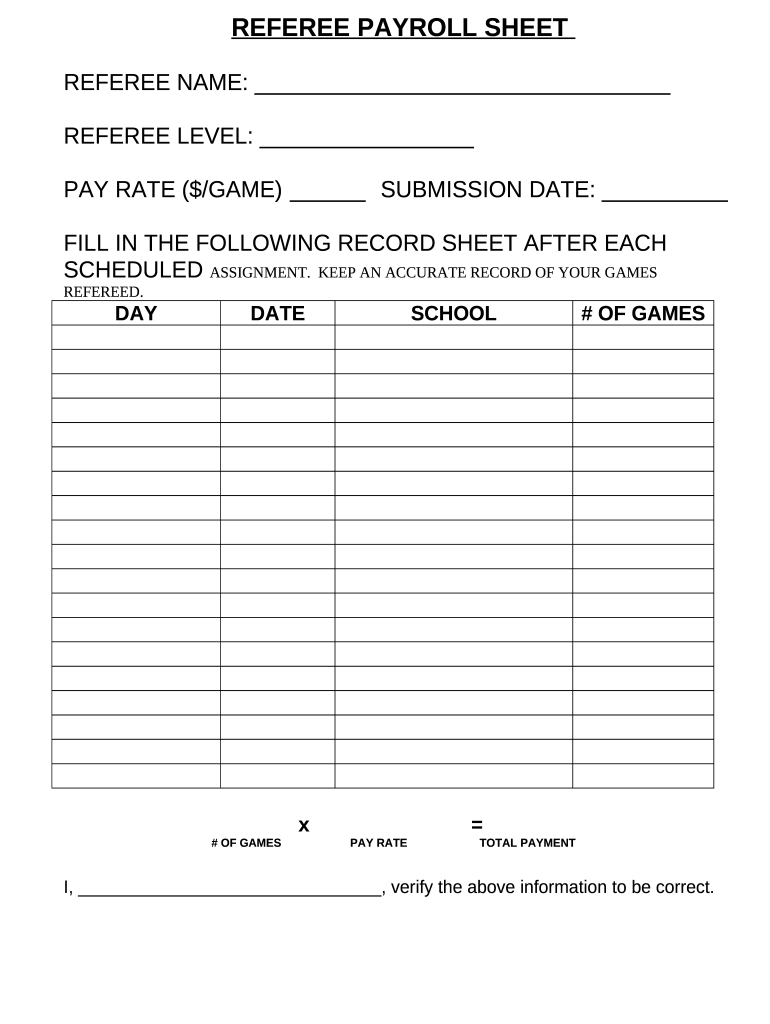
The Referee Payroll Sheet is a payroll document used by referees to accurately record and calculate their earnings from officiated games.
pdfFiller scores top ratings on review platforms




Who needs Referee Payroll?
Explore how professionals across industries use pdfFiller.

Referee Payroll is needed by:
-
Sports referees managing their payment records
-
School athletic departments tracking officiating costs
-
Event organizers requiring payroll documentation for referees
-
Referee associations ensuring accurate earnings reports
-
Freelance referees documenting their work for tax purposes
Comprehensive Guide to Referee Payroll
What is the Referee Payroll Sheet?
The Referee Payroll Sheet is a form designed for sports officials to accurately record their earnings from games officiated. This essential document serves multiple use cases for referees, including tracking individual game payments, providing a clear earnings record, and ensuring compliance with any relevant financial regulations. Accurately recording game officiating earnings is vital for maintaining financial clarity and facilitating smooth payment processing.
Purpose and Benefits of the Referee Payroll Sheet
This payroll form for referees is crucial for both tax purposes and salary transparency. By utilizing a referee earnings record, officials can simplify the payment process while keeping an accurate account of their total compensation. The form not only benefits referees by tracking their earnings but also supports leagues and institutions in managing payments effectively.
-
Streamlined record-keeping for income
-
Enhanced clarity on payment status
-
Improved organization for financial matters
-
Facilitation of tax reporting on officiating income
Key Features of the Referee Payroll Sheet
The fillable form includes several critical fields such as the referee's name, pay rate, and the games officiated. Each entry helps establish a comprehensive history of payments for referees. The significance of the signing line cannot be understated, as it provides a verification step, confirming that all information recorded is accurate. Additionally, referees can customize the payroll form for their specific needs.
Who Needs the Referee Payroll Sheet?
The intended users of the sports referee payment form include referees at all levels, from amateur leagues to professional organizations. This form proves especially beneficial in scenarios such as school sports or community leagues, where accurate payment documentation is crucial. Independent contractors will find this form particularly relevant, as it helps establish a formal record of earnings for tax compliance.
How to Fill Out the Referee Payroll Sheet Online (Step-by-Step)
Filling out the referee payroll sheet online requires attention to detail. Start with a checklist of needed information before proceeding to ensure all fields are completed accurately.
-
Enter your name as it appears in official documents.
-
Indicate your level as a referee.
-
Provide your pay rate per game.
-
List the games officiated, including dates and locations.
-
Sign the form to verify the accuracy of the information.
Always double-check to confirm that all data entered is correct before submitting the form.
Review and Validation Checklist
When completing the referee payroll sheet, referees should be mindful of common errors that can arise. A comprehensive validation checklist can help avoid issues that could delay payment processing.
-
Ensure the name is spelled correctly.
-
Check all pay rates against agreed amounts.
-
Verify game details, including date and location, are accurate.
-
Review the signing section before submission.
How to Sign the Referee Payroll Sheet
Signing the referee payroll sheet can be done either digitally or with a wet signature, depending on the requirements of the submitting authority. Using pdfFiller for eSigning offers enhanced security and streamlines the process significantly. Ensuring the form is signed as required is crucial, as failure to do so can result in non-processing of the payment.
Where to Submit the Referee Payroll Sheet
Referees can submit their completed payroll form through various methods: online, by mail, or in person. It's important to know the specific departments or locations to send the form to ensure it reaches the right place for timely processing.
-
Online submissions may involve uploading to a designated portal.
-
Mail submissions should be sent to the league or organization’s finance department.
-
In-person submissions can be made at league offices during business hours.
Be aware of any relevant deadlines to avoid delays in payment.
Tracking Your Submission and What Happens After You Submit
Referees can confirm receipt of their forms through various tracking methods provided by the organization. It's essential to be aware of expected processing times and the next steps following submission.
-
Keep copies of submitted forms for records.
-
Inquire about processing timelines during submission.
-
Follow up with the office if there are issues reported.
Maximizing Your Use of the Referee Payroll Sheet with pdfFiller
Utilizing pdfFiller simplifies the form completion process through its intuitive interface and robust features. It enhances the efficiency of form management and document security, helping referees to maintain compliance while managing their paperwork seamlessly.
Leveraging pdfFiller's capabilities ensures referees can focus on their officiating duties without worrying about document management challenges.
How to fill out the Referee Payroll
-
1.To access the Referee Payroll Sheet, navigate to the pdfFiller website and log in or create an account if you don’t have one.
-
2.Once logged in, use the search bar to find 'Referee Payroll Sheet' and select it from the list of available documents.
-
3.Begin the filling process by clicking on the first highlighted field. You'll see a cursor appear, indicating where to type.
-
4.Before filling out the form, gather essential details such as your name, level of officiating, pay rate, and records of games officiated including dates, schools, and total games.
-
5.Enter your name in the designated field. Then proceed to fill in your officiating level, ensuring it accurately reflects your experience.
-
6.Next, input your pay rate, making sure it meets the agreed compensation for your officiating services.
-
7.Continue by recording each game you officiated, noting the date, school, and number of games conducted.
-
8.After entering all required information, review each field carefully for accuracy. Make any necessary corrections before moving forward.
-
9.To add your signature, navigate to the signature line at the bottom of the form and either draw your signature with the mouse or upload a pre-signed image depending on your preference.
-
10.Finalizing the form involves saving your changes. Click on the 'Save' button located at the top of the page.
-
11.You may choose to download a copy of your completed form by clicking 'Download' or submit it through your intended method directly from pdfFiller.

Who is eligible to use the Referee Payroll Sheet?
The Referee Payroll Sheet is primarily for referees who need to document their earnings for games officiated. Any referee, regardless of level, can utilize this form to maintain accurate payroll records.
What information is required to complete this form?
You will need to provide your name, officiating level, pay rate, and detailed records of games officiated, including the date, school, and total number of games. Accurate records are crucial for verifying earnings.
How do I submit the completed Referee Payroll Sheet?
Once completed, you can submit the Referee Payroll Sheet by downloading it and emailing it to your athletic department or event organizer. Alternatively, use the submission options provided in pdfFiller to send it directly.
What common mistakes should I avoid when filling out the sheet?
Common mistakes include omitting important information, such as game dates and pay rates, inaccuracies in your signature, and failing to review the completed form for errors. Ensure all fields are filled correctly to avoid processing delays.
How long does it take to process my payroll once submitted?
Processing times vary by organization, but typically it can take anywhere from a few days to a couple of weeks. Check with your school or event organizer for specific timelines related to their payroll processing.
Is notarization required for the Referee Payroll Sheet?
No, notarization is not required for the Referee Payroll Sheet. However, it's essential to sign the document to validate the information provided.
Can I use the Referee Payroll Sheet for multiple games?
Yes, the Referee Payroll Sheet is designed to document multiple games in one form, allowing you to record all necessary details for the games you officiated during a specified period.
Related Forms




Related Catalogs
Get the latest insights from our blog


If you believe that this page should be taken down, please follow our DMCA take down process
here
.
This form may include fields for payment information. Data entered in these fields is not covered by PCI DSS compliance.