
Last updated on
Oct 31, 2026

Request To Hire Form free printable template
We are not affiliated with any brand or entity on this form

Fill out
Complete the form online in a simple drag-and-drop editor.

eSign
Add your legally binding signature or send the form for signing.

Share
Share the form via a link, letting anyone fill it out from any device.

Export
Download, print, email, or move the form to your cloud storage.
Why pdfFiller is the best tool for your documents and forms


End-to-end document management
From editing and signing to collaboration and tracking, pdfFiller has everything you need to get your documents done quickly and efficiently.
Accessible from anywhere
pdfFiller is fully cloud-based. This means you can edit, sign, and share documents from anywhere using your computer, smartphone, or tablet.
Secure and compliant
pdfFiller lets you securely manage documents following global laws like ESIGN, CCPA, and GDPR. It's also HIPAA and SOC 2 compliant.
What is Request To Hire Form
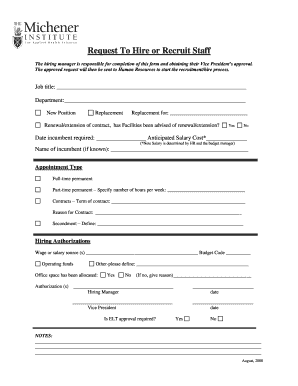
The Request for Approval to Hire is an employment form used by managers and HR representatives to seek approval for hiring a new employee.
pdfFiller scores top ratings on review platforms




Who needs Request To Hire Form?
Explore how professionals across industries use pdfFiller.

Request To Hire Form is needed by:
-
Managers looking to hire staff
-
HR representatives responsible for new hires
-
Hiring committees evaluating job requisitions
-
Departments planning to onboard new employees
-
Organizations adhering to employment policies
Comprehensive Guide to Request To Hire Form
What is the Request for Approval to Hire?
The Request for Approval to Hire form is a critical document in the hiring process. This form serves as a formal request to obtain permission for hiring a new employee, ensuring that all decisions are documented within the hiring workflow. Managers and HR representatives must provide their signatures to validate the request.
The purpose of the Request for Approval to Hire is to maintain a structured approach to employee recruitment, promoting transparency and accountability in hiring practices.
Purpose and Benefits of the Request for Approval to Hire
Filling out this employment approval form is crucial for several reasons. First, it formalizes the hiring process, ensuring that all stakeholders agree on the need for a new hire. This formalization helps prevent staffing issues and maintains organizational integrity.
Second, utilizing this form fosters accountability in hiring decisions. By requiring managerial and HR input, it minimizes the risk of unauthorized or ill-considered hires. Hiring without prior approval can lead to significant repercussions, including financial strain and operational disruption.
Key Features of the Request for Approval to Hire
-
Includes essential fields such as requisition details, job title, and proposed salary.
-
Accurate field completion is vital for employer compliance with company policy and legal standards.
-
Requires digital or wet signatures from both the manager and HR representative to ensure validity.
The document's structure aids in achieving a thorough understanding of what information is necessary, shaping a smoother hiring process.
Who Needs the Request for Approval to Hire?
This form is typically filled out by managers and HR personnel who are integral to the hiring process. Managers initiate the request, while HR ensures compliance with company policies.
Various industries, including corporate, healthcare, and education, regularly utilize the Request for Approval to Hire, making it an essential tool for structured recruitment practices.
How to Fill Out the Request for Approval to Hire Online (Step-by-Step)
-
Access the Request for Approval to Hire form through the designated online platform.
-
Complete all required fields, ensuring all necessary information is included.
-
Review each section for accuracy, paying close attention to requisition details and proposed salary.
-
Obtain required signatures from both the manager and HR representative.
-
Submit the completed form electronically or prepare it for physical delivery.
By following these steps, users can ensure that they provide all necessary information, thus avoiding potential errors during submission.
Submission Methods and Delivery for the Request for Approval to Hire
The completed Request for Approval to Hire form can be submitted electronically or delivered physically, depending on the organization’s policies. Electronic submissions are encouraged due to increased security and tracking capabilities.
It’s important to use secure platforms for submission, ensuring that sensitive information is protected throughout the process. Users should also be aware of the expected processing time and ensure they receive confirmation of receipt once submitted.
Common Errors and How to Avoid Them
-
Missing signatures from required parties can invalidate the submission.
-
Incomplete fields may lead to processing delays.
-
Incorrect job title or salary information can result in budget misalignments.
To minimize these errors, users should double-check the completed form before submission. Utilizing tools like pdfFiller can greatly assist in reducing mistakes during form completion.
Security and Compliance for the Request for Approval to Hire
Ensuring the security of sensitive personnel information is paramount. pdfFiller adheres to robust security measures that include 256-bit encryption and compliance with regulations such as HIPAA and GDPR.
Organizations must prioritize the careful handling of employment approval documents to protect against unauthorized access and data breaches.
Engaging with pdfFiller to Complete Your Request for Approval to Hire
pdfFiller simplifies the process of filling, signing, and submitting the Request for Approval to Hire form. Users can benefit from an online document management platform that streamlines their workflow and enhances organizational efficiency.
Tracking changes and revisions through pdfFiller provides added clarity and accountability throughout the approval process, making it an advantageous tool for managing hiring documentation.
How to fill out the Request To Hire Form
-
1.Access pdfFiller and log in to your account. Navigate to the form library and search for 'Request for Approval to Hire'. Click on the form to open it.
-
2.Once the form is open, familiarise yourself with the layout. Use the toolbar to zoom in or out for better visibility as needed.
-
3.Before filling out the form, gather necessary information such as the job title, employment type, proposed salary, department, duties, and start date to ensure accuracy.
-
4.Begin filling in the blank fields with relevant details. Enter the requisition number and applicant's name in the designated areas. Click on the text boxes to type efficiently.
-
5.Pay special attention to the signature fields. Be sure to include the required titles and dates next to signatures for both the manager and the HR representative.
-
6.After inputting all necessary information, review the form thoroughly. Ensure all fields are filled accurately to avoid delays in the approval process.
-
7.Once satisfied with the information entered, save your progress using the save option in the toolbar. Additionally, consider downloading a copy for your records.
-
8.If ready to submit the form, select the submission option available on pdfFiller based on your organization's procedure, or download and email it directly to the appropriate parties.

Who is required to sign the Request for Approval to Hire?
Both the manager and the HR representative are required to sign the Request for Approval to Hire form to validate the request.
What information do I need to gather before filling out the form?
You should collect the job title, employment type, proposed salary, department, duties, start date, and any necessary requisition specifics before completing the form.
How do I submit the completed form?
After completing the form on pdfFiller, you can either save it and send it via email or use the built-in submission feature to send it directly to the relevant department.
Are there any specific deadlines for submitting the form?
Although the metadata does not specify deadlines, it is advisable to submit the form as soon as possible to ensure timely processing of the hiring request.
What are some common mistakes to avoid when completing this form?
Ensure all fields are filled accurately and signatures are provided. Common mistakes include leaving fields blank or incorrect job title entries.
Is notarization required for this form?
No, notarization is not required for the Request for Approval to Hire form, making the submission process easier.
What should I do if I encounter issues while filling out the form on pdfFiller?
If you experience difficulties, consult the pdfFiller help section or contact their support for guidance on troubleshooting issues.
Related Forms




Get the latest insights from our blog


If you believe that this page should be taken down, please follow our DMCA take down process
here
.
This form may include fields for payment information. Data entered in these fields is not covered by PCI DSS compliance.