
Last updated on
Oct 31, 2026
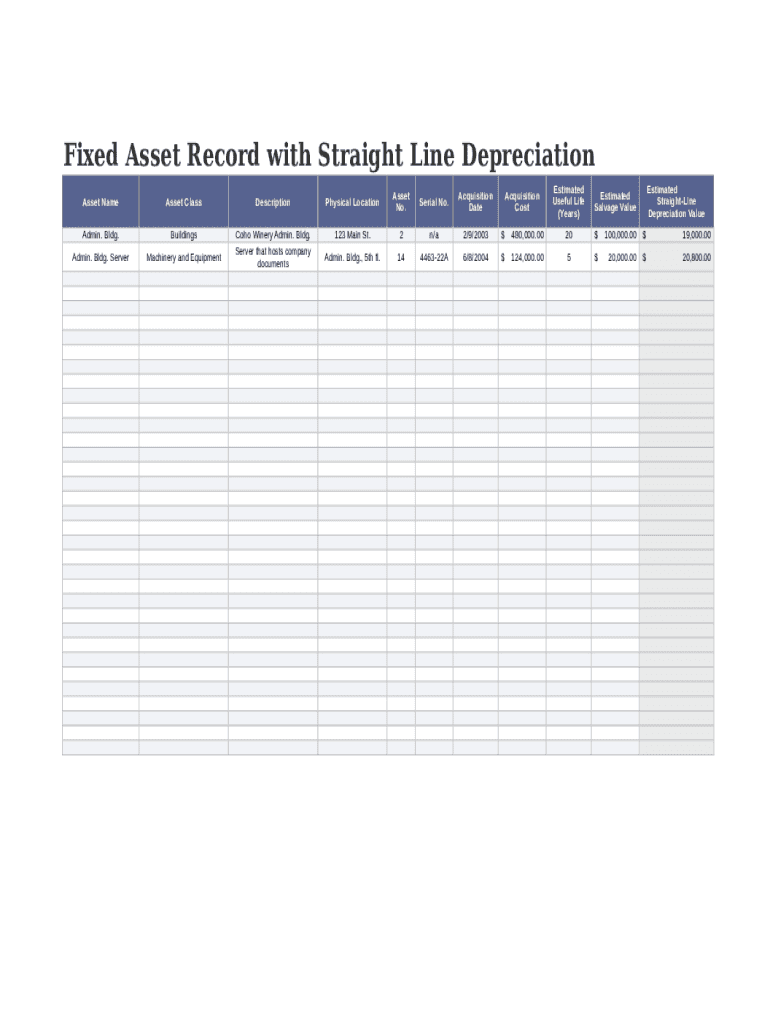
Strght Line Depreciation Form free printable template
We are not affiliated with any brand or entity on this form

Fill out
Complete the form online in a simple drag-and-drop editor.

eSign
Add your legally binding signature or send the form for signing.

Share
Share the form via a link, letting anyone fill it out from any device.

Export
Download, print, email, or move the form to your cloud storage.
Why pdfFiller is the best tool for your documents and forms


End-to-end document management
From editing and signing to collaboration and tracking, pdfFiller has everything you need to get your documents done quickly and efficiently.
Accessible from anywhere
pdfFiller is fully cloud-based. This means you can edit, sign, and share documents from anywhere using your computer, smartphone, or tablet.
Secure and compliant
pdfFiller lets you securely manage documents following global laws like ESIGN, CCPA, and GDPR. It's also HIPAA and SOC 2 compliant.
What is Strght Line Depreciation Form
The Fixed Asset Record with Straight Line Depreciation is a financial document used by businesses to track and calculate the depreciation of fixed assets using the straight-line method.
pdfFiller scores top ratings on review platforms




Who needs Strght Line Depreciation Form?
Explore how professionals across industries use pdfFiller.

Strght Line Depreciation Form is needed by:
-
Accountants managing fixed asset records
-
Business owners tracking asset depreciation
-
Financial analysts preparing financial statements
-
Auditors conducting financial reviews
-
Tax professionals ensuring compliance
-
University finance departments handling asset management
Comprehensive Guide to Strght Line Depreciation Form
What is the Fixed Asset Record with Straight Line Depreciation?
The Fixed Asset Record with Straight Line Depreciation is a specialized financial document designed for the accurate tracking and management of fixed assets. This form plays a crucial role in asset tracking and record-keeping by providing a structured format for documenting essential details.
Using a template like this is vital for businesses, as it ensures compliance with accounting standards and supports precise financial record-keeping. The structured approach facilitates an organized way to monitor assets and their depreciation over time.
Purpose and Benefits of the Fixed Asset Record
Accurately tracking fixed assets and their depreciation is paramount for any business. This template significantly aids in the preparation of financial statements, ensuring that all asset-related information is accurately recorded and easily accessible.
The benefits of using the Fixed Asset Record include streamlined asset management processes and enhanced compliance with financial regulations. By maintaining organized records, businesses can also improve their overall financial transparency and accountability.
Key Features of the Fixed Asset Record Template
The Fixed Asset Record template contains several fillable fields designed to capture comprehensive asset information. Key fields include:
-
Asset Name
-
Asset Class
-
Description
-
Physical Location
-
Useful Life
Each field contributes to detailed asset documentation and helps in accurate depreciation calculations. Furthermore, the ease of online access through pdfFiller allows users to edit and manage their forms efficiently.
Who Needs the Fixed Asset Record with Straight Line Depreciation?
Various businesses and professionals require the Fixed Asset Record for effective asset management. Accountants and small business owners are among those who particularly benefit from this form, as they often need reliable methods for tracking asset values and depreciation.
It's important to clarify that the form is accessible to anyone involved in managing financial documents, debunking common misconceptions about its usage.
How to Fill Out the Fixed Asset Record with Straight Line Depreciation Online (Step-by-Step)
To complete the Fixed Asset Record using pdfFiller, follow these simple steps:
-
Access the Fixed Asset Record template online.
-
Begin filling in the fields sequentially, starting with the Asset Name.
-
Continue to provide details in each field as prompted.
-
Double-check all entries to ensure accuracy.
-
Save, download, or print the completed form when finished.
Pay close attention to each instructions and avoid common errors, such as omitting crucial information.
Security and Compliance Features for Your Financial Documents
When using pdfFiller, users can trust their financial documents are protected by robust security measures. The platform employs 256-bit encryption and adheres to strict compliance with GDPR and HIPAA standards.
Protecting sensitive financial information is essential, and pdfFiller's commitment to data security establishes it as a trustworthy document management solution for businesses.
Submission and Management of the Fixed Asset Record
Once the Fixed Asset Record is completed, users should be aware of the following submission methods:
-
Save and download the form for electronic submission.
-
For physical submission, print the document and mail it as needed.
After submission, it is recommended to retain a copy of the form for record-keeping purposes, ensuring that all asset information is consistently managed.
What Happens After You Submit the Fixed Asset Record?
After submission, users can expect a processing time for their Fixed Asset Record. Furthermore, tracking the status of submitted forms is essential for keeping tabs on any required follow-up actions.
If corrections or amendments are necessary, users should be prepared for potential rejections and understand the common reasons for them, such as incomplete information or inaccuracies.
Sample of a Completed Fixed Asset Record with Straight Line Depreciation
A visual reference can be invaluable. Below is an example of a completed Fixed Asset Record:
The sample includes sections filled out for clarity, allowing users to better understand how to approach their own form. Review each part of this example to effectively guide your entries.
Experience the Ease of Managing Your Financial Forms with pdfFiller
pdfFiller enhances the efficiency of form completion and management through its user-friendly platform. Key capabilities include editing text and images, creating fillable forms, and providing secure eSigning options.
Users can experience the flexibility of accessing and managing their documents securely from any device, reinforcing the platform’s commitment to data security and user accessibility.
How to fill out the Strght Line Depreciation Form
-
1.Access pdfFiller and search for the Fixed Asset Record with Straight Line Depreciation form.
-
2.Open the form in the pdfFiller interface to start filling it out.
-
3.Familiarize yourself with the fillable fields such as Asset Name, Asset Class, and Description.
-
4.Gather necessary information such as the asset's details and acquisition data before you begin.
-
5.Input the asset's name, class, and a brief description in their respective fields.
-
6.Fill in the physical location where the asset is stored.
-
7.Determine the useful life of the asset and enter it in the appropriate field.
-
8.Calculate the estimated straight-line depreciation value based on the asset's initial cost and useful life.
-
9.Review all entries to ensure accuracy and completeness.
-
10.Finalize the form by checking for any errors or omissions.
-
11.Save your completed form on pdfFiller, either downloading it to your device or submitting as instructed.

What is the purpose of the Fixed Asset Record with Straight Line Depreciation?
This form is used by businesses to track the acquisition and depreciation of fixed assets, ensuring accurate financial reporting and asset management.
Who should use this form?
This form is ideal for accountants, business owners, financial analysts, and tax professionals who need to manage and report fixed assets.
Are there any deadlines associated with this form?
While there are no specific deadlines, timely completion is crucial for accurate financial reporting and compliance during tax season.
What supporting documents do I need to complete this form?
You should gather information regarding each asset's purchase details, including invoices, receipts, and asset classification information.
How can I submit the completed form?
After completion, you can save the form in pdfFiller to your device and then use it for your records or submit it as part of a financial statement.
What common mistakes should I avoid when filling out this form?
Ensure accurate entries for all fields, especially useful life and depreciation values, to prevent financial inaccuracies.
What processing time should I expect after submission?
There is no processing time associated with the form itself; however, review and updates may take additional time depending on your organization's procedures.
Related Forms



Get the latest insights from our blog


If you believe that this page should be taken down, please follow our DMCA take down process
here
.
This form may include fields for payment information. Data entered in these fields is not covered by PCI DSS compliance.