
Last updated on
Oct 31, 2026

DoT Service Animal Air Transportation Form 2020 free printable template
We are not affiliated with any brand or entity on this form

Fill out
Complete the form online in a simple drag-and-drop editor.

eSign
Add your legally binding signature or send the form for signing.

Share
Share the form via a link, letting anyone fill it out from any device.

Export
Download, print, email, or move the form to your cloud storage.
Why pdfFiller is the best tool for your documents and forms


End-to-end document management
From editing and signing to collaboration and tracking, pdfFiller has everything you need to get your documents done quickly and efficiently.
Accessible from anywhere
pdfFiller is fully cloud-based. This means you can edit, sign, and share documents from anywhere using your computer, smartphone, or tablet.
Secure and compliant
pdfFiller lets you securely manage documents following global laws like ESIGN, CCPA, and GDPR. It's also HIPAA and SOC 2 compliant.
What is DoT Service Animal Air Transportation Form
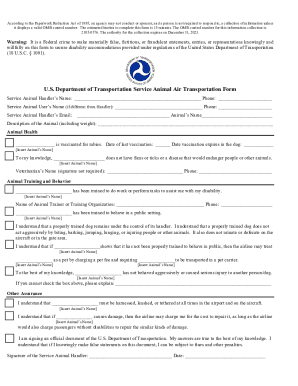
The US DOT Service Animal Air Transportation Form is a government document used by individuals traveling with service animals to provide essential information to airlines.
pdfFiller scores top ratings on review platforms




Who needs DoT Service Animal Air Transportation Form?
Explore how professionals across industries use pdfFiller.

DoT Service Animal Air Transportation Form is needed by:
-
Individuals traveling with service animals
-
Service animal handlers in the US
-
Airline personnel managing service animal accommodations
-
Disability advocates assisting travelers
-
Legal representatives supporting service animal claims
Comprehensive Guide to DoT Service Animal Air Transportation Form
What is the US DOT Service Animal Air Transportation Form?
The US DOT Service Animal Air Transportation Form is a critical document for individuals traveling with service animals. This form facilitates the safe and compliant transportation of service animals by detailing essential information about the animal, the handler, and any relevant health data. Service animal handlers are required to complete this form to ensure they meet airline safety and operational guidelines.
Traveling with a service animal entails specific responsibilities. Handlers must provide necessary documentation to airlines to confirm that their animals are trained to assist them with their disabilities. Without this form, service animal handlers may face challenges during air travel.
Purpose and Benefits of the US DOT Service Animal Form
The US DOT Service Animal Form serves dual purposes; it is both a legal requirement and a valuable tool for service animal handlers. By completing this form, handlers help ensure they adhere to regulations that govern air travel with service animals.
Among the benefits of using this form are:
-
Streamlined travel experience for handlers and airlines.
-
Legal protection for both parties by documenting the handler's right to travel with their service animal.
-
Efficient processing at airport check-ins.
Eligibility and Who Needs the US DOT Service Animal Form?
Understanding who needs to fill out the US DOT Service Animal Form is vital for compliance. Specifically, this form is mandatory for any service animal handler looking to travel with their animal on U.S. airlines.
Eligibility criteria for service animals include:
-
The animal must be trained to perform specific tasks for an individual with a disability.
-
Only recognized service animals, such as dogs, are eligible under current U.S. law.
How to Fill Out the US DOT Service Animal Air Transportation Form Online (Step-by-Step)
Filling out the US DOT Service Animal Form online can be done seamlessly through pdfFiller. Here’s how to do it:
-
Access the form through pdfFiller’s platform.
-
Complete the handler's name and contact information.
-
Provide details about the service animal, including its training and behavior.
-
Sign the form to validate it.
Pay special attention to key fields to avoid unnecessary delays.
Required Documents and Information You'll Need to Gather
Before filling out the US DOT Service Animal Form, it is crucial to gather all necessary documents and information. Essential documents include:
-
Vaccination records of the service animal.
-
Training certificates proving the animal's capabilities.
-
Handler's contact information for verification purposes.
Having these documents ready will facilitate a smoother application process.
Common Errors and How to Avoid Them When Submitting the Form
While submitting the US DOT Service Animal Form, some common errors can occur. Awareness of these pitfalls can help prevent delays:
-
Omitting the handler's signature, which is mandatory.
-
Forgetting to include essential details about the service animal.
-
Failing to submit the form within the required time frame of 48 hours before the flight.
To ensure accuracy, double-check all entries and validate the information before submission.
How to Submit the US DOT Service Animal Air Transportation Form
The submission process for the US DOT Service Animal Form can be completed through various methods:
-
Online submission directly via pdfFiller.
-
Emailing the completed form to the airline.
-
Mailing the form to the airline’s designated address.
Timely submission is essential; do not forget that the form must be submitted at least 48 hours before your flight.
What Happens After You Submit the Form?
After submitting the US DOT Service Animal Form, you can expect a confirmation process from the airline. This process typically includes:
-
A notification regarding the acceptance or need for further information.
-
Instructions on any additional requirements.
Keep track of your submission and be prepared for any follow-up actions that might be needed.
Security and Compliance When Handling the US DOT Service Animal Form
When completing the US DOT Service Animal Form, security and compliance with privacy regulations are paramount. pdfFiller employs robust security measures, including:
-
256-bit encryption to protect user data.
-
Adherence to HIPAA and GDPR compliance standards.
You can trust that your sensitive information is handled securely throughout the form completion process.
Engaging with pdfFiller for Easy Completion of the Form
Utilizing pdfFiller for the US DOT Service Animal Form offers numerous advantages. Key features include:
-
Simple editing tools for text and images.
-
Options for eSigning directly on the platform.
-
Safe storage of completed documents for future access.
By choosing pdfFiller, you can confidently complete and submit your service animal form with ease.
How to fill out the DoT Service Animal Air Transportation Form
-
1.Access the US DOT Service Animal Air Transportation Form on pdfFiller by using the search function or directly visiting the designated page.
-
2.Once opened, navigate through the form's layout using the toolbar to familiarize yourself with the fillable areas, checkboxes, and sections requiring your input.
-
3.Before starting, gather the necessary information including the service animal's details, health certifications, training documentation, and your contact information to facilitate smooth completion.
-
4.Begin filling in the form by typing the Service Animal Handler’s Name, ensuring clarity and accuracy in this field for correct identification.
-
5.Following this, provide details about your service animal such as its breed, size, and training history in the designated fields, ensuring all required information is accurately reflected.
-
6.Use the checkboxes to indicate any relevant additional information regarding the service animal's behavior and health status, per the instructions provided.
-
7.After completing all sections, carefully review the form for completeness and correctness, paying special attention to the accuracy of contact information.
-
8.Finalize the form by adding your signature in the designated area, ensuring this is completed to validate your submission.
-
9.Once satisfied, save your work regularly by clicking the save button to avoid data loss. You may then download the form in your preferred format or submit it electronically through the options available.
-
10.Ensure you submit the completed form at least 48 hours before travel to comply with airline requirements regarding service animal documentation.

Who is eligible to use the US DOT Service Animal Air Transportation Form?
Individuals traveling with service animals are eligible to use this form. It is specifically designed for service animal handlers within the US to meet airline requirements.
What is the submission deadline for this form?
The completed form must be submitted at least 48 hours prior to the flight departure to ensure compliance with airline policies regarding service animals.
How do I submit the completed form?
You can submit the completed US DOT Service Animal Air Transportation Form electronically through pdfFiller or download it to submit directly to your airline according to their guidelines.
What supporting documents are required when submitting this form?
You typically need to include health and training documentation of your service animal. Ensure all information is accurate to avoid complications with your submission.
What are common mistakes to avoid when filling out this form?
Common mistakes include failing to provide accurate contact information, neglecting to sign the form, and not submitting it within the required timeframe before travel.
How long does it take to process this form?
Processing time can vary based on the airline's procedures. Submitting the form at least 48 hours before your flight is crucial to allow for any necessary verification.
Are there any fees associated with submitting this form?
There are typically no fees for submitting the US DOT Service Animal Air Transportation Form itself, but check with your airline for any potential fees related to service animal accommodations.
DoT Service Animal Air Transportation Form Form Versions
Related Forms




Get the latest insights from our blog



If you believe that this page should be taken down, please follow our DMCA take down process
here
.
This form may include fields for payment information. Data entered in these fields is not covered by PCI DSS compliance.