
Last updated on
Nov 6, 2026
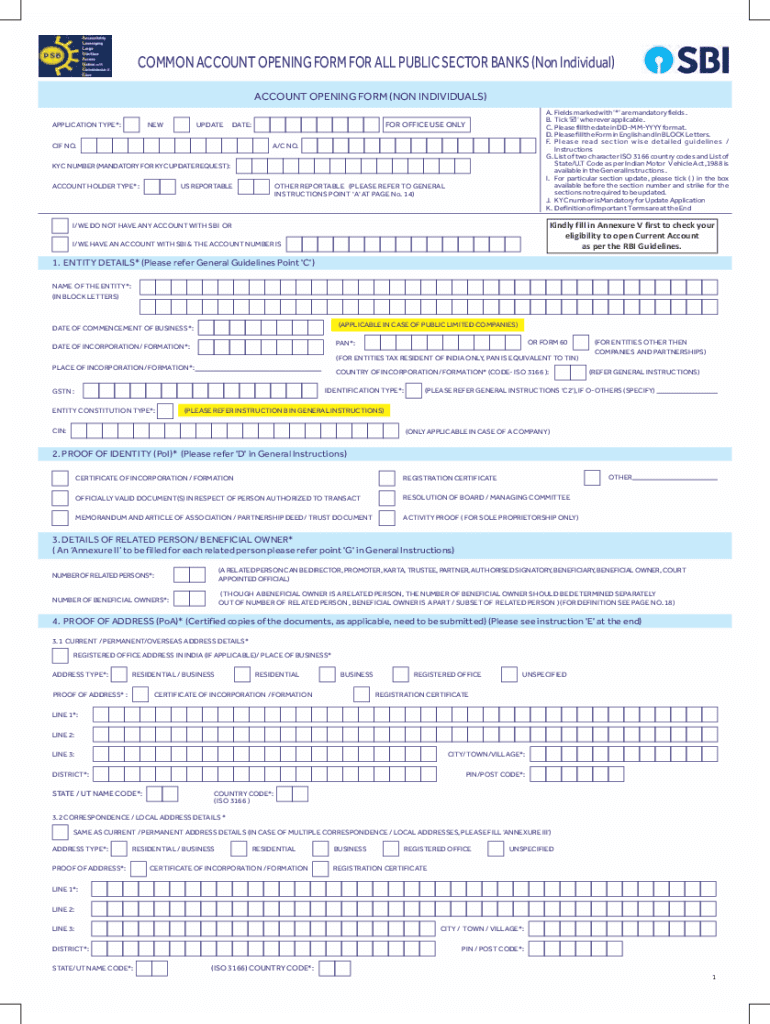
India SBI Common Account Opening Form for All Public Sector Banks (Non Individual) 2020-2026 fre...
We are not affiliated with any brand or entity on this form

Fill out
Complete the form online in a simple drag-and-drop editor.

eSign
Add your legally binding signature or send the form for signing.

Share
Share the form via a link, letting anyone fill it out from any device.

Export
Download, print, email, or move the form to your cloud storage.
Why pdfFiller is the best tool for your documents and forms


End-to-end document management
From editing and signing to collaboration and tracking, pdfFiller has everything you need to get your documents done quickly and efficiently.
Accessible from anywhere
pdfFiller is fully cloud-based. This means you can edit, sign, and share documents from anywhere using your computer, smartphone, or tablet.
Secure and compliant
pdfFiller lets you securely manage documents following global laws like ESIGN, CCPA, and GDPR. It's also HIPAA and SOC 2 compliant.
What is India SBI Common Account Opening Form for All Public Sector Banks (Non Individual)
The Common Account Opening Form for Public Sector Banks is a financial document used by entities in India to open or update non-individual accounts with public sector banks.
pdfFiller scores top ratings on review platforms




User friendly and can generate quality documents.
Easy Auto-Renew Subscription Refund
Like most sites that offer small services with yearly or monthly subscriptions, you most likely run into the "auto renew subscription" headache. While it is frustrating (as this happened to me with PDFfiller), it is always nice to have a little forgiveness. Before I disputed the transaction with my bank I "calmly" contacted PDFfiller support asking if I could be refunded for this un-consented transaction of $72. It only took 5 mins with customer support to give me a full refund. And for that hasty/easy relief they gave me (as well as a refund with no questions asked) I give them 5 stars. Also, not to mention, it is a great PDF filling software.
Who needs India SBI Common Account Opening Form for All Public Sector Banks (Non Individual)?
Explore how professionals across industries use pdfFiller.

India SBI Common Account Opening Form for All Public Sector Banks (Non Individual) is needed by:
-
Businesses seeking to establish a new bank account
-
Corporations needing to update bank account information
-
Non-profits requiring a specific banking solution
-
Partnerships looking to manage business finances
-
Legal entities applying for business licenses
-
Trusts needing a financial account for transactions
Comprehensive Guide to India SBI Common Account Opening Form for All Public Sector Banks (Non Individual)
Understanding the Common Account Opening Form for Public Sector Banks
The Common Account Opening Form serves an essential purpose for non-individual entities in India, functioning as a critical document for facilitating business banking operations. This form is especially relevant for various types of entities, including companies, partnerships, trusts, and societies. Understanding its importance can help these entities navigate the banking landscape effectively.
Purpose and Benefits of the Common Account Opening Form
This form simplifies the account opening process for businesses, ensuring that they can establish a proper banking structure. By having a dedicated account, entities can manage their finances more efficiently, leading to improved financial benefits. Adopting a non-individual account helps in maintaining clear financial records and enhancing credibility in business transactions.
Key Features of the Common Account Opening Form
The Common Account Opening Form includes several components that require detailed information for processing. Key fields often found in this form incorporate 'NAME OF THE ENTITY* (IN BLOCK LETTERS)' and 'DATE OF COMMENCEMENT OF BUSINESS*'. Unique features, such as guides at various fields, enhance user-friendliness, making it easier to fill out.
Who Needs the Common Account Opening Form?
This form is necessary for a wide range of businesses and entities, including corporates and partnerships. Failing to use this form could lead to complications in setting up a business account, resulting in delays or denials by banks. It's crucial for entities to recognize their obligations regarding the corporate account form to ensure compliance with banking requirements.
How to Fill Out the Common Account Opening Form for Public Sector Banks (Step-by-Step)
Filling out the Common Account Opening Form requires careful attention to detail. Here’s a step-by-step guide:
-
Gather all necessary information, including entity name, type, and registration details.
-
Complete each section of the form meticulously, especially key fields like the 'DATE OF COMMENCEMENT OF BUSINESS.'
-
Review the completed form for accuracy before ensuring all required signatures are provided.
Required Documents and Supporting Materials
To process the Common Account Opening Form efficiently, several documents are necessary. These include:
-
Proof of identity for all signatories.
-
Proof of business registration or license.
-
Address verification documents.
Having these documents on hand expedites the form's processing and avoids unnecessary delays.
Review and Validation Checklist for the Common Account Opening Form
To ensure accurate completion of the form, users should utilize this checklist:
-
Verify that all sections are filled completely and correctly.
-
Check that all required supporting documents are attached.
-
Look for common errors, such as missing signatures or incorrect dates.
Submission Methods and Where to Submit the Common Account Opening Form
There are several methods available for submitting the Common Account Opening Form:
-
Online submission through the bank's portal.
-
In-person submission at the nearest public sector bank branch.
-
Postal submission may be available, depending on the bank's guidelines.
Identifying the right submission method can streamline the process significantly.
What Happens After You Submit the Common Account Opening Form?
After submitting the form, the review process begins, typically taking several business days. During this time, the bank evaluates the application, and applicants can track their application status through the bank's portal or customer service. Being aware of the timeline helps manage expectations and prepares the business for the next steps.
Ensuring Security and Compliance While Handling the Common Account Opening Form
When filling out and submitting the Common Account Opening Form, it is vital to implement security measures to protect sensitive information. Ensuring that the platform used for submission complies with standards like GDPR and HIPAA reassures users of data protection, which is crucial in today’s digital age.
Streamlining Your Experience with pdfFiller
pdfFiller offers various features that can assist users in filling out the Common Account Opening Form seamlessly. Its tools enhance productivity by allowing users to edit, eSign, and manage documents securely. Utilizing pdfFiller can clean up complexities involved in form handling and streamline the overall experience.
How to fill out the India SBI Common Account Opening Form for All Public Sector Banks (Non Individual)
-
1.To access the Common Account Opening Form on pdfFiller, visit the website and search for the form by name.
-
2.Once found, click on the form to open it within pdfFiller's interface, where you will see the fields to fill in.
-
3.Before you begin, gather all necessary information such as proof of identity, address documentation, and details of the entity's business.
-
4.Carefully navigate through the form, filling in each blank field as prompted, ensuring all required fields marked with an asterisk are completed.
-
5.Utilize the checkboxes for any options provided, and ensure the correct details about the entity are accurately input.
-
6.After filling out the form, take a moment to review all the information entered, checking for any typos or missing data.
-
7.Once satisfied with your entries, finalize the document by clicking the option to save or download your completed form.
-
8.If submission is required, follow the prompts to submit the form electronically or print it for manual submission as instructed.

Who is eligible to use the Common Account Opening Form?
Eligibility typically includes businesses, corporations, partnerships, non-profits, and any legal entities intending to open or update an account with public sector banks in India.
Are there any deadlines for submitting the form?
There are generally no strict deadlines, but it is advisable to submit the form promptly to ensure timely processing of your banking requests.
How should I submit the Common Account Opening Form?
The form can be submitted electronically through pdfFiller or printed for manual submission at your chosen public sector bank branch.
What supporting documents are required with this form?
Supportive documentation typically includes proof of identity, address verification, and details pertaining to the entity's operations, as specified by the bank.
What common mistakes should I avoid when filling out the form?
Ensure that all required fields are completed accurately, double-check for spelling errors, and avoid omitting any necessary supporting documents as this can delay processing.
How long does it take to process the Common Account Opening Form?
Processing times may vary by bank, but generally it can take anywhere from a few days to several weeks, depending on the completeness of the submission.
What if I need assistance while filling out the form?
If you require assistance, pdfFiller offers help through customer support, and you can also refer to the instructions provided on the form or consult your bank directly.
Related Forms




Get the latest insights from our blog


If you believe that this page should be taken down, please follow our DMCA take down process
here
.
This form may include fields for payment information. Data entered in these fields is not covered by PCI DSS compliance.