
Last updated on
Oct 7, 2026

Get the free form filled by a girl
We are not affiliated with any brand or entity on this form

Fill out
Complete the form online in a simple drag-and-drop editor.

eSign
Add your legally binding signature or send the form for signing.

Share
Share the form via a link, letting anyone fill it out from any device.

Export
Download, print, email, or move the form to your cloud storage.
Why pdfFiller is the best tool for your documents and forms


End-to-end document management
From editing and signing to collaboration and tracking, pdfFiller has everything you need to get your documents done quickly and efficiently.
Accessible from anywhere
pdfFiller is fully cloud-based. This means you can edit, sign, and share documents from anywhere using your computer, smartphone, or tablet.
Secure and compliant
pdfFiller lets you securely manage documents following global laws like ESIGN, CCPA, and GDPR. It's also HIPAA and SOC 2 compliant.
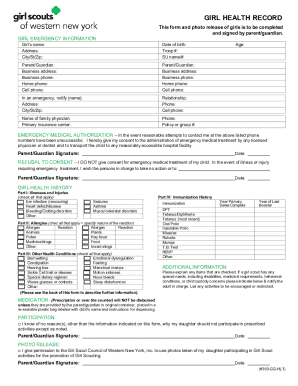
What is Girl Scout Medical Form
The Form Filled by a is a document used by individuals to provide specific information or declarations as required by various administrative bodies.
pdfFiller scores top ratings on review platforms




Who needs Girl Scout Medical Form?
Explore how professionals across industries use pdfFiller.

Girl Scout Medical Form is needed by:
-
Individuals applying for permits
-
Students filling out applications
-
Professionals submitting reports
-
Businesses preparing compliance documents
-
Non-profit organizations collecting data
-
Contractors seeking approvals
Comprehensive Guide to Girl Scout Medical Form
What is the Form Filled by a Specific Name of the Form?
The form filled by a Specific Name of the Form serves a distinct role in facilitating specific transactions or communications. It is primarily designed to gather essential information relevant to its purpose, making it critical for various applications.
This form is commonly used in scenarios where structured data collection is necessary, such as during registration processes, applications for services, or information updates.
Benefits of Using the Form Filled by a Specific Name of the Form
Utilizing the form filled by a Specific Name of the Form offers numerous benefits that enhance the experience for both individuals and organizations. First, it standardizes the information collection process, reducing variability and errors.
Additionally, the form streamlines workflows, enabling users to complete necessary tasks quickly and without confusion. The time savings and clarity it provides help users engage more effectively with the process.
Key Features of the Form Filled by a Specific Name of the Form
The form filled by a Specific Name of the Form includes several key features that simplify the form-filling experience. Users can expect editable text fields, checkboxes, and drop-down menus, allowing for tailored responses.
-
Edit text entries for precise input.
-
Utilize checkboxes for straightforward selections.
-
Incorporate digital signatures for authenticity.
-
Attach supporting documents easily.
-
Save and resume later functionality for convenience.
Who Needs to Fill Out the Form Filled by a Specific Name of the Form?
The form is typically targeted at specific demographics, such as professionals in healthcare, education, or administration who require structured data for various purposes. It is particularly relevant for those needing to comply with regulations or internal protocols within their fields.
Individuals seeking certain services or benefits may also find themselves filling out this form to meet eligibility criteria.
How to Fill Out the Form Filled by a Specific Name of the Form Online: A Step-by-Step Guide
To fill out the form online using pdfFiller, follow these straightforward steps:
-
Access the form through the pdfFiller platform.
-
Click on the editable fields to enter required information.
-
Select options where applicable using checkboxes or dropdowns.
-
Review all entries for accuracy.
-
Submit the form through the designated method.
With user-friendly features, pdfFiller enables easy navigation and enhances the filling process, making form completion hassle-free.
Common Errors and How to Avoid Them When Filling Out the Form
Users often encounter frequent mistakes when completing the form, which can lead to delays or rejections. Common errors include skipping required fields, misinterpreting instructions, or failing to provide accurate information.
To avoid these pitfalls, consider the following tips:
-
Carefully read all instructions before starting.
-
Double-check all entries for accuracy.
-
Consult help resources if unclear about a section.
Security and Compliance When Submitting the Form Filled by a Specific Name of the Form
Ensuring the security of the form submission process is paramount. With pdfFiller, users benefit from robust security measures such as 256-bit encryption to protect sensitive information.
Furthermore, pdfFiller complies with industry standards, including SOC 2 Type II, HIPAA, and GDPR, ensuring that user data remains private and secure during and after the submission process.
How to Submit the Form Filled by a Specific Name of the Form
Users have multiple options for submitting the form filled by a Specific Name of the Form. The available methods typically include online submission via pdfFiller, mailing printed copies, or using designated submission portals.
Be sure to check for any associated deadlines and potential fees that may apply to ensure timely submission.
What Happens After You Submit the Form Filled by a Specific Name of the Form?
Upon submission, the form goes through a review process where the information is verified. Users can Track the progress of their submissions to ensure that everything is moving forward appropriately.
Receiving confirmation of submission is crucial, and following up if necessary can help clarify any outstanding issues or questions.
Transform Your Form Filling Experience with pdfFiller
Using pdfFiller can significantly enhance your form-filling experience, offering not just ease of use but also security and efficiency. The platform empowers users to manage forms effortlessly, ensuring that all submissions are handled with care and professionalism.
Consider leveraging pdfFiller for your form management needs to benefit from its user-friendly interface and comprehensive features.
How to fill out the Girl Scout Medical Form
-
1.Start by visiting pdfFiller's website and create an account or log in if you already have one.
-
2.Utilize the search bar to locate the Form Filled by a by typing its name and selecting the appropriate document from the results.
-
3.Once the form is open, carefully review each section to familiarize yourself with the content and required information.
-
4.Gather any necessary information or documents you may need to complete the form, such as identification or proof of residency.
-
5.Begin filling in the form by clicking on each field and typing the information as required. Use the 'Text' tool for basic entries and other tools for specific information types.
-
6.If you need to make corrections, utilize pdfFiller’s editing tools, like 'Erase' or 'Undo', to modify your entries easily.
-
7.Regularly save your progress to avoid losing any information, using the 'Save' option frequently.
-
8.Once all fields are filled out, review the entire form for accuracy, ensuring all required sections are completed.
-
9.Finalize your document by clicking on 'Finish' to create a polished version that is ready for submission.
-
10.When ready, download the form in your desired format, or proceed to submit it directly through pdfFiller if applicable.

Who is eligible to fill out the Form Filled by a?
Eligibility for the Form Filled by a typically includes individuals, students, professionals, and businesses who need to submit certain information to authorities. Check specific guidelines relevant to your situation.
What is the deadline for submitting the Form Filled by a?
Deadlines for submission vary based on the purpose of the form. It is important to check with the relevant administrative body or organization for their specific timelines.
How can I submit the completed Form Filled by a?
You can submit the completed Form Filled by a either online through pdfFiller if applicable or by downloading and sending it via email or conventional mail, as required by the receiving organization.
Are there any supporting documents required when filling out the form?
Supporting documents often depend on the form's purpose. Typically, identification, proof of residency, or relevant credentials are required. Ensure you gather all necessary documents before starting.
What common mistakes should I avoid when completing the form?
Common mistakes include omitting required fields, providing incorrect information, or failing to sign the form where necessary. Always double-check your entries before submission.
How long does it take to process the Form Filled by a?
Processing times can vary widely based on the entity receiving your form. It’s advisable to allow several weeks to a few months for processing, depending on their workload and requirements.
Is notarization required for the Form Filled by a?
Notarization requirements depend on the specific guidelines associated with the Form Filled by a. Generally, if the form requires verification of identity or signatures, notarizing may be necessary.
Related Content
Related Forms



Related Catalogs
Get the latest insights from our blog


If you believe that this page should be taken down, please follow our DMCA take down process
here
.
This form may include fields for payment information. Data entered in these fields is not covered by PCI DSS compliance.