
Last updated on
Nov 1, 2026

Canada INS5242B E 2014 free printable template
We are not affiliated with any brand or entity on this form

Fill out
Complete the form online in a simple drag-and-drop editor.

eSign
Add your legally binding signature or send the form for signing.

Share
Share the form via a link, letting anyone fill it out from any device.

Export
Download, print, email, or move the form to your cloud storage.
Why pdfFiller is the best tool for your documents and forms


End-to-end document management
From editing and signing to collaboration and tracking, pdfFiller has everything you need to get your documents done quickly and efficiently.
Accessible from anywhere
pdfFiller is fully cloud-based. This means you can edit, sign, and share documents from anywhere using your computer, smartphone, or tablet.
Secure and compliant
pdfFiller lets you securely manage documents following global laws like ESIGN, CCPA, and GDPR. It's also HIPAA and SOC 2 compliant.
What is Canada INS5242B E
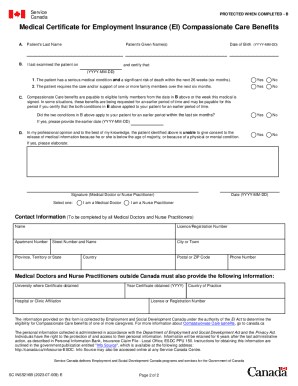
The Medical Certificate for Employment Insurance Benefits for Parents of Critically Ill Children is a government form used by parents to certify that a child under 18 is critically ill and requires parental care for EI benefits.
pdfFiller scores top ratings on review platforms




Easy to navigate and use and a good way of finding documents again.
I love it. No scanners, Printers. Everything on line!!
Who needs Canada INS5242B E?
Explore how professionals across industries use pdfFiller.

Canada INS5242B E is needed by:
-
Parents of critically ill children seeking EI benefits
-
Licensed medical doctors certifying a child's condition
-
Health care providers involved in pediatric care
-
Social workers assisting families in need
-
Legal representatives advising on government forms
-
Organizations supporting families with sick children
Comprehensive Guide to Canada INS5242B E
What is the Medical Certificate for Employment Insurance Benefits for Parents of Critically Ill Children?
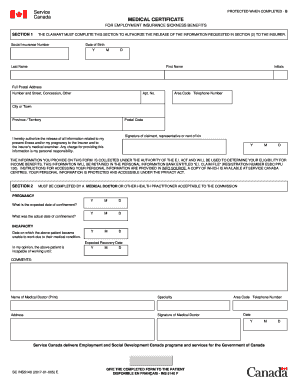
The Medical Certificate for Employment Insurance Benefits for Parents of Critically Ill Children, known as INS5242B, serves a crucial role in assisting families seeking financial support during challenging times. This form is specifically designed for parents who need to provide care for children under the age of 18 who are critically ill or injured.
To be valid, the form must be certified by a licensed medical doctor, emphasizing the importance of accurate medical documentation. The requirement for a medical doctor's signature reinforces the necessity for professional validation in accessing essential employment insurance medical benefits.
Purpose and Benefits of the Medical Certificate for Employment Insurance Benefits
Obtaining this medical certificate provides significant advantages for parents caring for critically ill children. This form is instrumental in securing Employment Insurance (EI) benefits, which can ease financial burdens for families during such stressful times.
By validating the need for parental care, the certificate not only helps ensure that families receive the necessary financial support but also mitigates the emotional strain associated with managing a child's serious health issues. Employment insurance medical certificates can be a vital resource for eligible families.
Key Features of the Medical Certificate for Employment Insurance Benefits
The medical certificate includes several critical sections for comprehensive documentation, such as:
-
Patient details: Includes the child's name and date of birth.
-
Medical certification: A statement confirming the child's medical condition.
-
Doctor's information: Contact details for the signing medical professional.
To complete the form correctly, attention must be paid to the necessary documents and details required for submission. Additionally, the form is fillable, allowing medical professionals to complete it directly online with clear instructions provided throughout the process.
Who Needs the Medical Certificate for Employment Insurance Benefits?
This medical certificate is essential for parents of critically ill children who require financial support through Employment Insurance. The eligibility to complete the form lies solely with licensed medical doctors, who must attest to the child’s condition.
Typical scenarios for needing this form include cases where parents must take leave from work to provide care during a child's hospitalization or treatment. Understanding when to use the certificate is vital for those seeking EI benefits for parental care.
How to Fill Out the Medical Certificate for Employment Insurance Benefits Online
Filling out the INS5242B form electronically can streamline the process. Follow these steps for effective completion:
-
Access the form on the pdfFiller platform.
-
Enter the patient’s name and date of birth accurately.
-
Fill in the date the patient was examined.
-
Have the medical doctor sign the form electronically.
-
Review all fields to ensure no information is missing.
Utilizing pdfFiller enhances user experience, ensuring the form is easy to fill out and submit properly.
Submission Methods for the Medical Certificate for Employment Insurance Benefits
Once completed, the form can be submitted through various methods. Here are the options available:
-
Online submission via the Service Canada portal.
-
Physical submission by mailing the form to the designated Service Canada office.
Awareness of associated deadlines is crucial to ensure timely processing. Moreover, tracking your submission can provide reassurance regarding the status of your application.
Common Errors and How to Avoid Them
When filling out the medical certificate, several common errors may lead to rejection. Common mistakes include:
-
Omitting crucial patient information.
-
Failing to secure the necessary medical doctor's signature.
-
Incorrectly entering the date of examination.
To minimize errors, families should utilize validation checklists and double-check all entries for accuracy before submitting the form.
Importance of Security and Compliance for Handling the Medical Certificate
In handling the medical certificate, ensuring data protection and compliance is paramount. Sensitive health information requires robust security measures to protect privacy.
pdfFiller prioritizes security through 256-bit encryption and compliance with HIPAA and GDPR, making it a trustworthy platform for submitting the employment insurance medical certificate.
How pdfFiller Facilitates the Medical Certificate Completion Process
pdfFiller offers numerous features that simplify form completion, including:
-
eSigning capabilities for easy signing directly on the platform.
-
Editing tools that allow customization of the form as needed.
-
The ability to save and securely download completed forms.
By using pdfFiller, users can efficiently manage the medical certificate process while benefiting from enhanced functionality.
Get Started with Your Medical Certificate for Employment Insurance Benefits Today!
Now is the time to take action on completing and submitting your medical certificate. Utilizing pdfFiller can streamline this process, ensuring that you are set up to receive the support you need while being user-friendly and efficient.
How to fill out the Canada INS5242B E
-
1.Access pdfFiller and search for the Medical Certificate for Employment Insurance Benefits for Parents of Critically Ill Children form using the search bar.
-
2.Open the form to view the fillable fields and instructions provided on the interface.
-
3.Gather all necessary information, including the patient's name, date of birth, and details of the medical examination prior to starting the form.
-
4.Carefully fill out each field, ensuring to enter accurate and complete information regarding the critically ill child's condition and required care.
-
5.Use the navigation tools on pdfFiller to move between sections of the form easily.
-
6.Review all entries for accuracy, paying special attention to the medical certification section that requires the doctor's signature.
-
7.Once all fields are completed, finalize the form by clicking on the save or complete button.
-
8.Save your form to your device or choose the download option to receive a copy for your records.
-
9.Submit the form electronically if pdfFiller allows it or print it out for manual submission to Service Canada.

Who is eligible to fill out the Medical Certificate form?
The Medical Certificate must be filled out by a licensed medical doctor in Canada certifying a child's critically ill condition to support EI benefits claims for parents.
What documents do I need to submit with this form?
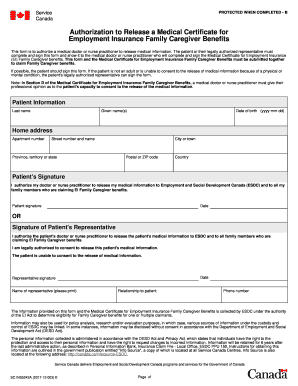
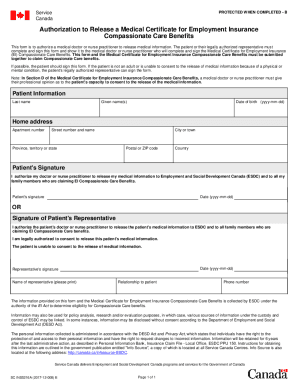
Along with the Medical Certificate, parents may need to submit an authorization form and any previous medical records if required to validate the claim for Employment Insurance benefits.
How do I submit the Medical Certificate form?
You can submit the form electronically through pdfFiller if available or print it and submit it in person or by mail to your local Service Canada office.
What common mistakes should I avoid when completing the form?
Be careful to fill in all required fields accurately, especially those requiring the doctor's signature and certification. Double-check for spelling errors in names and dates.
Is there a deadline for submitting the Medical Certificate form?
There is no specific deadline mentioned for submitting the Medical Certificate; however, it should be submitted as soon as possible to avoid delays in receiving EI benefits for parental care.
How long does it take to process the Medical Certificate form?
Processing times may vary depending on Service Canada’s workload. Typically, it can take several weeks. Checking with Service Canada directly for updates is advisable.
Can I make changes to the form once it's completed?
Yes, you can edit the form within pdfFiller before finalizing. After submission, contact Service Canada for guidance on correcting submitted forms.
Canada INS5242B E Form Versions
Related Forms


Get the latest insights from our blog


If you believe that this page should be taken down, please follow our DMCA take down process
here
.
This form may include fields for payment information. Data entered in these fields is not covered by PCI DSS compliance.