
Last updated on
Nov 6, 2026
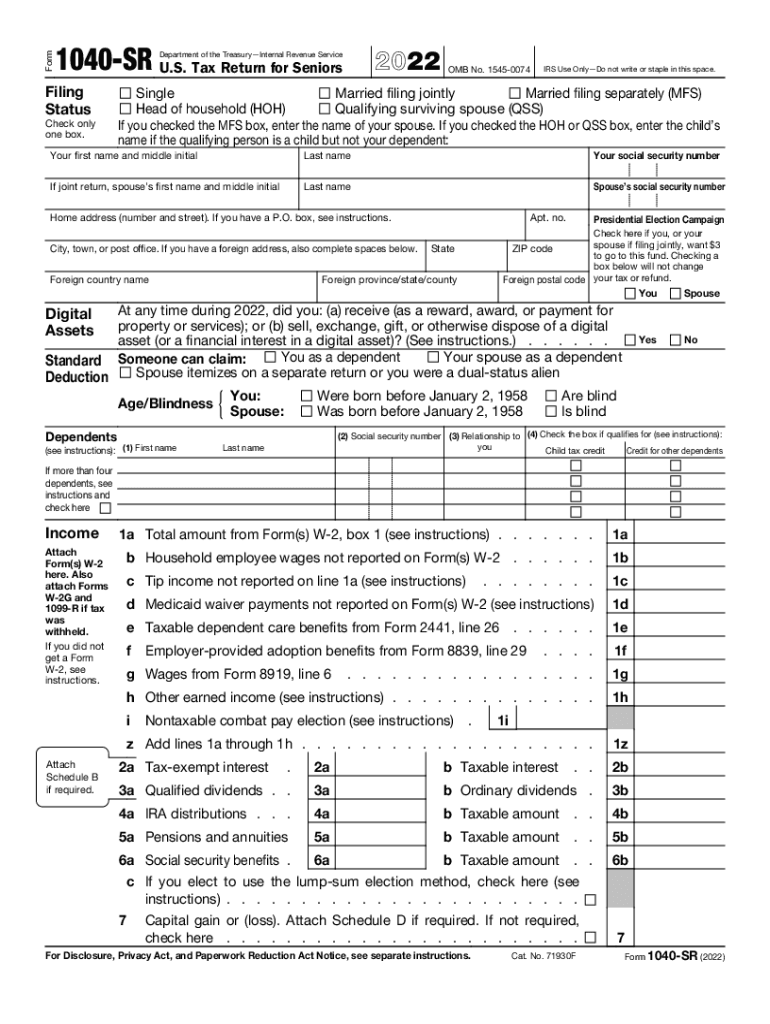
IRS 1040-SR 2022 free printable template
pdfFiller is not affiliated with IRS

Fill out
Complete the form online in a simple drag-and-drop editor.

eSign
Add your legally binding signature or send the form for signing.

Share
Share the form via a link, letting anyone fill it out from any device.

Export
Download, print, email, or move the form to your cloud storage.
Why pdfFiller is the best tool for your documents and forms


End-to-end document management
From editing and signing to collaboration and tracking, pdfFiller has everything you need to get your documents done quickly and efficiently.
Accessible from anywhere
pdfFiller is fully cloud-based. This means you can edit, sign, and share documents from anywhere using your computer, smartphone, or tablet.
Secure and compliant
pdfFiller lets you securely manage documents following global laws like ESIGN, CCPA, and GDPR. It's also HIPAA and SOC 2 compliant.
What is IRS 1040-SR
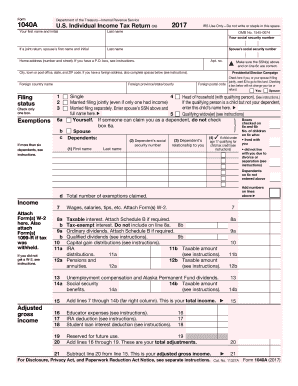
The US Federal 1040-SR Tax Return for Seniors 2022 is an individual tax return document used by U.S. seniors to report income and calculate tax liability for the year 2022.
pdfFiller scores top ratings on review platforms




not a techie, but was able to navigate the program fairly easily. love the auto fill feature and the capability to email right away and to go back and edit
You can find the tax forms you need all in one location.
It's excellent this thing help me out to sing out a multimillion contract!!! Thank you:D
I am just learning about this program. So far it is easy and appears secure. I have initially been using the redaction/ blackout feature for several PDF files that I am sending to a client and it has been very effective. I am impressed with the "save" feature in that it allows you to save the edited file in a different format, I.e. Word.
I enjoy the convenience of pdf filler. I am not computer savy - but I can use this !!!
GREAT WEBSITE IT IS VERY EASY TO USE IT I LOVE IT
Who needs IRS 1040-SR?
Explore how professionals across industries use pdfFiller.

IRS 1040-SR is needed by:
-
Seniors aged 65 and older filing taxes
-
Taxpayers who receive Social Security
-
Individuals claiming standard deductions available for seniors
-
Spouses filing jointly with a senior taxpayer
-
Tax consultants assisting senior clients
-
Financial advisors guiding retirement tax strategies
Comprehensive Guide to IRS 1040-SR
What is the US Federal 1040-SR Tax Return for Seniors 2022?
The 1040-SR form is a U.S. federal tax return specifically designed for seniors. This form is intended to report income, calculate tax liability, and claim credits and deductions. Individuals born before January 2, 1958, qualify to use the 1040-SR form, which is advantageous for simpler reporting compared to other tax forms.
Understanding the difference in required documentation is crucial, as this form is tailored to the unique needs of seniors, making it an essential choice for those eligible.
Purpose and Benefits of the US Federal 1040-SR Tax Return for Seniors 2022
The 1040-SR form serves several beneficial purposes for senior taxpayers. It simplifies the process of reporting income and calculating tax liabilities.
-
The form includes senior-specific deductions and credits, enhancing tax savings.
-
Its clear layout makes it easier for seniors to navigate and complete compared to other forms.
By utilizing the 1040-SR, seniors can take full advantage of available tax benefits while ensuring compliance with federal requirements.
Key Features of the US Federal 1040-SR Tax Return for Seniors 2022
The 1040-SR form includes several unique features that cater to the needs of seniors. These unique aspects streamline the filing experience and facilitate accurate submissions.
-
The form contains fillable fields and checkboxes that simplify data entry.
-
It offers notable sections for standard deductions tailored specifically for seniors.
-
Instructions embedded within the form guide users through each step, ensuring clarity and ease of completion.
Who Needs the US Federal 1040-SR Tax Return for Seniors 2022?
Eligibility for the 1040-SR tax return is defined by specific criteria that include age and income levels. Individuals seeking to use this form must meet certain requirements.
-
Eligible individuals must be born before January 2, 1958.
-
Income thresholds may apply, and considerations for joint filing should be taken into account.
-
Acceptable reported income types range widely, including pensions and social security payments.
How to Fill Out the US Federal 1040-SR Tax Return for Seniors 2022 Online (Step-by-Step)
Filling out the 1040-SR form online can streamline the filing process. Below is a structured guide to assist you in completing the form accurately.
-
Start by entering your first name, middle initial, and last name, followed by your social security number.
-
Fill in your address details, ensuring accuracy to avoid issues with correspondence.
-
Proceed to report your total income, making sure to include all sources.
-
Check any applicable deductions and credits specific to seniors.
-
Review all information before submission to ensure correctness.
Utilizing digital tools such as pdfFiller can facilitate the filling process, providing guidance at each step.
How to Sign the US Federal 1040-SR Tax Return for Seniors 2022
Signing the 1040-SR form is a necessary step in the submission process. Different requirements apply based on whether you are filing jointly with a spouse.
-
A wet signature is typically required, but digital signatures are acceptable in many cases.
-
Both the taxpayer and spouse must sign if filing jointly.
-
pdfFiller provides eSignature capabilities to streamline this process.
Submitting the US Federal 1040-SR Tax Return for Seniors 2022
Understanding the submission process for the 1040-SR form is essential to comply with IRS regulations. Multiple methods are available for submission.
-
Filers can choose between mailing the form or e-filing online.
-
Deadlines are critical; adhere to them to avoid penalties for late filing.
-
After submission, tracking the status of your return can provide peace of mind.
Security and Privacy Considerations for the US Federal 1040-SR Tax Return for Seniors 2022
Protecting personal information while filling out tax forms is paramount. Security measures must be in place to safeguard sensitive data.
-
pdfFiller employs 256-bit encryption and complies with SOC 2 Type II, HIPAA, and GDPR standards.
-
Safeguarding personal and financial information is essential for successful tax filing.
-
Implement best practices for document storage and sharing to ensure data remains confidential.
Why Choose pdfFiller for Your US Federal 1040-SR Tax Return for Seniors 2022
Utilizing pdfFiller can significantly enhance your experience when completing the 1040-SR form. The platform offers numerous advantages for users seeking efficiency.
-
pdfFiller provides an intuitive interface for filling and editing forms, making the process user-friendly.
-
Secure eSigning capabilities streamline the signature requirements, saving time and effort.
-
Document management tools are readily available, making it easier to organize your financial paperwork.
How to Fill Out Small Business Tax Forms Online with pdfFiller
Struggling with your Schedule C or not sure how to file business taxes as a sole proprietor, LLC, or self-employed professional? This step-by-step pdfFiller tutorial walks you through completing IRS Schedule C quickly and accurately — no printing, no scanning, no stress. Whether you're handling small business tax deductions, tracking self-employed taxes, or preparing your full business tax return, pdfFiller makes it simple right in your browser.

How to fill out the IRS 1040-SR
-
1.To begin, go to pdfFiller's website and search for 'US Federal 1040-SR Tax Return for Seniors 2022'. Click on the link to open the form.
-
2.Once the form is open, familiarize yourself with its sections. You can use the zoom feature to see the details better and navigate through the fillable fields.
-
3.Gather all necessary personal information including your Social Security number, income documents such as W-2s or 1099s, and any records of tax credits and deductions you plan to claim before starting to fill out the form.
-
4.Start entering your information in the designated fields. Click on each field to input your data and use checkboxes where needed. pdfFiller allows you to save your progress as you go.
-
5.After completing the required fields, carefully review all the information provided. Check for any errors, ensuring all entries are accurate and complete before finalizing the form.
-
6.When you're satisfied with your entries, use pdfFiller's tools to download or save the completed form. You can also print it directly from the platform.
-
7.To submit your tax return, follow IRS guidelines for submission. You can e-file through approved e-filing services or mail your completed form to the IRS based on your preferred filing method.

Who is eligible to use the 1040-SR form?
The 1040-SR form is designed for individuals aged 65 and older. To be eligible, you should be filing taxes for income earned in the year 2022 and may benefit from additional standard deductions.
What is the deadline for submitting the 2022 tax return?
The deadline for submitting your 2022 tax return using the 1040-SR form is typically April 15, 2023. It's advisable to file earlier to avoid late fees and ensure timely processing.
How can I submit my completed 1040-SR form?
You can submit your completed 1040-SR form by e-filing through an authorized tax software or mailing a printed copy to the IRS. Make sure to follow the IRS guidelines for your submission method.
What documents do I need to complete the 1040-SR form?
You will need your Social Security number, income tax forms such as W-2s and 1099s, records of other income, and documentation for any tax credits or deductions you wish to claim.
What are common mistakes to avoid when filling out the 1040-SR form?
Common mistakes include miscalculating your income, missing signatures, and failing to include necessary documents or tax identification numbers. Double-check all fields before submission.
How long does it take for the IRS to process my 1040-SR form?
Processing times for the 1040-SR form can vary. Generally, e-filed returns are processed faster, typically within 21 days, while mailed returns can take longer. Check the IRS website for updates.
Is there a fee associated with accessing the 1040-SR form?
The form itself is free to access as it is provided by the IRS. However, using tax preparation services or platforms like pdfFiller may have fees associated with their services.
IRS 1040-SR Form Versions
Related Forms


Get the latest insights from our blog


If you believe that this page should be taken down, please follow our DMCA take down process
here
.
This form may include fields for payment information. Data entered in these fields is not covered by PCI DSS compliance.