
Last updated on
Nov 6, 2026
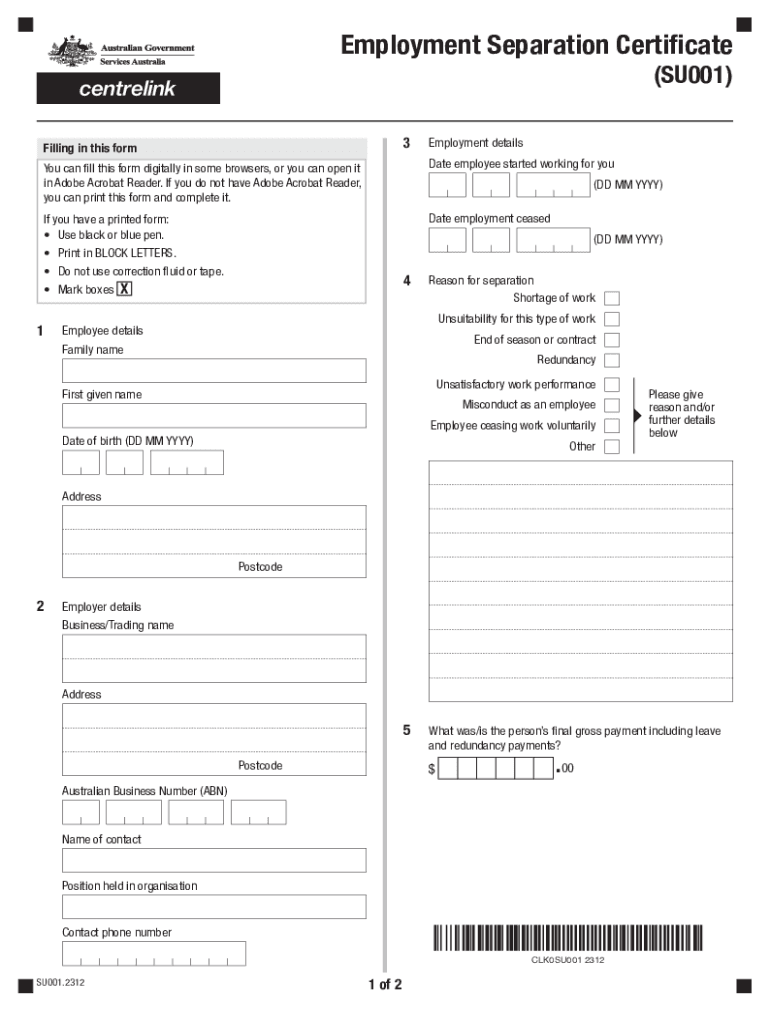
AU SU001 2023 free printable template
We are not affiliated with any brand or entity on this form

Fill out
Complete the form online in a simple drag-and-drop editor.

eSign
Add your legally binding signature or send the form for signing.

Share
Share the form via a link, letting anyone fill it out from any device.

Export
Download, print, email, or move the form to your cloud storage.
Why pdfFiller is the best tool for your documents and forms


End-to-end document management
From editing and signing to collaboration and tracking, pdfFiller has everything you need to get your documents done quickly and efficiently.
Accessible from anywhere
pdfFiller is fully cloud-based. This means you can edit, sign, and share documents from anywhere using your computer, smartphone, or tablet.
Secure and compliant
pdfFiller lets you securely manage documents following global laws like ESIGN, CCPA, and GDPR. It's also HIPAA and SOC 2 compliant.
What is AU SU001
The Employment Separation Certificate is an official document used by employers in Australia to provide essential information about a former employee's termination for income support purposes.
pdfFiller scores top ratings on review platforms




I love this extra help. I have never had it so easy on paperwork.
Excellent, fair, easy to use.
pdfFiller has solved all my previous headaches. Receiving a PDF in the past was always a nightmare and I could never fill it out and it would lead to me printing and scanning. It was just a nightmare. pdfFiller solves all of that.
I love how easy to use it is and it has all of the features that I always wanted. I always hated PDFs because they always made things complicated and I couldn't mark up, sign, or make the changes that I needed to. This tool is inexpensive and solves all of my issues with PDFs.
The inability to be able to completed change wording. I have not figured out how to do that. In addition, I would like to see if it can integrate with our other software.
Priced reasonably and has really great features. Tons of useful integrations too!
it is nice to be able to access different forms and save/send them to various destination from the same place
Don't let the name fool you, it does so much more than allow editing
I use pdfFiller to sign agreements when I'm traveling and don't have the version of Acrobat where you can sign, on my computer. I actually like pdfFiller much better, because it allows me to edit things that Acrobat does not. I've utilized several of the templates that have been very well laid out.
I was pleasantly surprised to see all of the templates and formatting options that are built in to pdfFiller
There is really nothing not to like. I don't use some of the features, because we don't need them, but I can't say it's missing anything or has any issues.
This is very user friendly
This is very user friendly! Simple Simple! FINALLY!
Who needs AU SU001?
Explore how professionals across industries use pdfFiller.

AU SU001 is needed by:
-
Employers in Australia processing employee separations
-
Former employees seeking income support
-
Human Resource professionals managing employee records
-
Administrators at Services Australia for processing claims
-
Legal professionals advising on employment matters
-
Consultants assisting companies with compliance requirements
Comprehensive Guide to AU SU001
What is the Employment Separation Certificate?
The Employment Separation Certificate (SU001) serves as a vital document for Australian employers, providing necessary income support details for former employees. This form plays a crucial role in ensuring that the correct amount of income support payments is processed. Governed by the Social Security (Administration) Act 1999, it is essential for compliance and transparency during employment separations. Employers must understand its significance when completing this Australian employment form to avoid potential issues.
Purpose and Benefits of the Employment Separation Certificate
This form is designed to benefit both employers and employees. It ensures that former employees receive the correct income support payments by verifying their employment details. For employers, completing this form establishes compliance with legal requirements and enhances transparency in managing employee separations. Utilizing the Employment Separation Certificate minimizes the risk of complications related to income payments from Services Australia.
Key Features of the Employment Separation Certificate
The Employment Separation Certificate includes several essential fields that must be accurately filled to ensure the document's validity. It requires personal information such as the family name, employment dates, and reason for separation. Critical entries also include the final gross payment and any unused leave entitlements. Proper completion of these sections is crucial for demonstrating compliance and supporting former employees in securing their entitlements.
Who Needs the Employment Separation Certificate?
This certificate is required for employers managing employee separations in the Australian Capital Territory. It is necessary in various scenarios, including resignations and terminations. Employers must complete this form to facilitate the income support process for their former employees, ensuring compliance with Australian employment regulations.
How to Fill Out the Employment Separation Certificate Online (Step-by-Step)
To complete the Employment Separation Certificate digitally via pdfFiller, follow this step-by-step guide:
-
Begin by entering the employee's personal information, including the family name.
-
Fill in the employment details, such as the start date and end date of employment.
-
Provide the reason for the separation, ensuring accuracy for proper processing.
-
Include details about the final gross payment and any outstanding leave entitlements.
-
Have the employer sign the form and date it to validate the submission.
Before filling out the form, gather accurate information to expedite the process and prevent errors.
Common Errors and How to Avoid Them
When completing the Employment Separation Certificate, certain fields are prone to common mistakes that could delay form processing. Common issues include inaccuracies in entering dates and names. To prevent errors, utilize a review and validation checklist to ensure that all sections are complete and accurate before submission. This practice will help facilitate a smoother approval process.
Submitting the Employment Separation Certificate
The submission of the Employment Separation Certificate can be performed through various methods, including electronic and paper submissions. Depending on the method chosen, ensure that the completed form is returned to either Services Australia or directly to the former employee. Be mindful of submission timelines, as delays may lead to complications or missed deadlines for income support payments.
Security and Compliance with the Employment Separation Certificate
Users can feel assured that their data will be secure when utilizing pdfFiller to handle the Employment Separation Certificate. The platform employs 256-bit encryption to enhance data protection and maintains compliance with regulations such as HIPAA and GDPR. This focus on security ensures that sensitive information remains confidential throughout the document handling process.
Sample or Example of a Completed Employment Separation Certificate
To aid users in understanding the correct completion of the Employment Separation Certificate, a filled-out template can be beneficial. This example highlights key entries such as personal information, employment dates, and the reason for separation, explaining their significance. Reviewing a completed SU001 form can guide employers in filling out their own documents accurately.
Get Started with pdfFiller to Complete Your Employment Separation Certificate
pdfFiller makes it easy for users to fill out the Employment Separation Certificate with its user-friendly interface. Its capabilities include document editing, eSigning, and secure sharing while ensuring the confidentiality of sensitive data. Start using pdfFiller today to complete the Employment Separation Certificate efficiently and securely.
How to fill out the AU SU001
-
1.Access the Employment Separation Certificate by visiting pdfFiller and using the search function to locate the form.
-
2.Open the form by clicking on the template link, ensuring that you’re in edit mode to make changes.
-
3.Review the fields required before starting. Gather necessary information such as the employee's personal details, employment dates, and reason for separation.
-
4.Begin filling in the form by entering the employee's name and employment start and end dates in the designated fields.
-
5.Make sure to include details about the final gross payment and any unused leave entitlements accurately.
-
6.Navigate through the document by using pdfFiller’s toolbar to easily complete fillable fields with prompts to guide your entries.
-
7.Once all fields are completed, review the information for accuracy to avoid any mistakes, ensuring compliance with the requirements outlined.
-
8.After reviewing, finalize the form by checking if you or your company’s authorized signatory needs to provide a signature.
-
9.Save your work frequently while filling out by clicking on the save option to prevent accidental loss of data.
-
10.Once finalized, download the completed document directly to your computer, or submit it via pdfFiller’s built-in submission options to Services Australia or the former employee.

Who is required to complete the Employment Separation Certificate?
The Employment Separation Certificate must be completed by employers in Australia when terminating an employee, ensuring necessary information is submitted to assist the employee with income support claims.
What is the deadline for submitting the Employment Separation Certificate?
Employers must submit the Employment Separation Certificate to the former employee or Services Australia within 14 days of the employee's termination to comply with regulations.
How do I submit the Employment Separation Certificate?
The Employment Separation Certificate can be submitted electronically through platforms like pdfFiller, or it can be printed and mailed or handed directly to the former employee or Services Australia.
What information is required to complete the Employment Separation Certificate?
You will need the employee's full name, employment start and end dates, reason for separation, final gross payment, and details about any unused leave entitlements to fill out the form correctly.
What common mistakes should I avoid when filling out the Employment Separation Certificate?
Ensure all fields are complete and accurate before submission. Common mistakes include omitting necessary details, incorrect dates, and failing to sign where required.
How long does it take to process the Employment Separation Certificate?
Once submitted, processing times can vary based on the submission method but aim to ensure that the document reaches Services Australia or the employee promptly within the stipulated timelines.
What are the penalties for failing to submit the Employment Separation Certificate on time?
Failing to submit the Employment Separation Certificate within 14 days may lead to compliance issues with Services Australia and potentially affect the former employee's ability to receive timely income support.
AU SU001 Form Versions
Related Content
Related Forms




Get the latest insights from our blog


If you believe that this page should be taken down, please follow our DMCA take down process
here
.
This form may include fields for payment information. Data entered in these fields is not covered by PCI DSS compliance.