
Last updated on
Nov 7, 2026

MI CF-2210 - Grand Rapids 2022 free printable template
pdfFiller is not affiliated with any government organization

Fill out
Complete the form online in a simple drag-and-drop editor.

eSign
Add your legally binding signature or send the form for signing.

Share
Share the form via a link, letting anyone fill it out from any device.

Export
Download, print, email, or move the form to your cloud storage.
Why pdfFiller is the best tool for your documents and forms


End-to-end document management
From editing and signing to collaboration and tracking, pdfFiller has everything you need to get your documents done quickly and efficiently.
Accessible from anywhere
pdfFiller is fully cloud-based. This means you can edit, sign, and share documents from anywhere using your computer, smartphone, or tablet.
Secure and compliant
pdfFiller lets you securely manage documents following global laws like ESIGN, CCPA, and GDPR. It's also HIPAA and SOC 2 compliant.
What is MI CF-2210 - Grand Rapids
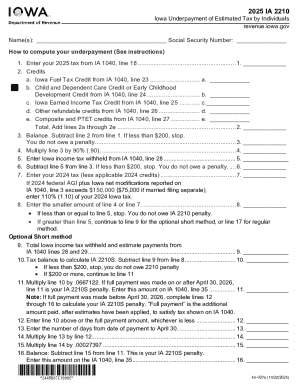
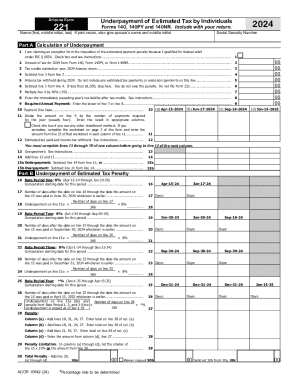
The Form CF-2210 Underpayment of Estimated Tax is a tax document used by Michigan residents to calculate interest and penalties for unpaid or underpaid estimated income tax payments.
pdfFiller scores top ratings on review platforms




Who needs MI CF-2210 - Grand Rapids?
Explore how professionals across industries use pdfFiller.

MI CF-2210 - Grand Rapids is needed by:
-
Michigan taxpayers seeking to address underpayment penalties
-
Individuals who have underpaid their estimated income taxes
-
Tax professionals assisting clients with tax liabilities
-
Accounting firms managing client tax forms
-
Tax planners advising on estimated tax payments
Comprehensive Guide to MI CF-2210 - Grand Rapids
What is Form CF-2210 Underpayment of Estimated Tax?
Form CF-2210 is essential for Michigan taxpayers who need to determine any penalties and interest due for underpaying their estimated income taxes. This form aids in the accurate calculation of tax obligations and ensures compliance with the state's tax regulations.
Positioned within Michigan’s tax framework, Form CF-2210 interacts closely with Form CF-1040, which provides the necessary taxpayer details required for accurate completion. Understanding the purpose of this form allows taxpayers to manage their tax payments effectively.
Purpose and Benefits of Form CF-2210
Utilizing Form CF-2210 can significantly benefit taxpayers by helping them avoid costly tax penalties. It assists in calculating the amount owed for underpaid estimated taxes, which can often lead to waivers for certain circumstances.
Addressing underpayment on time through this form is critical; failing to do so can result in substantial financial penalties and interest charges. Knowing when and how to use the form can mitigate these risks.
Who Needs to Fill Out Form CF-2210?
Form CF-2210 is typically required for various taxpayers in Michigan, particularly those who have underpaid their estimated taxes. Individuals with irregular income, businesses, and self-employed individuals are often in need of this form.
Specific circumstances, such as those influenced by income levels or filing methods, determine who must complete this form. It is important to note that both individuals and businesses can be impacted by underpayment issues, highlighting the form's broad applicability.
Eligibility Criteria for Using Form CF-2210 in Michigan
To qualify for completing Form CF-2210, taxpayers must meet specific criteria set forth by Michigan's tax regulations. This includes individuals and businesses who fall within defined income brackets or filing criteria.
There are exceptions to the rules, and understanding these nuances is vital for proper compliance. Reviewing eligibility before submitting Form CF-2210 ensures that taxpayers do not miss out on potential waivers or relief measures.
How to Fill Out Form CF-2210 Online (Step-by-Step Guide)
Filling out Form CF-2210 online can be achieved easily when following these steps:
-
Access the form on a reliable platform like pdfFiller.
-
Enter the required information, including the taxpayer’s name and Social Security Number (SSN).
-
Complete each section carefully, focusing on the accuracy of tax details derived from Form CF-1040.
Adopting a fillable PDF format minimizes errors and simplifies the process, offering an efficient way to submit taxes without common pitfalls.
Submission Methods for Form CF-2210
Taxpayers can submit Form CF-2210 through various methods that include both electronic and paper options. Understanding the submission process is essential for compliance with deadlines.
Forms can typically be submitted to designated tax offices in Michigan, and it's crucial to keep track of submission receipts for confirmation. Timely filing avoids unnecessary penalties or complications.
Consequences of Not Filing or Late Filing of Form CF-2210
Failing to file or late submission can lead to significant consequences, including penalties and accumulating interest. Such oversights can adversely affect a taxpayer’s financial relationship with the state of Michigan.
Timely action is essential to mitigate these risks and ensure that taxpayers remain compliant with their obligations, ultimately safeguarding their financial standing.
Security and Compliance When Handling Form CF-2210
When handling sensitive documents like Form CF-2210, security is paramount. pdfFiller employs advanced security features, including encryption, to protect taxpayer information from breaches.
Compliance with regulations such as HIPAA and GDPR ensures transparency in handling personal data. Best practices for security should be implemented during both form completion and submission.
Enhancing Your Experience with pdfFiller
pdfFiller offers a variety of features that greatly enhance the experience of filling out Form CF-2210. Users can benefit from tools for editing, eSigning, and accessing templates that simplify the process.
The platform is designed to streamline document management, ensuring users have efficient solutions for their tax-related needs.
Your Next Steps with Form CF-2210
Upon understanding Form CF-2210, gather all required documentation such as income statements and prior tax returns to facilitate the filling process. Downloading the form directly from pdfFiller can streamline this task.
It is vital to review all entries for accuracy before submission to avoid complications or delays in processing.
How to fill out the MI CF-2210 - Grand Rapids
-
1.Access the form CF-2210 on pdfFiller by searching for 'Form CF-2210' or by entering the URL directly in your browser.
-
2.Once the form is opened, review the entire document layout to familiarize yourself with the available fields and sections.
-
3.Gather all necessary information such as your tax details from Form CF-1040, including income, deductions, and previous estimated tax payments before you begin filling out the form.
-
4.Navigate to the first blank field, and enter your information as prompted. Use the tab key to move between fields quickly.
-
5.Fill in your Taxpayer's name, SSN, and any required financial details about your estimated tax payments.
-
6.Utilize pdfFiller's features to calculate interest and penalties based on your entries. Use the calculation lines to ensure accuracy.
-
7.After completing all fields and calculations, take a moment to review the form to ensure all data is correct and complete.
-
8.If you need to make changes, easily click on the fields to edit your submissions until you're satisfied.
-
9.Once finalized, save your filled form using the 'Save' button, or download it directly to your device in your preferred format.
-
10.If required, submit the form according to your tax return filing instructions. You can also maintain a copy for your records.

What are the eligibility requirements for using Form CF-2210?
The Form CF-2210 is intended for Michigan taxpayers who have underpaid their estimated income taxes. You can use it if you failed to pay the required estimated tax payment amounts and want to calculate any applicable penalties and interest.
What deadlines should I be aware of when filing this form?
Filing deadlines for Form CF-2210 align with your state income tax return submission deadlines. Be sure to check Michigan's filing dates, typically by April 15 for most individuals, to avoid penalties.
How can I submit Form CF-2210?
Form CF-2210 must be filed along with your tax return. You can submit it electronically via e-filing if your tax software allows or send a hard copy by mail with your completed tax return.
What supporting documents are required with this form?
You need to include your previous tax return, specifically Form CF-1040, and records of your estimated payments to calculate any penalties accurately when submitting Form CF-2210.
What common mistakes should I avoid while filling out this form?
Ensure all entries are accurate and all relevant fields are completed. A common mistake is failing to calculate penalties correctly, so double-check your calculations and follow the instructions closely.
How long does it take to process Form CF-2210?
Processing times may vary, but filed forms can typically take several weeks for state review. If filed electronically, processing may be quicker than paper submissions.
Are there any fees associated with filing this form?
There usually aren't specific fees for filing Form CF-2210 itself; however, underpayment penalties and interest may apply if tax liabilities remain unpaid. Always check the latest Michigan tax guidelines.
MI CF-2210 - Grand Rapids Form Versions
Related Forms




Get the latest insights from our blog


If you believe that this page should be taken down, please follow our DMCA take down process
here
.
This form may include fields for payment information. Data entered in these fields is not covered by PCI DSS compliance.