
Last updated on
Oct 31, 2026

TN Memphis Zoo Employment Application free printable template
pdfFiller is not affiliated with any government organization

Fill out
Complete the form online in a simple drag-and-drop editor.

eSign
Add your legally binding signature or send the form for signing.

Share
Share the form via a link, letting anyone fill it out from any device.

Export
Download, print, email, or move the form to your cloud storage.
Why pdfFiller is the best tool for your documents and forms


End-to-end document management
From editing and signing to collaboration and tracking, pdfFiller has everything you need to get your documents done quickly and efficiently.
Accessible from anywhere
pdfFiller is fully cloud-based. This means you can edit, sign, and share documents from anywhere using your computer, smartphone, or tablet.
Secure and compliant
pdfFiller lets you securely manage documents following global laws like ESIGN, CCPA, and GDPR. It's also HIPAA and SOC 2 compliant.
What is TN Memphis Zoo Employment Application
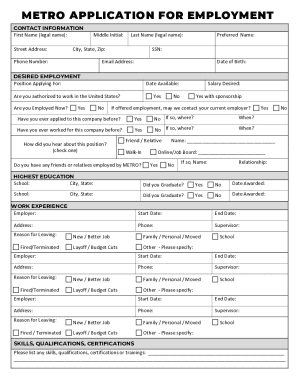
The Memphis Zoo Employment Application is an employment application form used by job applicants to apply for positions at the Memphis Zoological Society.
pdfFiller scores top ratings on review platforms




Who needs TN Memphis Zoo Employment Application?
Explore how professionals across industries use pdfFiller.

TN Memphis Zoo Employment Application is needed by:
-
Individuals seeking employment at the Memphis Zoo
-
Candidates applying for zoological positions
-
Job seekers in the Tennessee employment market
-
People interested in working with animals
-
Individuals looking for part-time or full-time zoo roles
-
Persons needing a formal application for zoo-related jobs
Comprehensive Guide to TN Memphis Zoo Employment Application
What is the Memphis Zoo Employment Application?
The Memphis Zoo Employment Application is a crucial form for individuals seeking employment with the Memphis Zoological Society. This application facilitates job seekers in providing essential information that reflects their qualifications. The primary goal is to streamline the hiring process, ensuring that applicants submit their personal details, educational background, and employment history accurately.
Understanding the importance of this form is vital for candidates. A well-completed application significantly enhances the chances of being considered for available positions at the zoo.
Purpose and Benefits of the Memphis Zoo Employment Application
The Memphis Zoo Employment Application serves as a foundational tool for prospective employees, making it essential for job applicants at the Memphis Zoological Society. By utilizing the application correctly, candidates can present their qualifications in an organized manner, ultimately aiding hiring managers in the evaluation process.
The benefits of using this hiring form include an efficient compilation of required information and a clearer understanding of an applicant’s eligibility, which helps to expedite the recruitment timeline in Tennessee.
Key Features of the Memphis Zoo Employment Application
This application includes several key components that are critical to the evaluation of applicants. Required fields encompass personal information, educational history, and a detailed employment history. Additionally, applicants must provide professional references and disclose any past convictions, which are integral for a thorough background check.
Understanding these features ensures applicants are adequately prepared to fill the application, thus enhancing their candidacy for roles within the zoo.
Who Should Use the Memphis Zoo Employment Application?
The Memphis Zoo Employment Application is designed for potential zoo employees, specifically targeting individuals seeking to work in various roles at the Memphis Zoological Society. Eligibility criteria include certain educational qualifications and the legal capacity to work in Tennessee, ensuring that all applicants meet the standards set forth by the zoo.
This clarity helps potential applicants determine if they are suitable for roles within the organization.
How to Fill Out the Memphis Zoo Employment Application Online (Step-by-Step)
To effectively complete the Memphis Zoo Employment Application online, follow these steps:
-
Access the application form via pdfFiller.
-
Begin by entering your personal information in the designated fields.
-
Provide your educational background, including schools attended and degrees obtained.
-
Detail your employment history, including job titles, employers, and dates of employment.
-
List professional references, ensuring to obtain their consent prior to listing.
-
Disclose any past convictions as required.
-
Review your application thoroughly before submitting.
Common Mistakes to Avoid While Filling Out the Memphis Zoo Employment Application
Filling out the Memphis Zoo Employment Application requires attention to detail. Common errors applicants make include:
-
Leaving required fields blank.
-
Providing inaccurate or outdated information.
-
Failing to disclose necessary information regarding past convictions.
-
Not proofreading the application for typos or grammatical errors.
Ensuring all fields are completed accurately is crucial for a successful application.
How to Sign the Memphis Zoo Employment Application
Signing the Memphis Zoo Employment Application can be done in multiple ways. Applicants can provide a digital signature through pdfFiller or physically sign the printed application. Regardless of the method chosen, providing a signature indicates agreement to the terms and conditions related to employment at the zoo.
Understanding the implications of signing helps candidates ensure compliance with hiring protocols.
Submission Methods for the Memphis Zoo Employment Application
Applicants have several methods for submitting the Memphis Zoo Employment Application, including:
-
Online submission through pdfFiller.
-
In-person delivery at the zoo’s administration office.
-
Mailing the completed application to the specified address.
It is important to be aware of any deadlines relevant to the application process to ensure timely submission.
What Happens After You Submit the Memphis Zoo Employment Application?
Once you submit the Memphis Zoo Employment Application, the follow-up process typically involves a review by the hiring team. Applicants can check the status of their application through specified channels, usually via email or phone. Understanding this process can help manage expectations regarding timelines and potential outcomes, including common reasons for rejection.
Using pdfFiller for the Memphis Zoo Employment Application
pdfFiller is an excellent tool for applicants when completing the Memphis Zoo Employment Application. The platform allows users to edit, fill in, and securely submit PDF forms without needing to download additional software. Features include 256-bit encryption, ensuring the safety of sensitive information, which is essential for compliance with privacy regulations.
The user-friendly interface makes navigating the application process straightforward, empowering candidates to submit their best work.
How to fill out the TN Memphis Zoo Employment Application
-
1.Access the Memphis Zoo Employment Application by visiting pdfFiller and searching for the form name in the search bar.
-
2.Once located, click on the form to open it in the editor, which allows you to fill out fields and navigate through the document easily.
-
3.Before completing the form, gather all necessary personal information including your education history, prior employment details, and references to streamline the process.
-
4.Begin filling out the form by clicking on each field. Ensure that you input your information accurately, paying close attention to required fields indicated by an asterisk.
-
5.If you have past convictions, review the relevant section carefully and provide honest disclosures, as this information is crucial for background checks.
-
6.After completing all sections, make sure to review your entries for any typos or omissions. Use the pdfFiller editing tools to correct any mistakes.
-
7.Finalize your application by signing and dating the designated sections to confirm your agreement to the terms and conditions.
-
8.Once you are satisfied with your application, proceed to save your form. You can choose to download the completed application as a PDF or submit directly through the platform.

What are the eligibility requirements for the Memphis Zoo Employment Application?
To apply for a position at the Memphis Zoo, applicants typically need to meet age requirements, have relevant experience or education, and provide accurate personal and employment history as requested in the application.
Is there a deadline for submitting the Memphis Zoo Employment Application?
While specific deadlines may vary by position, it’s advisable to submit your application as soon as possible. Positions may be filled quickly, so early applications are encouraged.
How can I submit my completed Memphis Zoo Employment Application?
You can submit your application directly through pdfFiller by using the 'Submit' button or by downloading it and sending it via email to the designated contact for the Memphis Zoological Society.
What supporting documents are required with the employment application?
Generally, applicants should attach a resume, cover letter, and any relevant certifications or references as part of the supporting documents when submitting the application.
What are common mistakes to avoid when filling out this application?
Avoid leaving required fields blank, misspelling names or contacts, and neglecting to sign the application. Double-check all information for accuracy before submission.
How long does it take to process the Memphis Zoo Employment Application?
Processing times can vary, but applicants typically receive a response within a few weeks. Candidates are encouraged to follow up if they have not heard back after that period.
Can I update my application after submission?
Once submitted, any updates to your application may need direct communication with the hiring department. It’s best to reach out to clarify if changes are possible.
Related Content
Related Forms

Related Catalogs
Get the latest insights from our blog


If you believe that this page should be taken down, please follow our DMCA take down process
here
.
This form may include fields for payment information. Data entered in these fields is not covered by PCI DSS compliance.