
Last updated on
Oct 2, 2026
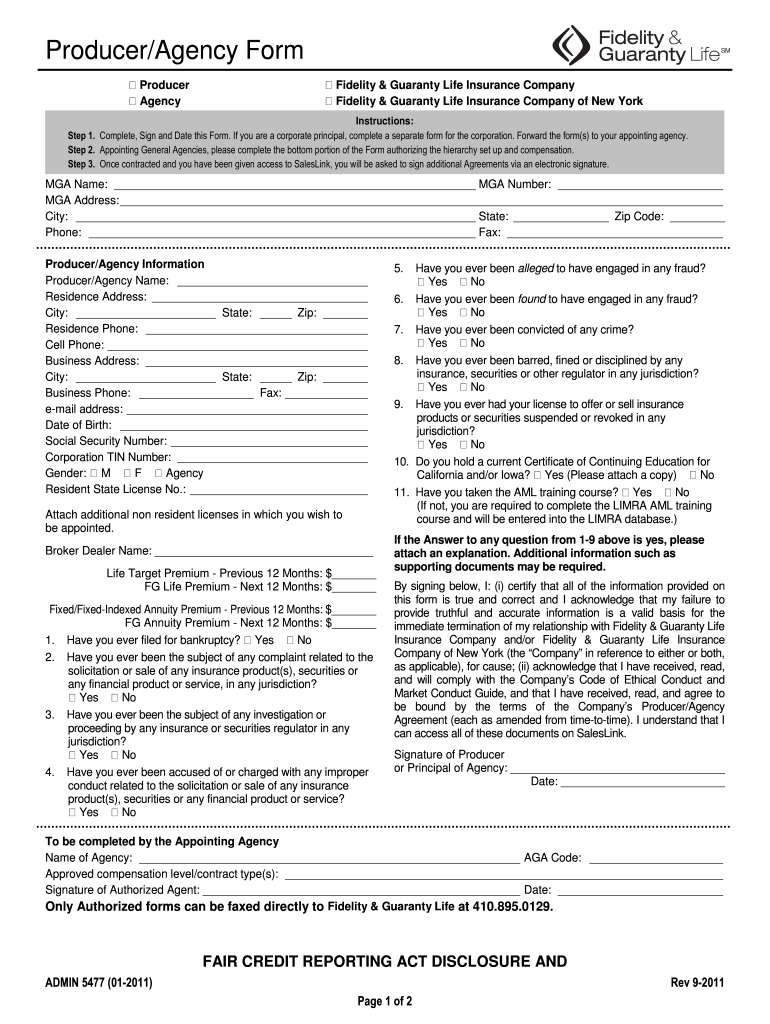
Fidelity & Guaranty Life ADMIN 5477 2011-2026 free printable template
pdfFiller is not affiliated with any government organization

Fill out
Complete the form online in a simple drag-and-drop editor.

eSign
Add your legally binding signature or send the form for signing.

Share
Share the form via a link, letting anyone fill it out from any device.

Export
Download, print, email, or move the form to your cloud storage.
Why pdfFiller is the best tool for your documents and forms


End-to-end document management
From editing and signing to collaboration and tracking, pdfFiller has everything you need to get your documents done quickly and efficiently.
Accessible from anywhere
pdfFiller is fully cloud-based. This means you can edit, sign, and share documents from anywhere using your computer, smartphone, or tablet.
Secure and compliant
pdfFiller lets you securely manage documents following global laws like ESIGN, CCPA, and GDPR. It's also HIPAA and SOC 2 compliant.
What is Fidelity & Guaranty Life ADMIN 5477
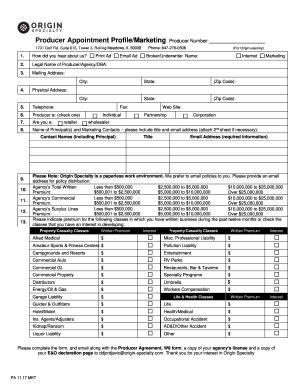
The Producer/Agency Form is a business document used by insurance producers and agencies to apply for appointment with Fidelity & Guaranty Life Insurance Company.
pdfFiller scores top ratings on review platforms




Who needs Fidelity & Guaranty Life ADMIN 5477?
Explore how professionals across industries use pdfFiller.

Fidelity & Guaranty Life ADMIN 5477 is needed by:
-
Insurance producers seeking agency appointment
-
Principals of agencies submitting applications
-
Authorized agents completing insurance forms
-
Individuals applying for a New York insurance license
-
Businesses needing to register as insurance producers
-
Agencies looking for contracts with insurance companies
Comprehensive Guide to Fidelity & Guaranty Life ADMIN 5477
Overview of the Producer/Agency Form
The Producer/Agency Form is essential for insurance producers and agencies that seek to establish an appointment with Fidelity & Guaranty Life Insurance. This form serves as a vital component in the insurance industry, particularly in streamlining the application process for those aiming to obtain an insurance producer license. It encompasses a range of personal and business information crucial for evaluating applicants.
-
The form includes definitions pertaining to both producers and agencies.
-
It highlights why this form is a core requirement for seeking appointments with Fidelity & Guaranty Life Insurance.
-
Users can expect to provide personal information as well as details about their business operations.
Why Use the Producer/Agency Form?
Utilizing the Producer/Agency Form offers a variety of advantages over traditional manual methods. One of the key benefits is its ability to streamline the application process, making it simpler and more efficient for acquiring an insurance producer license.
-
The form ensures that all submissions meet the necessary legal and regulatory compliance standards.
-
Another notable benefit is the significant reduction in processing time due to the capabilities of digital submissions.
Eligibility Requirements for the Producer/Agency Form
Understanding the eligibility criteria for filing the Producer/Agency Form is crucial for potential applicants. The roles that can file this form include Producers, Principals of Agencies, and Authorized Agents, each with its specific requirements.
-
Producers must provide necessary signatures and information for their application.
-
Principals of Agencies should ensure that their credentials and signatures are included.
-
Authorized Agents need to complete the form per the provided guidelines.
Additionally, New York has specific conditions regarding applications that must be adhered to in order to ensure proper registration.
Step-by-Step Guide: How to Fill Out the Producer/Agency Form Online
Filling out the Producer/Agency Form online involves several detailed steps to ensure all required information is accurately provided. Start by gathering the necessary details such as addresses and phone numbers before initiating the form completion process.
-
Access the online form and begin filling out your personal and business information.
-
Use electronic signatures as directed within the application system.
-
Pay careful attention to accuracy, particularly in the legal and professional history sections.
Common Mistakes and How to Avoid Them
While completing the Producer/Agency Form, applicants may encounter common pitfalls that can result in delays or rejections. Awareness of these mistakes is essential for a successful submission.
-
Common errors include missing signatures or providing incorrect information.
-
It is advisable to create a review and validation checklist to ensure all entries are complete and accurate.
-
Applicants should familiarize themselves with legal requirements to prevent potential rejections of their applications.
Submission Process for the Producer/Agency Form
The submission process for the Producer/Agency Form offers several options, allowing applicants to choose the method most convenient for them. Submitters can utilize either an online platform, like SalesLink, or mail their completed forms.
-
Be aware of any associated fees that may apply during the submission process.
-
Processing times may vary, so understanding the timeline is vital.
-
Make sure to track the status of your application post-submission for timely follow-up.
What Happens After Submission?
After the submission of the Producer/Agency Form, applicants can expect various potential outcomes. Being aware of these outcomes can help reduce anxiety during the waiting period.
-
Possible results include approval from Fidelity & Guaranty Life Insurance or requests for additional information.
-
If corrections are needed, applicants should follow the designated process for amending their form.
-
Communication from Fidelity & Guaranty Life Insurance will outline next steps or additional requirements.
Security and Compliance with the Producer/Agency Form
When dealing with personal information on the Producer/Agency Form, security and compliance are paramount. Applicants can be assured that their sensitive data is well-protected throughout the application process.
-
pdfFiller employs 256-bit encryption and adheres to GDPR compliance standards.
-
It's crucial to safeguard sensitive information during submission to comply with data protection policies.
-
Potential disclosures about data protection help clarify how information will be used and protected.
Utilizing pdfFiller for Your Producer/Agency Form Needs
pdfFiller enhances the overall experience of completing the Producer/Agency Form by offering a range of user-friendly features. Leveraging pdfFiller's tools can significantly simplify the process for applicants.
-
Benefits include the ability to edit, electronically sign, and securely store your completed forms.
-
Users are encouraged to take advantage of the platform for a seamless experience in form filling.
-
Testimonials from users highlight the ease of use and efficiency that pdfFiller offers.
How to fill out the Fidelity & Guaranty Life ADMIN 5477
-
1.Start by accessing pdfFiller and searching for the Producer/Agency Form in the template library.
-
2.Once you locate the form, click on it to open it in the pdfFiller interface.
-
3.Before filling the form, gather all necessary information such as personal and business details, addresses, phone numbers, and legal history.
-
4.Begin completing the form by clicking on each fillable field. Use your keyboard to enter your responses.
-
5.If there are checkboxes, click on them to mark applicable options.
-
6.Pay attention to specific instructions provided in the form, such as where to sign and date.
-
7.After filling in all necessary information, review the form carefully to ensure accuracy and completeness.
-
8.Finalize the form by checking all the fields have been filled out and signatures added.
-
9.Once satisfied, you can save the completed form on pdfFiller by clicking the save option.
-
10.You can also download or print the form by selecting the respective options available.
-
11.If required, submit the form electronically via SalesLink or follow your agency's submission process.

Who needs to sign the Producer/Agency Form?
The form must be signed by the producer, the principal of the agency, and an authorized agent to ensure that all parties are in agreement with the application.
Are there any specific documents required for submission?
Typically, you will need to provide detailed personal business information. Additional agreements may also be needed electronically via SalesLink.
What if I do not have all the requested information?
It is important to gather all necessary information before starting the form. Incomplete forms may cause delays in processing.
How do I submit the completed form?
After filling out the form, it can be electronically submitted via SalesLink or based on the instructions provided by your agency.
Is notarization required for this form?
No, the Producer/Agency Form does not require notarization. However, ensure all required signatures are present.
What are the processing times for the form?
Processing times may vary, but it usually takes several business days. Check with the appointing agency for specific timelines.
What should I do if I make a mistake on the form?
If you find errors after submission, contact the appointing agency as soon as possible for guidance on how to correct or amend the form.
Related Content
Related Forms






Get the latest insights from our blog


If you believe that this page should be taken down, please follow our DMCA take down process
here
.
This form may include fields for payment information. Data entered in these fields is not covered by PCI DSS compliance.