
Last updated on
Oct 2, 2026

Marshall University Employee Information Change Form 2010 free printable template
pdfFiller is not affiliated with any government organization

Fill out
Complete the form online in a simple drag-and-drop editor.

eSign
Add your legally binding signature or send the form for signing.

Share
Share the form via a link, letting anyone fill it out from any device.

Export
Download, print, email, or move the form to your cloud storage.
Why pdfFiller is the best tool for your documents and forms


End-to-end document management
From editing and signing to collaboration and tracking, pdfFiller has everything you need to get your documents done quickly and efficiently.
Accessible from anywhere
pdfFiller is fully cloud-based. This means you can edit, sign, and share documents from anywhere using your computer, smartphone, or tablet.
Secure and compliant
pdfFiller lets you securely manage documents following global laws like ESIGN, CCPA, and GDPR. It's also HIPAA and SOC 2 compliant.
What is Marshall University Employee Information Change Form
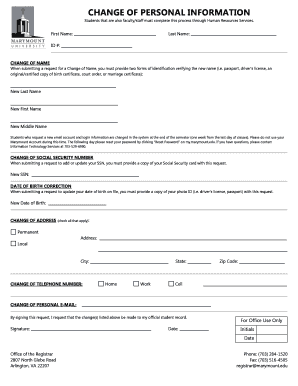
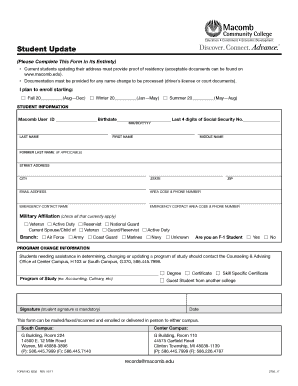
The Marshall University Name Social Security Number Address Change Form is an official document used by students to update personal information such as name, social security number, and address.
pdfFiller scores top ratings on review platforms




Who needs Marshall University Employee Information Change Form?
Explore how professionals across industries use pdfFiller.

Marshall University Employee Information Change Form is needed by:
-
Current students at Marshall University
-
Employees of Marshall University
-
Vendors associated with Marshall University
-
Individuals needing to update social security information
-
Anyone requiring a change of address within the university
-
New applicants for enrollment who need personal information corrections
Comprehensive Guide to Marshall University Employee Information Change Form
What is the Marshall University Name Social Security Number Address Change Form?
The Marshall University Name Social Security Number Address Change Form is an essential document that facilitates the update of personal information for students, employees, and vendors. This form is intended for those needing to change their name, social security number, or address within university records, ensuring that the information is accurate and current.
It serves a critical role for the university, as accurate personal information contributes to maintaining proper records and administrative processes. Keeping your details updated is vital, not only for compliance but also for enhancing communication and service delivery within the university.
Purpose and Benefits of the Marshall University Name Social Security Number Address Change Form
The primary purpose of the Marshall University Name Social Security Number Address Change Form is to ensure that all necessary changes in personal details are captured timely. By accurately updating their name, social security number, and address, users reap multiple benefits, including streamlined access to university services.
This form significantly aids in maintaining updated records for the university, which is crucial for processing applications, registration, and identity verification. Students can also expect fewer administrative hurdles, thereby reinforcing their identity within university systems.
Who Needs the Marshall University Name Social Security Number Address Change Form?
This form is designed for a variety of users, primarily including current students, former students, and university employees. Specific situations warrant the use of this form, such as:
-
Legal name changes due to marriage or divorce
-
Relocations requiring an address update
-
Changes necessary for updated social security information
Understanding the importance of timely updates is crucial for students and staff alike, as delays may affect access to campus services and important communications.
How to Fill Out the Marshall University Name Social Security Number Address Change Form Online (Step-by-Step)
To fill out the Marshall University Name Social Security Number Address Change Form efficiently, follow these steps:
-
Access the form through pdfFiller or your university portal.
-
Complete all required fields, including your name, social security number, and address.
-
Ensure that all information is accurate and double-check for completeness.
-
Save the filled form as a PDF and prepare it for submission.
Utilizing tools like pdfFiller makes it easier to manage your form and ensures that your updates are processed correctly.
Required Documents and Supporting Materials for the Marshall University Name Social Security Number Address Change Form
When submitting the Marshall University Name Social Security Number Address Change Form, it is essential to include the necessary supporting documents. The following items are typically required:
-
Social security card if changing your name or social security number
-
Proof of residence for address changes
-
Legal documentation for any name changes
Ensuring that all required documents are attached is critical, as incomplete submissions may lead to delays or rejection of your request.
Submission Methods and Delivery for the Marshall University Name Social Security Number Address Change Form
Once you have completed the form, there are several submission methods available. You can:
-
Submit the form online through pdfFiller
-
Deliver the form in-person to the appropriate university office
-
Mail the completed form to the designated department for your role
Be aware of the specific university office relevant to your situation to ensure proper handling of your submission. Processing times may vary, so it’s advisable to check for confirmation after submission.
What Happens After You Submit the Marshall University Name Social Security Number Address Change Form?
After submitting the form, it will undergo a review process where university officials will verify the information provided. Users can check the status of their submission by contacting the relevant office.
If corrections or updates need to be made after submission, it is important to act promptly to avoid further complications. Familiarize yourself with common rejection reasons to ensure a smooth process.
Security and Compliance for the Marshall University Name Social Security Number Address Change Form
Users can be assured of robust security measures in place when handling sensitive information through the form. Data protection protocols are implemented while using pdfFiller, ensuring compliance with regulations such as HIPAA and GDPR.
Protecting your personal data during updates is a priority, and the university is committed to ensuring that your information remains secure throughout the process.
Experience the Ease of Filling Out Forms with pdfFiller
Utilizing pdfFiller offers numerous advantages for completing and managing the Marshall University Name Social Security Number Address Change Form. Users can take advantage of features such as editing, eSigning, and seamlessly sharing their forms.
The cloud-based access provided by pdfFiller means users can update their information from anywhere, enhancing the overall experience. Users have praised the platform for its effectiveness in simplifying form management.
How to fill out the Marshall University Employee Information Change Form
-
1.Access the Marshall University Name Social Security Number Address Change Form on pdfFiller by visiting the website and searching for the form.
-
2.Open the form on pdfFiller by clicking on the relevant link in the search results.
-
3.Once opened, identify the sections that require your personal information.
-
4.Before starting, gather necessary information such as your previous name, new name, social security number, and new address.
-
5.Use pdfFiller’s interface to easily fill in the fields. Click on each blank space and type in your information or select the appropriate checkboxes.
-
6.As you fill out the form, ensure you accurately input your previous and new details, paying special attention to the requirement of including a copy of your Social Security card for name or SSN changes.
-
7.Review all filled-in fields carefully to confirm that all information is correct and complete.
-
8.Once satisfied, save your progress within pdfFiller to avoid losing any data.
-
9.You can download a copy of your completed form or submit it directly via pdfFiller, adhering to the submission process outlined based on your role.
-
10.Ensure that you follow up to confirm the form has been received by the appropriate office after submission.

Who is eligible to use the Marshall University Name Social Security Number Address Change Form?
Current students, employees, and vendors associated with Marshall University are eligible to use this form for updating personal information.
What supporting documents do I need when submitting this form?
You will need to provide a copy of your Social Security card to support any requests for changes to your name or social security number.
How do I submit the Marshall University Name Social Security Number Address Change Form?
You can submit the form either online through pdfFiller or by printing it and sending it to the appropriate university office based on your role.
Are there any deadlines for submitting this form?
While specific deadlines may vary, it is advisable to submit the form as soon as the need arises to ensure timely updates to your information.
What common mistakes should I avoid when completing this form?
Common mistakes include leaving fields blank, submitting without required attachments, and forgetting to sign the form. Always double-check your information before submission.
How long does it take to process this form once submitted?
Processing times can vary, but it usually takes a few weeks. Always follow up with the appropriate office if you haven’t received confirmation after submission.
Can I make changes to the form after I submit it?
Once submitted, changes typically cannot be made. If you need to amend your submission, contact the relevant office for guidance on how to proceed.
Marshall University Employee Information Change Form Form Versions
Related Content
Related Forms





Related Catalogs
Get the latest insights from our blog


If you believe that this page should be taken down, please follow our DMCA take down process
here
.
This form may include fields for payment information. Data entered in these fields is not covered by PCI DSS compliance.