
Last updated on
Nov 10, 2026

ND Girl Scouts Event Registration Form 2012-2026 free printable template
pdfFiller is not affiliated with any government organization

Fill out
Complete the form online in a simple drag-and-drop editor.

eSign
Add your legally binding signature or send the form for signing.

Share
Share the form via a link, letting anyone fill it out from any device.

Export
Download, print, email, or move the form to your cloud storage.
Why pdfFiller is the best tool for your documents and forms


End-to-end document management
From editing and signing to collaboration and tracking, pdfFiller has everything you need to get your documents done quickly and efficiently.
Accessible from anywhere
pdfFiller is fully cloud-based. This means you can edit, sign, and share documents from anywhere using your computer, smartphone, or tablet.
Secure and compliant
pdfFiller lets you securely manage documents following global laws like ESIGN, CCPA, and GDPR. It's also HIPAA and SOC 2 compliant.
What is ND Girl Scouts Event Registration Form
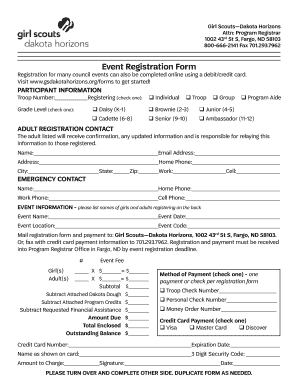
The Girl Scouts Event Registration Form is a personal document used by individuals or groups to register for Girl Scout events in North Dakota.
pdfFiller scores top ratings on review platforms




Who needs ND Girl Scouts Event Registration Form?
Explore how professionals across industries use pdfFiller.

ND Girl Scouts Event Registration Form is needed by:
-
Parents of Girl Scouts seeking to register their children for events.
-
Troop leaders organizing group participation in events.
-
Community members interested in supporting Girl Scout activities.
-
Event registrars managing event participation for troops.
-
Volunteers involved in Girl Scout events.
Comprehensive Guide to ND Girl Scouts Event Registration Form
What is the Girl Scouts Event Registration Form?
The Girl Scouts Event Registration Form is a crucial document designed for individuals, troops, or groups to register for various Girl Scout events. It serves a specific purpose by collecting necessary details such as troop number, grade level, and event information. The timely submission of this form is essential to ensure participation in desired events, as missing the deadline may jeopardize registration opportunities.
This form primarily targets individuals involved in Girl Scout activities and helps streamline the event registration process, making it efficient and organized.
Purpose and Benefits of the Girl Scouts Event Registration Form
The Girl Scouts Event Registration Form facilitates effective event coordination by enabling event organizers to collect all necessary information from participants. One major benefit of using this form is that it enhances data management through platforms like pdfFiller, which allows users to fill out and manage forms effortlessly.
Accurate data submission is vital for the success of events, as it ensures that all participants are accounted for, contributing to a smooth and enjoyable event experience.
Key Features of the Girl Scouts Event Registration Form
This form includes essential fillable fields, such as troop number, grade level, and specific event details, which users must complete. Safety and security are prioritized during the submission process, ensuring that personal information remains protected.
Additionally, the convenience of electronic signatures and online submission enhances the overall user experience, allowing for quick and efficient processing of registrations.
Who Needs the Girl Scouts Event Registration Form?
The primary users of the Girl Scouts Event Registration Form are individuals in certain roles, including Adult Registration Contacts and Credit Card Holders, both of whom are required to sign the form. Each role plays a distinct part in ensuring eligible participants are properly registered for events.
Understanding these specific roles is crucial to maintaining compliance with registration requirements, thereby ensuring successful event participation.
How to Fill Out the Girl Scouts Event Registration Form Online (Step-by-Step)
-
Access pdfFiller and locate the Girl Scouts Event Registration Form.
-
Follow the on-screen instructions to fill out each section of the form.
-
Review the entered data carefully to ensure accuracy.
-
Submit the completed form online or follow the provided mailing instructions.
Submission Methods and Delivery for the Girl Scouts Event Registration Form
There are multiple options for submitting the Girl Scouts Event Registration Form. Participants can choose to submit the form online through pdfFiller or mail it to the designated address in Fargo, ND. It's essential to include all required documents and payment details with the submission.
Users should pay close attention to deadlines to guarantee their registration is processed correctly and on time.
What Happens After You Submit the Girl Scouts Event Registration Form?
Upon submitting the Girl Scouts Event Registration Form, users will receive a confirmation regarding their registration status. This confirmation helps track submissions and facilitates follow-up if necessary.
Be aware of common reasons for submission delays, such as missing information or paperwork, and take appropriate steps to address these issues promptly.
Security and Compliance for the Girl Scouts Event Registration Form
Utilizing pdfFiller for the Girl Scouts Event Registration Form encompasses robust security measures that ensure data protection and regulatory compliance. Sensitive information submitted through this platform is safeguarded by advanced encryption techniques.
Users can trust that their data remains safe throughout the registration process, allowing for a worry-free experience when handling personal details.
Sample of a Completed Girl Scouts Event Registration Form
A sample of a filled-out Girl Scouts Event Registration Form provides helpful guidance for users looking to complete their own forms accurately. Each section of the sample is explained in detail, showcasing how to properly include all necessary information.
Referring to this sample can help ensure correct completion of similar forms to avoid errors that may affect event registration.
Enhance Your Girl Scouts Event Registration Experience with pdfFiller
pdfFiller offers a valuable solution for managing the Girl Scouts Event Registration Form efficiently. By leveraging the platform's features, users can streamline the form-filling process, making it much easier.
Utilizing pdfFiller provides various advantages, including electronic signing, secure storage, and the ability to edit forms as needed, ultimately enhancing the user experience throughout the registration process.
How to fill out the ND Girl Scouts Event Registration Form
-
1.Access the Girl Scouts Event Registration Form by navigating to the pdfFiller website and entering the form's name in the search bar to locate it.
-
2.Once located, click on the form to open it in pdfFiller’s editor interface.
-
3.Gather necessary information before starting, such as the troop number, participant grade level, and event details to ensure prompt completion.
-
4.Fill in the required fields including 'Name', 'E-mail Address', 'Address', and 'Phone' directly using the fillable fields provided in the form.
-
5.Use the checkboxes where applicable to select options based on the event requirements.
-
6.Follow any additional instructions, such as including payment information if required for the event.
-
7.Review all entries to ensure accuracy, checking each filled field against your gathered information for completeness.
-
8.Finalize your form by clicking the save option once you have filled in all necessary fields.
-
9.You can download the form as a PDF or submit it directly through pdfFiller, if that feature is available.
-
10.If submitting, follow the prompts to ensure successful submission to the Event Registrar in Fargo, ND.

Who is eligible to submit the Girl Scouts Event Registration Form?
Any parent or guardian of a Girl Scout, troop leader, or community member can submit the form to register for events, provided they have the required information about the participant and the event.
What is the deadline for submitting the registration form?
The registration form must be submitted by the specified event registration deadline, which is typically outlined in the event announcement or flyer. Ensure to check those details.
How should I submit the completed event registration form?
You can submit the completed form by mailing it to the Event Registrar in Fargo, ND. Alternatively, if using pdfFiller, you may have the option to submit digitally.
Are there any fees associated with registering for events through this form?
Certain events may require a registration fee. Be sure to include payment information if needed and check specific event details for any fees listed.
What supporting documents are needed to register?
Typically, no supporting documents are required beyond the completed registration form. However, any specific event requirements will usually be noted in the event details.
What are some common mistakes to avoid when completing this form?
Common mistakes include leaving fields blank, providing incorrect payment information, or missing the event submission deadline. Always double-check your entries before submitting.
How long does it take to process the registration after submission?
Processing times can vary depending on the event and the registrar's workload. It's best to confirm details with the Event Registrar if you have time-sensitive questions.
Related Content
Related Forms



Related Catalogs
Get the latest insights from our blog


If you believe that this page should be taken down, please follow our DMCA take down process
here
.
This form may include fields for payment information. Data entered in these fields is not covered by PCI DSS compliance.