
Last updated on
Nov 9, 2026
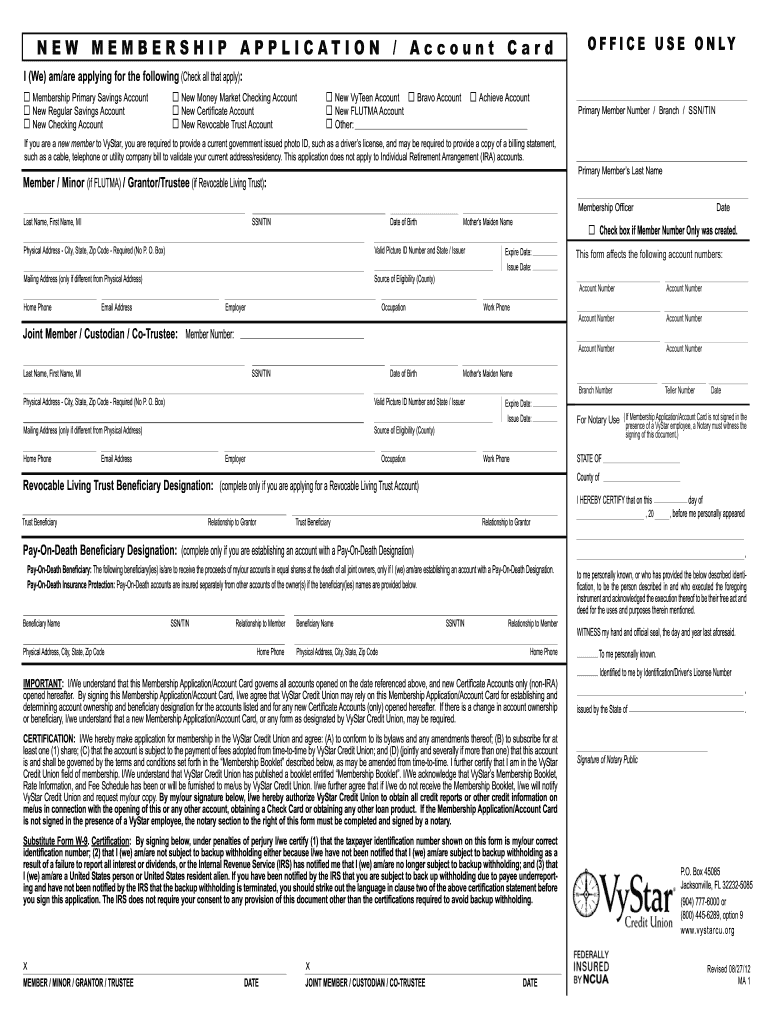
VyStar Credit Union New Membership Application/Account Card 2012 free printable template
pdfFiller is not affiliated with any government organization

Fill out
Complete the form online in a simple drag-and-drop editor.

eSign
Add your legally binding signature or send the form for signing.

Share
Share the form via a link, letting anyone fill it out from any device.

Export
Download, print, email, or move the form to your cloud storage.
Why pdfFiller is the best tool for your documents and forms


End-to-end document management
From editing and signing to collaboration and tracking, pdfFiller has everything you need to get your documents done quickly and efficiently.
Accessible from anywhere
pdfFiller is fully cloud-based. This means you can edit, sign, and share documents from anywhere using your computer, smartphone, or tablet.
Secure and compliant
pdfFiller lets you securely manage documents following global laws like ESIGN, CCPA, and GDPR. It's also HIPAA and SOC 2 compliant.
What is VyStar Credit Union New Membership Application/Account Card
The VyStar Credit Union Membership Application is a business document used by individuals or entities to apply for various financial accounts with VyStar Credit Union.
pdfFiller scores top ratings on review platforms




Who needs VyStar Credit Union New Membership Application/Account Card?
Explore how professionals across industries use pdfFiller.

VyStar Credit Union New Membership Application/Account Card is needed by:
-
Individuals seeking a new savings or checking account
-
Joint members or custodians looking to open an account
-
Notary public verifying signatures for the application
-
Beneficiaries needing account designation on forms
-
Anyone in Florida applying for a credit union membership
Comprehensive Guide to VyStar Credit Union New Membership Application/Account Card
What is the VyStar Credit Union Membership Application?
The VyStar Credit Union Membership Application serves as a formal request to establish membership with VyStar, a leading Florida credit union. This application enables individuals to open various types of accounts, including Primary Savings, Checking, and Certificate Accounts. Accuracy in filling out the application is crucial, as it ensures the efficient processing of your membership request.
Benefits of Joining VyStar Credit Union
Joining VyStar Credit Union offers numerous advantages. Members enjoy competitive rates, personalized member services, and a commitment to community engagement. With a range of savings, loans, and other financial products, members can maximize their financial potential. By investing in a VyStar membership, individuals can potentially see significant returns on their financial decisions.
Key Features of the VyStar Membership Application
The VyStar Membership Application includes several key sections designed to collect important information. These sections cover personal information, account options, and details related to beneficiary designations. It's important to note notarization requirements, as well as to understand how to utilize fillable fields and checkboxes within the form.
Who Should Apply for the VyStar Credit Union Membership Application?
The application is ideal for individuals and families seeking reliable financial services in Florida. People transitioning to new residency, first-time bank account holders, or those looking for community-focused banking solutions will find value in joining VyStar Credit Union.
Eligibility Criteria for the VyStar Membership Application
To apply for membership, applicants must provide essential personal information, including their Social Security Number (SSN) or Tax Identification Number (TIN), date of birth, and address. Furthermore, specific age and residency requirements must also be met, as well as appropriate identification for verification.
How to Fill Out the VyStar Credit Union Membership Application Online
Filling out the VyStar Membership Application online involves several steps:
-
Begin by entering your personal information, ensuring it matches your identification.
-
Select the account options you wish to pursue from the provided choices.
-
Complete the beneficiary designation section if applicable.
-
Carefully review each section to avoid common mistakes in personal data.
-
Utilize visual aids available on the website for specific fields.
Signing and Notarizing the VyStar Membership Application
Once completed, applicants can sign the form digitally or with a wet signature. In cases where notarization is required, applicants should seek a certified notary public to validate their signature, ensuring compliance with VyStar’s application processing rules.
Submission Process for VyStar Credit Union Membership Application
Submitting the VyStar Membership Application can be done through various channels:
-
Online submission via the VyStar website.
-
In-person submission at a local VyStar branch.
-
Mailing the completed form as instructed.
After submission, it is advisable to track the application status and be aware of common rejection reasons to proactively address any potential issues.
Utilizing pdfFiller for Your VyStar Credit Union Membership Application
pdfFiller streamlines the form-filling process for the VyStar Membership Application. With features that allow editing, eSigning, and secure document handling, pdfFiller ensures a seamless user experience. Its advanced security measures protect sensitive information while you complete your application.
Next Steps After Applying for Your VyStar Membership
After applying, applicants can expect a specific processing time during which their application will be reviewed. Understanding how to correct or amend the application is important if issues arise. Additionally, information on renewals or potential resubmission processes will be provided by VyStar to assist members.
How to fill out the VyStar Credit Union New Membership Application/Account Card
-
1.Access the VyStar Credit Union Membership Application by navigating to pdfFiller and searching for the form title in the search bar.
-
2.Open the form in pdfFiller’s editor. Familiarize yourself with the layout, including the sections and fillable fields available.
-
3.Gather necessary information before you begin filling out the form. This includes your personal identification details such as name, SSN/TIN, date of birth, and address.
-
4.Fill out the fields as prompted. Enter your last name, SSN/TIN, and physical address in the appropriate sections. Use checkboxes to indicate the types of accounts you wish to open.
-
5.If you are applying as a joint member or custodian, provide the required details for the additional parties involved.
-
6.Review your filled-in details carefully to ensure accuracy. Ensure all signatures required by the applicant and notary are included.
-
7.Finalize the form by checking off any additional boxes related to beneficiary designations or tax information, if applicable.
-
8.Once completed, save the document by clicking the save icon or download it to your device to keep a copy.
-
9.If you need to submit the form, follow the specific submission instructions provided by VyStar Credit Union, which may involve mailing or delivering the application in person.

Who is eligible to apply for membership using this form?
Eligibility to apply for membership with VyStar Credit Union typically includes individuals residing in Florida and those who meet any specified association or employment criteria. Ensure you check VyStar's official guidelines for complete requirements.
What supporting documents are required for the application?
You will need to provide personal identification documents such as a government-issued ID, proof of residency, and your Social Security Number or Tax Identification Number when submitting the application.
Can I submit the VyStar Credit Union Membership Application online?
The submission method for the VyStar application may vary. If online submission isn’t specified, you’d typically print, sign, and mail the completed form or deliver it in person to a VyStar branch.
What common mistakes should I avoid when filling out this form?
Ensure all fields are filled out accurately, especially your SSN and address. Double-check for missing signatures, and don’t forget to have the notary public review and sign if required.
How long does it take to process the membership application?
Processing times may vary, but typically you can expect a response within a few business days after the application is received. Check with VyStar Credit Union for any specific time frames.
Is notarization required for this application?
Yes, if the application is not signed in the presence of a VyStar employee, notarization is required to validate the signatures provided.
What types of accounts can I apply for with this form?
This form allows you to apply for various types of accounts, including Primary Savings, Checking, and Certificate Accounts with VyStar Credit Union.
VyStar Credit Union New Membership Application/Account Card Form Versions
Related Content
Related Forms



Related Catalogs
Get the latest insights from our blog


If you believe that this page should be taken down, please follow our DMCA take down process
here
.
This form may include fields for payment information. Data entered in these fields is not covered by PCI DSS compliance.