
Last updated on
Oct 31, 2026

IRS Instruction 8863 2023 free printable template
pdfFiller is not affiliated with IRS

Fill out
Complete the form online in a simple drag-and-drop editor.

eSign
Add your legally binding signature or send the form for signing.

Share
Share the form via a link, letting anyone fill it out from any device.

Export
Download, print, email, or move the form to your cloud storage.
Why pdfFiller is the best tool for your documents and forms


End-to-end document management
From editing and signing to collaboration and tracking, pdfFiller has everything you need to get your documents done quickly and efficiently.
Accessible from anywhere
pdfFiller is fully cloud-based. This means you can edit, sign, and share documents from anywhere using your computer, smartphone, or tablet.
Secure and compliant
pdfFiller lets you securely manage documents following global laws like ESIGN, CCPA, and GDPR. It's also HIPAA and SOC 2 compliant.
What is IRS Instruction 8863
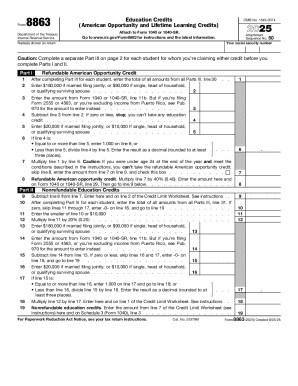
Form 8863 is a tax form used by U.S. taxpayers to claim the American Opportunity and Lifetime Learning Credits for education-related expenses.
pdfFiller scores top ratings on review platforms




Who needs IRS Instruction 8863?
Explore how professionals across industries use pdfFiller.

IRS Instruction 8863 is needed by:
-
U.S. taxpayers claiming education credits
-
Students eligible for the American Opportunity Credit
-
Individuals enrolled in post-secondary education
-
Parents claiming education credits for dependents
-
Tax preparers assisting clients with education deductions
-
Financial aid administrators verifying tax credits
-
Education institutions providing authorization information
Comprehensive Guide to IRS Instruction 8863
What is Form 8?
Form 8863, often referred to as Form 8, is an IRS tax form utilized to claim education tax credits, specifically the American Opportunity and Lifetime Learning Credits. This form allows eligible students and their families to reduce their tax liability by providing information on qualified educational expenses. Form 8863 is submitted alongside Form 1040 or 1040-SR, ensuring that taxpayers can leverage available educational benefits when filing their federal taxes.
Purpose and Benefits of Form 8
The primary purpose of Form 8863 is to help taxpayers claim significant financial benefits associated with education credits, such as the American Opportunity Credit and the Lifetime Learning Credit. These credits can lead to substantial tax savings, making higher education more affordable for families. By claiming these credits, students may also access additional financial aid and resources, providing crucial support during their educational journey.
Who Needs to Use Form 8?
This form is essential for students pursuing higher education, as well as their parents, who may be eligible to claim the education tax credits. To qualify for Form 8863, individuals must meet specific eligibility criteria outlined by the IRS. Non-traditional students or those attending certain educational institutions may have additional requirements to consider when filing.
Eligibility Criteria for Form 8
To qualify for the education tax credits available through Form 8863, taxpayers must meet comprehensive eligibility criteria. These include factors like income limitations, enrollment in eligible educational programs, and specific credit requirements. It is also important to be aware of any exceptions or special conditions that may affect qualification, such as part-time enrollment or attending certain institutions.
How to Fill Out Form 8 Online (Step-by-Step)
Filling out Form 8863 online is a straightforward process that typically involves several key steps. Users should:
-
Start by entering student information, including names and social security numbers.
-
Provide details regarding qualified expenses, such as tuition and fees.
-
Calculate the eligible credits based on the information provided.
Examples and hypothetical scenarios can further assist in understanding the filling process, ensuring accuracy and completeness.
Field-by-Field Instructions for Form 8
Each field on Form 8863 requires careful attention to detail. Here is a breakdown of essential fields:
-
The "Name(s) shown on return" field must match IRS records for smooth processing.
-
Submit a separate Part III for each student to whom credits apply.
-
Double-check calculations for any common errors, such as incorrect totals or mismatched data.
Being meticulous while filling out these fields can prevent processing delays and increase the likelihood of receiving the desired education credits.
How to Sign and Submit Form 8
Submitting Form 8863 involves specific signature requirements, which may vary based on submission methods. Taxpayers may sign digitally or with a traditional wet signature, depending on their filing choice. The form may be submitted electronically or mailed, with each method having distinct processes. Additionally, individuals should be aware of tracking options available for submissions and know what steps to take if issues arise post-submission.
Consequences of Not Filing Form 8
Failing to file Form 8863 in a timely manner can result in various penalties and consequences for taxpayers. Such consequences may include the loss of valuable tax benefits and diminished eligibility for future credits. Fortunately, there are remedies available for correcting missed filings, providing taxpayers with an avenue to rectify their submissions and potentially reclaim missed credits.
Security and Compliance When Handling Form 8
When submitting sensitive documents like Form 8863, maintaining security is paramount. It is crucial to comply with IRS regulations and data protection standards to safeguard personal information. pdfFiller ensures users’ security while processing Form 8863, utilizing industry-standard encryption and compliance protocols to protect submitted data.
Get Started with pdfFiller to Complete Your Form 8
pdfFiller offers robust tools to assist users in efficiently filling out and submitting Form 8863. The platform's user-friendly interface, combined with editing features, allows for quick adjustments and seamless submissions. Additionally, users can benefit from secure storage and document sharing options, ensuring that sensitive information is both accessible and protected throughout the filing process.
How to Fill Out Small Business Tax Forms Online with pdfFiller
Struggling with your Schedule C or not sure how to file business taxes as a sole proprietor, LLC, or self-employed professional? This step-by-step pdfFiller tutorial walks you through completing IRS Schedule C quickly and accurately — no printing, no scanning, no stress. Whether you're handling small business tax deductions, tracking self-employed taxes, or preparing your full business tax return, pdfFiller makes it simple right in your browser.

How to fill out the IRS Instruction 8863
-
1.Access pdfFiller and use the search bar to find 'Form 8863 2023'.
-
2.Open the document by clicking on it once it appears in the search results.
-
3.Familiarize yourself with the layout; sections a, b, and c will contain fields requiring information about the students and expenses.
-
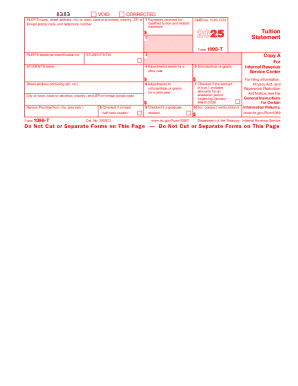
4.Prior to filling out the form, gather your Social Security Number, the Student's SSN, and the Form 1098-T or relevant documents showing qualified expenses.
-
5.Begin filling in the form by entering personal details in Part I. Make sure to enter the names accurately and the correct SSNs in their designated fields.
-
6.In Part II, provide the necessary education expense information. Double-check the amounts against your receipts or Form 1098-T for accuracy.
-
7.If you are claiming credit for multiple students, complete a separate Part III for each student listed, following the on-screen instructions in pdfFiller.
-
8.After completing all sections, review the entire form for any missing or incorrect information to ensure everything is accurate before finalizing.
-
9.Once reviewed, use the 'Save' option to store your work, or download the form as a PDF.
-
10.If you are ready to file, you have the option to submit it directly through pdfFiller if you are e-filing, or print it for mailing to the IRS.

Who is eligible to claim Form 8863?
To claim Form 8863, taxpayers must have qualifying education expenses for themselves or a dependent enrolled in an eligible educational institution, and they must meet specific income limits set by the IRS.
What is the deadline to submit Form 8863?
Form 8863 must be submitted by the tax filing deadline, which is usually April 15. If filing for an extension, ensure submission by the extended deadline.
How can I submit Form 8863?
Form 8863 can be submitted electronically if you're using tax preparation software or can be mailed to the IRS along with your tax return, typically Form 1040 or 1040-SR.
What supporting documents are required?
When filing Form 8863, gather Form 1098-T from educational institutions, receipts for qualified expenses, and your Social Security Number for yourself and any dependents.
What are common mistakes to avoid when filling out Form 8863?
Ensure accurate Social Security Numbers for yourself and dependents, claim only eligible expenses, and confirm income eligibility to avoid delays and issues with your tax return.
How long does it take to process Form 8863?
Typically, processing times vary; electronic submissions are usually faster, taking around 21 days, while paper filings may take 6-8 weeks.
What if I need to amend my Form 8863?
If you need to amend your Form 8863, use Form 1040-X to revise your tax return and include the corrected Form 8863, ensuring to address the changes appropriately.
IRS Instruction 8863 Form Versions
Related Content
Related Forms



Get the latest insights from our blog


If you believe that this page should be taken down, please follow our DMCA take down process
here
.
This form may include fields for payment information. Data entered in these fields is not covered by PCI DSS compliance.