
Last updated on
Oct 19, 2026
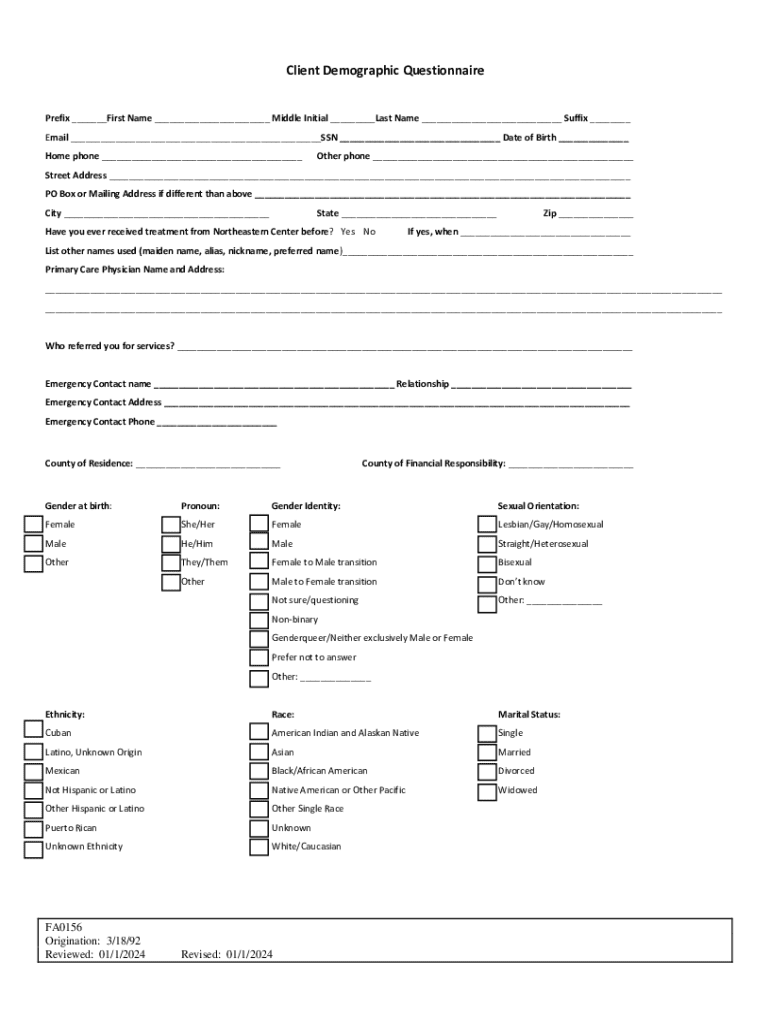
Get the free Client Demographic Questionnaire
We are not affiliated with any brand or entity on this form

Fill out
Complete the form online in a simple drag-and-drop editor.

eSign
Add your legally binding signature or send the form for signing.

Share
Share the form via a link, letting anyone fill it out from any device.

Export
Download, print, email, or move the form to your cloud storage.
Why pdfFiller is the best tool for your documents and forms


End-to-end document management
From editing and signing to collaboration and tracking, pdfFiller has everything you need to get your documents done quickly and efficiently.
Accessible from anywhere
pdfFiller is fully cloud-based. This means you can edit, sign, and share documents from anywhere using your computer, smartphone, or tablet.
Secure and compliant
pdfFiller lets you securely manage documents following global laws like ESIGN, CCPA, and GDPR. It's also HIPAA and SOC 2 compliant.
What is Demographic Questionnaire
The Client Demographic Questionnaire is a healthcare form used by the Northeastern Center to gather essential personal, medical, and financial details from patients for service eligibility and insurance billing.
pdfFiller scores top ratings on review platforms




Who needs Demographic Questionnaire?
Explore how professionals across industries use pdfFiller.

Demographic Questionnaire is needed by:
-
Patients seeking healthcare services
-
Guardians of patients requiring medical assistance
-
Healthcare administrators managing patient registrations
-
Insurance representatives verifying patient information
-
Northeastern Center staff overseeing eligibility assessment
Comprehensive Guide to Demographic Questionnaire
What is the Client Demographic Questionnaire?
The Client Demographic Questionnaire serves as a vital healthcare intake form that gathers essential information from patients. Its primary purpose is to facilitate the registration process, ensuring that healthcare providers can offer the most appropriate services. By collecting personal, medical, and financial information, this document plays a crucial role in connecting patients to healthcare services efficiently.
Healthcare providers rely on this form for a comprehensive understanding of patient needs, which directly impacts service access and overall care. The information included not only aids in meeting regulatory requirements but also enhances the patient experience by ensuring that all necessary data is at the provider's fingertips.
Understanding the Purpose and Benefits of the Client Demographic Questionnaire
Understanding the purpose of the Client Demographic Questionnaire is essential for users. This form is instrumental in assessing eligibility for various healthcare services, making it a fundamental part of the patient registration process. Additionally, it supports accurate insurance billing and processing, significantly reducing potential billing errors.
Moreover, by collecting detailed patient information, healthcare providers can tailor their services to better meet individual needs. This personalization leads to improved healthcare outcomes and a more satisfactory patient experience.
Who Should Complete the Client Demographic Questionnaire?
Several roles necessitate the completion of the Client Demographic Questionnaire. Patients, heads of households, guardians, and Northeastern Center representatives are all required to fill out this form. Situations might arise where a guardian needs to complete the questionnaire on behalf of a minor, or a representative may assist in the process for those unable to do so.
The form must be signed by the patient or guardian and the Northeastern Center representative to validate the information provided. This signature requirement underscores the form's importance in ensuring that all submitted details are accurate and trustworthy.
How to Fill Out the Client Demographic Questionnaire Online
Filling out the Client Demographic Questionnaire online is streamlined and user-friendly. Access to the form can be achieved through pdfFiller, which allows users to complete it digitally. Here are the steps to efficiently fill out the form:
-
Log into pdfFiller and locate the Client Demographic Questionnaire.
-
Fill in the personal details section, ensuring accuracy.
-
Provide comprehensive medical history as required.
-
Review all fields, paying attention to any mandatory fields.
To avoid common mistakes, double-check for missing information and ensure that all required fields are properly completed before submitting the form.
Key Features of the Client Demographic Questionnaire
The Client Demographic Questionnaire is designed with a focus on user-friendliness. Key features include fillable fields, checkboxes for easy selection, and clear instructions to guide users through the completion process. Essential sections of the form include:
-
Personal details
-
Medical history
-
Insurance information
-
Financial attestation
Accurate information in these sections is critical for effective service delivery, ensuring that healthcare providers have the data necessary to serve patients well.
Review Checklist for the Client Demographic Questionnaire
Before submitting the Client Demographic Questionnaire, reviewing your form for completeness and accuracy is crucial. Include the following elements in your review checklist:
-
Verify all signatures are present.
-
Ensure all filled fields are accurate and complete.
-
Attach any required documentation as specified.
Being cautious of common errors, such as incomplete sections or incorrect information, helps make the submission process smoother and avoids delays in healthcare service access.
Submission Methods for the Client Demographic Questionnaire
The submission of the completed Client Demographic Questionnaire can be done through various methods to accommodate user preferences. Options include:
-
Submitting the form online via pdfFiller.
-
Delivering the form in person at the designated facility.
-
Mailing the completed form to the appropriate address.
Users should be aware of any applicable fees associated with services related to the form and the expected processing times post-submission.
Security and Privacy Considerations for the Client Demographic Questionnaire
Security and privacy are paramount when handling sensitive information within the Client Demographic Questionnaire. pdfFiller is committed to protecting user data through advanced security measures, including 256-bit encryption, which aligns with HIPAA and GDPR compliance standards.
Users can trust that their information remains secure throughout the completion process, reinforcing the importance of data privacy in healthcare documentation.
Utilizing pdfFiller for Your Client Demographic Questionnaire
Leveraging pdfFiller for your Client Demographic Questionnaire enhances the overall experience in form management. Key capabilities of pdfFiller include:
-
Editing and detailing all aspects of the form.
-
eSigning for a seamless submission experience.
-
Easy conversion of the completed questionnaire into various formats.
Utilizing this digital solution not only simplifies the filling out of forms but also ensures secure storage and compliance with healthcare regulations.
How to fill out the Demographic Questionnaire
-
1.Access the Client Demographic Questionnaire on pdfFiller by searching for it on the website or using a direct link to open the form in your browser.
-
2.Once opened, navigate through the document. Use the toolbar to zoom in or out for better visibility as you assess the form's sections.
-
3.Gather all necessary personal information including full name, address, date of birth, and insurance details before you start filling out the form to ensure accuracy.
-
4.Begin filling in fields by clicking on blank areas. Use the text boxes to enter your information and checkboxes for applicable questions, such as previous treatment history.
-
5.Pay close attention to sections requiring financial information or medical history to ensure all pertinent details are provided.
-
6.Review each entry carefully; ensure spelling is correct and that all required signatures are completed at the end of the form.
-
7.Once all fields are filled, go over the form again to double-check for any missed information or errors before finalizing it.
-
8.Finally, save your completed form by clicking the save option, download it to your device, or submit it directly through pdfFiller as per your requirements.

What is the purpose of the Client Demographic Questionnaire?
The Client Demographic Questionnaire is designed to collect personal, medical, and financial information to evaluate eligibility for healthcare services and ensure proper billing to insurance or payment sources.
Who needs to sign this form?
Both the patient (or their guardian) and a representative from the Northeastern Center must sign the form, indicating consent and acknowledgment of the information provided.
Are there any deadlines for submitting this form?
While specific deadlines may vary based on service requests, it is advisable to submit the Client Demographic Questionnaire as soon as possible to avoid delays in accessing healthcare services.
What kind of information is required to fill out the form?
You will need personal details such as your name and address, medical history, insurance information, and financial income details to complete the Client Demographic Questionnaire accurately.
How do I submit the Client Demographic Questionnaire?
You can submit the form by saving it on pdfFiller and either downloading it to send via email or using the direct submission option available on the platform to send it directly to the Northeastern Center.
What are common mistakes to avoid when filling out this form?
Common mistakes include leaving required fields blank, providing incorrect information, or forgetting to sign the form. Always double-check each section before submission.
How long does it take to process the information submitted via this form?
Processing times can vary based on the volume of submissions, but generally, responses to submitted forms like the Client Demographic Questionnaire are addressed within a few business days.
Related Forms





Get the latest insights from our blog


If you believe that this page should be taken down, please follow our DMCA take down process
here
.
This form may include fields for payment information. Data entered in these fields is not covered by PCI DSS compliance.