
Last updated on
Oct 19, 2026
Get the free Child Care Agreement
We are not affiliated with any brand or entity on this form

Fill out
Complete the form online in a simple drag-and-drop editor.

eSign
Add your legally binding signature or send the form for signing.

Share
Share the form via a link, letting anyone fill it out from any device.

Export
Download, print, email, or move the form to your cloud storage.
Why pdfFiller is the best tool for your documents and forms


End-to-end document management
From editing and signing to collaboration and tracking, pdfFiller has everything you need to get your documents done quickly and efficiently.
Accessible from anywhere
pdfFiller is fully cloud-based. This means you can edit, sign, and share documents from anywhere using your computer, smartphone, or tablet.
Secure and compliant
pdfFiller lets you securely manage documents following global laws like ESIGN, CCPA, and GDPR. It's also HIPAA and SOC 2 compliant.
What is Child Care Agreement
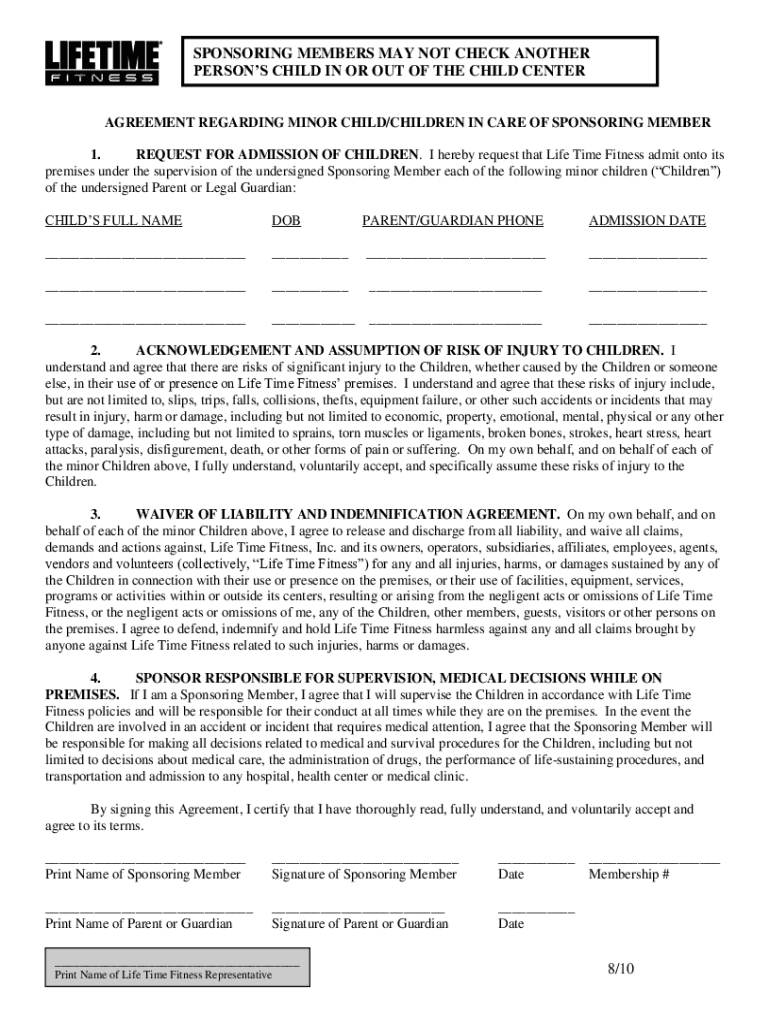
The Child Care Agreement is a legal document used by Life Time Fitness to authorize sponsoring members to bring minor children on their premises.
pdfFiller scores top ratings on review platforms




Who needs Child Care Agreement?
Explore how professionals across industries use pdfFiller.

Child Care Agreement is needed by:
-
Sponsoring members of Life Time Fitness
-
Parents or guardians of minor children
-
Child care providers
-
Legal guardians overseeing youth activities
-
Individuals responsible for children's supervision
-
Families participating in fitness programs
Comprehensive Guide to Child Care Agreement
What is the Child Care Agreement?
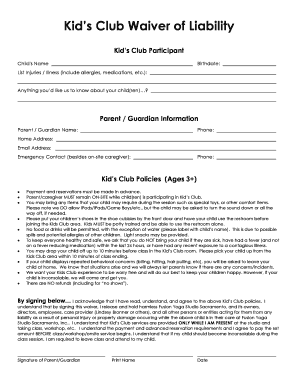
The Child Care Agreement is a vital legal document used by Life Time Fitness, designed to facilitate the inclusion of minor children under the care of sponsoring members. This agreement serves to outline the responsibilities and liabilities associated with child supervision during visits to the facility. It is essential for sponsoring members as it ensures that parents or guardians recognize the risks involved and agree to waive liability related to their children's participation in activities at Life Time Fitness.
The form includes key elements such as waivers of liability and each party's acknowledgment of responsibility, ensuring clarity in child care arrangements.
Purpose and Benefits of the Child Care Agreement
The primary purpose of the Child Care Agreement is to formally document parental consent for supervising minors while visiting Life Time Fitness. This agreement provides several benefits:
-
Clearly defines the terms of responsibility for child supervision.
-
Protects parents and sponsoring members legally, reducing potential risks associated with child care.
-
Enhances communication between parents and sponsors regarding children's activities and safety.
Ultimately, it offers peace of mind to both parties by ensuring that all legal aspects of child supervision are covered effectively.
Key Features of the Child Care Agreement
The Child Care Agreement boasts several important features designed for ease of use and clarity, including:
-
Fillable fields for entering child and parent/guardian information.
-
Sections requiring signatures from both the sponsoring member and the parent or guardian.
-
Digital capabilities that simplify the completion process and facilitate quick submissions.
These features ensure the form is comprehensive while remaining user-friendly, catering to the needs of those involved.
Who Needs the Child Care Agreement?
The Child Care Agreement should be completed by sponsoring members who intend to bring their minor children to Life Time Fitness. This includes parents, guardians, or any authorized individuals responsible for the child's care during their visit. The agreement is required in contexts where children will be present, ensuring that all parties are aware of the supervision requirements and legal commitments involved.
How to Fill Out the Child Care Agreement Online (Step-by-Step)
Filling out the Child Care Agreement online using pdfFiller is straightforward. Follow these steps for a successful completion:
-
Access the Child Care Agreement template through pdfFiller.
-
Enter the required child information in the designated fields.
-
Add parent or guardian details as necessary.
-
Review all entries for accuracy before finalizing.
-
Submit the completed form for processing.
By following these instructions, users can ensure their form is filled out correctly and ready for submission.
Signing and Notarizing the Child Care Agreement
To validate the Child Care Agreement, it must be signed by both parties involved. Users have the option to choose between digital signatures, facilitated by pdfFiller, or wet signatures. While notarization is not generally required for this agreement, individuals should confirm any specific needs within their jurisdiction. The integrity of signatures is crucial for the document's legal validity, making this a key step in the process.
Submission Methods and Delivery for the Child Care Agreement
Once completed, submitting the Child Care Agreement can be done through various methods, depending on Life Time Fitness's requirements. Users may be required to:
-
Submit the form electronically via pdfFiller.
-
Print and deliver a physical copy to the designated location.
After submission, it's advisable to confirm receipt and track the status of the agreement to ensure everything is processed correctly.
Security and Compliance for the Child Care Agreement
When handling sensitive documents like the Child Care Agreement, security is paramount. pdfFiller employs robust security measures, including 256-bit encryption, to protect personal data. The platform complies with regulations such as HIPAA and GDPR, assuring users that their information is managed securely and responsibly throughout the process.
How to Download, Save, and Print the Child Care Agreement PDF
After completing the Child Care Agreement, users can easily download, save, and print their PDF file. To do this, follow these simple steps:
-
Click the download button to save the form in your preferred format.
-
Choose a location on your device for easy access.
-
Print a hard copy if needed for in-person submission or personal records.
Utilizing these tips helps ensure documents are well-organized and readily available when required.
Get Started with pdfFiller to Easily Manage Your Child Care Agreement
Utilizing pdfFiller to manage your Child Care Agreement provides a user-friendly interface that simplifies the process of filling out legal forms online. With its accessible features, users can efficiently create and edit the necessary documents while benefiting from strong security protocols. Improve your experience with document management using pdfFiller today.
How to fill out the Child Care Agreement
-
1.To access the Child Care Agreement form on pdfFiller, visit the pdfFiller website and log in to your account. If you do not have an account, you may create one for free.
-
2.Once logged in, use the search bar to type in 'Child Care Agreement' and click on the document when it appears in the search results. This will open the form in the pdfFiller editor.
-
3.Before you start filling out the form, gather all necessary information, such as details about the child, the parent or guardian's contact information, and any other relevant data required for the form.
-
4.In the pdfFiller interface, click on each field to enter the necessary information. Use the toolbar to adjust text size or format if it is required for your entries.
-
5.Ensure that you fill in all mandatory fields as indicated by asterisks or highlighted sections. This ensures that there are no errors when submitting the form.
-
6.After completing the form, review all the entered details for accuracy. Make sure you check the spelling of names, dates, and contact information.
-
7.To finalize the form, click the 'Finish' button in the editor. You will have options to save the document, download it for personal records, or submit it directly from pdfFiller.

Who is eligible to complete the Child Care Agreement?
The Child Care Agreement can be completed by sponsoring members of Life Time Fitness and the parents or guardians of minor children they wish to bring on the premises.
What is the deadline for submitting the Child Care Agreement?
There is no specific deadline for submitting the Child Care Agreement; however, it should be completed and signed prior to bringing any minor child onto the premises.
How do I submit the completed Child Care Agreement?
The completed Child Care Agreement can be submitted directly through pdfFiller. You may also download a copy for your records or print it as needed.
What supporting documents are required with the Child Care Agreement?
Typically, no additional supporting documents are required with the Child Care Agreement itself. However, you may need to provide identification or proof of parental/guardian status upon request.
What common mistakes should I avoid while filling out the Child Care Agreement?
Common mistakes include omitting required fields, misspelling names, or failing to provide signature lines as needed. Always double-check that all information is accurate and complete.
How long does it take for the Child Care Agreement to process?
Processing time for the Child Care Agreement is typically immediate, as it does not require notarization. You will receive a confirmation upon submission through pdfFiller.
Can I edit the Child Care Agreement after submitting?
Once submitted, changes to the Child Care Agreement may not be possible unless you create a new form. Always ensure the information is correct before finalizing it.
Related Forms






Related Catalogs
Get the latest insights from our blog


If you believe that this page should be taken down, please follow our DMCA take down process
here
.
This form may include fields for payment information. Data entered in these fields is not covered by PCI DSS compliance.