
Last updated on
Nov 6, 2026

State Farm 135586.6 2010-2026 free printable template
pdfFiller is not affiliated with any government organization

Fill out
Complete the form online in a simple drag-and-drop editor.

eSign
Add your legally binding signature or send the form for signing.

Share
Share the form via a link, letting anyone fill it out from any device.

Export
Download, print, email, or move the form to your cloud storage.
Why pdfFiller is the best tool for your documents and forms


End-to-end document management
From editing and signing to collaboration and tracking, pdfFiller has everything you need to get your documents done quickly and efficiently.
Accessible from anywhere
pdfFiller is fully cloud-based. This means you can edit, sign, and share documents from anywhere using your computer, smartphone, or tablet.
Secure and compliant
pdfFiller lets you securely manage documents following global laws like ESIGN, CCPA, and GDPR. It's also HIPAA and SOC 2 compliant.
What is State Farm 135586.6
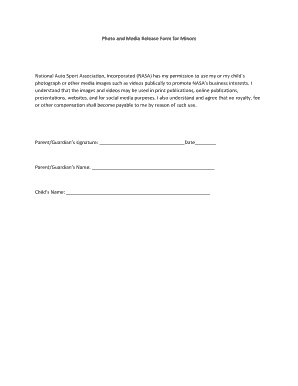
The Minor Authorization and Release Form is a legal document used by parents or legal guardians to grant permission for State Farm to use a minor's image, voice, and name for promotional purposes.
pdfFiller scores top ratings on review platforms




completed one form with ease and satisfaction
I love the features and ease of navigation for this site.
Who needs State Farm 135586.6?
Explore how professionals across industries use pdfFiller.

State Farm 135586.6 is needed by:
-
Parents or legal guardians of minors
-
State Farm agents or employees
-
Photographers or videographers conducting sessions with minors
-
Legal professionals assisting with child consent documentation
-
Event organizers planning activities involving minors
Comprehensive Guide to State Farm 135586.6
What is the Minor Authorization and Release Form?
The Minor Authorization and Release Form is a crucial document that allows parents or legal guardians to grant permission for the use of a minor's image, voice, and name. It serves as a formal agreement between the guardian and an organization like State Farm Mutual Automobile Insurance Company, outlining the rights assigned to the organization regarding promotional materials.
This form is primarily utilized by parents or legal guardians who wish to ensure that their child can participate in media-related events, shoots, or promotions. By completing the form, guardians provide the requisite consent, allowing their child’s likeness and identity to be used in various capacities.
Purpose and Benefits of the Minor Authorization and Release Form
The primary functions of the Minor Authorization and Release Form include gaining consent for promotional use and protecting the rights of the minor. Parents or legal guardians need this form to avoid legal complications when their child's image or voice is used.
One of the key benefits of utilizing this form is that it ensures compliance with legal standards and protects the minor’s rights. By formally assigning rights, the guardian alleviates potential issues related to unauthorized uses of the child's identity, establishing clear agreements upfront.
Who Needs the Minor Authorization and Release Form?
This form is essential for several key roles, predominantly parents and legal guardians. Whenever there is an opportunity for a child to be featured in media events, such as photo shoots or promotional campaigns, this authorization becomes necessary.
-
Parents requiring consent for school events or local media.
-
Legal guardians involved in auditions or artistic performances.
-
Organizations needing compliance for advertising involving minors.
How to Fill Out the Minor Authorization and Release Form Online (Step-by-Step)
Filling out the Minor Authorization and Release Form online is a straightforward process when using pdfFiller. Follow these steps to complete the form efficiently:
-
Access the Minor Authorization and Release Form via pdfFiller.
-
Input the minor's name, address, and contact information in the specified fields.
-
Review the permissions being granted and ensure accuracy in all sections.
-
Add the guardian's signature and date where required to validate the form.
Field-by-Field Instructions
Each section of the Minor Authorization and Release Form contains specific fields that must be correctly completed. Key fields include the minor’s name, the parent or guardian’s contact details, and intended usage of the visual material. It’s crucial to follow the specific instructions provided for each checkbox and entry.
To avoid common errors, double-check every entry and ensure that all necessary fields are filled. Additionally, check the validity of the signature, as this is often a crucial aspect during submission.
Signing and Validating the Minor Authorization and Release Form
Signing the form can be done digitally or with a wet signature, depending on the submission requirements. It is important to remember that a guardian's signature is essential for validating the authorization.
Understanding the implications of each signing method helps ensure that the form is legally binding and accepted without issues.
Common Rejection Reasons and How to Avoid Them
Understanding the common reasons for form rejection can help users avoid potential pitfalls. Common issues include incomplete fields, mismatched signatures, and failure to provide required documentation.
-
Ensure all fields are completely filled out before submission.
-
Match the guardian's signature consistently with other documents.
-
Double-check any attached files or extra documentation needed for context.
Where to Submit the Minor Authorization and Release Form
Once completed, the Minor Authorization and Release Form can be submitted through various methods. Online platforms are commonly preferred for their convenience, but mailing the form is also an option.
Users should also be aware of any associated fees, submission deadlines, and processing times pertinent to their chosen method of submission.
Privacy and Security When Using the Minor Authorization and Release Form
When using the Minor Authorization and Release Form, data security is paramount. pdfFiller employs robust security measures, including 256-bit encryption, to protect sensitive documents.
Furthermore, compliance with regulations such as HIPAA and GDPR ensures that users can confidently handle their documents while maintaining their privacy and security.
Get Started with Filling Out Your Minor Authorization and Release Form Today!
Utilizing pdfFiller’s services provides a straightforward approach to completing the Minor Authorization and Release Form. The platform simplifies the process, making it accessible and efficient for users to manage their documentation.
Getting started is easy, and pdfFiller's tools are designed to allow users to fill out and submit the form with confidence.
How to fill out the State Farm 135586.6
-
1.Start by accessing the Minor Authorization and Release Form on pdfFiller. Use the search function to find the form quickly.
-
2.Once opened, review the form layout and familiarize yourself with the sections that need to be filled out.
-
3.Gather all necessary information before proceeding. This includes the minor's full name, date of birth, and the details of the photography or recording session.
-
4.Begin by entering the parent or legal guardian's contact information, including their name, address, and phone number in the designated fields.
-
5.Next, provide specifics about the photography shoot or recording session such as the date and location.
-
6.Make sure to read the release statement carefully. If you agree, you'll need to check the appropriate boxes indicating your consent.
-
7.After filling out all required fields and confirming your consent, review the entire form for accuracy.
-
8.Check for any missed sections or errors before finalizing your submission.
-
9.Once you're satisfied that all information is correct, save your work periodically to prevent losing any progress.
-
10.To download or submit the form, follow pdfFiller's prompts to save it as a PDF or submit it directly to State Farm per their guidelines.

Who is eligible to sign the Minor Authorization and Release Form?
Only parents or legal guardians of the minor may sign the form to grant permission for State Farm to use the child's image, voice, and name.
What should I do if the minor's information changes after submitting the form?
If there are any changes to the minor's information, you should contact State Farm directly to discuss the necessary amendments.
Is there a deadline for submitting the Minor Authorization and Release Form?
While there's no universal deadline, it’s best to submit the form at least a week before the scheduled photography or recording session.
Are there any documents required along with the Minor Authorization and Release Form?
Typically, no additional documents are required. However, having proof of your relationship to the minor may be beneficial.
Can I edit the form after saving it on pdfFiller?
Yes, once saved, you can reopen the form on pdfFiller to make edits before final submission.
What are common mistakes to avoid when filling out the form?
Common mistakes include leaving required fields blank, providing incorrect contact details, and failing to review the release statement.
Related Content
Related Forms



Related Catalogs
Get the latest insights from our blog


If you believe that this page should be taken down, please follow our DMCA take down process
here
.
This form may include fields for payment information. Data entered in these fields is not covered by PCI DSS compliance.