
Last updated on
Oct 23, 2026
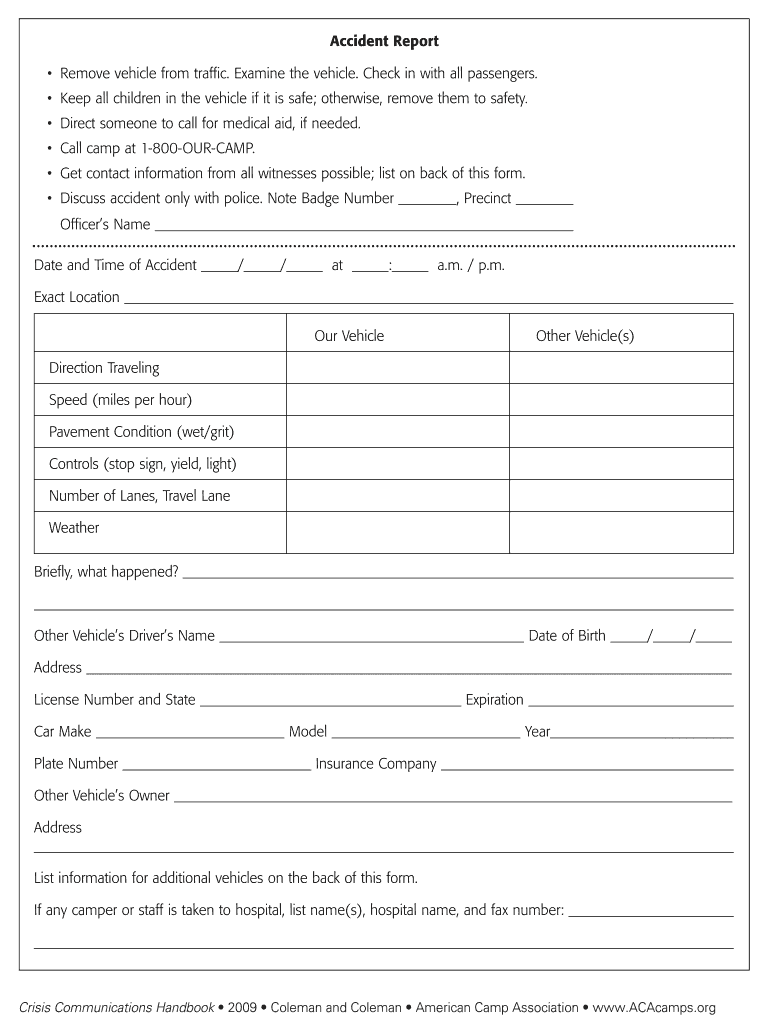
ACA Camps Accident Report free printable template
We are not affiliated with any brand or entity on this form

Fill out
Complete the form online in a simple drag-and-drop editor.

eSign
Add your legally binding signature or send the form for signing.

Share
Share the form via a link, letting anyone fill it out from any device.

Export
Download, print, email, or move the form to your cloud storage.
Why pdfFiller is the best tool for your documents and forms


End-to-end document management
From editing and signing to collaboration and tracking, pdfFiller has everything you need to get your documents done quickly and efficiently.
Accessible from anywhere
pdfFiller is fully cloud-based. This means you can edit, sign, and share documents from anywhere using your computer, smartphone, or tablet.
Secure and compliant
pdfFiller lets you securely manage documents following global laws like ESIGN, CCPA, and GDPR. It's also HIPAA and SOC 2 compliant.
What is ACA Camps Accident Report
The Accident Report Form is a document used by camp staff to record details of a vehicle accident for proper follow-up actions.
pdfFiller scores top ratings on review platforms




Who needs ACA Camps Accident Report?
Explore how professionals across industries use pdfFiller.

ACA Camps Accident Report is needed by:
-
Camp administrators managing incident reports
-
Staff members involved in vehicle operations
-
Insurance claims agents handling accident claims
-
Legal professionals requiring documentation of accidents
Comprehensive Guide to ACA Camps Accident Report
What is the Accident Report Form?
The Accident Report Form is a crucial document used to officially record details about vehicle accidents occurring both on and off camp premises. Its primary purpose is to facilitate accurate documentation of incidents, ensuring that necessary information is collected for follow-up. Accurate reporting through this camp accident report helps in coordinating appropriate responses and enhancing safety protocols.
A properly filled accident report form is essential for capturing important details such as involved parties, circumstances of the accident, and subsequent actions needed. This promotes accountability and assures that all incidents are recorded for future reference.
Purpose and Benefits of the Accident Report Form
The primary objective of the accident report form is to ensure a standardized method for documenting vehicle accidents. This is essential for maintaining safety and accountability within camp operations. Not only does this form provide documentation, but it also serves various benefits including:
-
Liability protection for staff and the organization.
-
Streamlining insurance claims processes.
-
Assisting in future safety analysis and accident prevention strategies.
By using the camp safety form effectively, users can ensure that all pertinent incident-related information is captured, contributing to safer camp activities in the future.
Key Features of the Accident Report Form
The accident report form contains specific fields designed to capture comprehensive details about the incident, such as:
-
Officer details including name and badge number.
-
Location and time of the accident.
-
Information about witnesses.
This form can be easily filled out online, edited, and saved for quick access. Features such as fillable forms and digital signing options further enhance usability, making it suitable for diverse reporting situations related to vehicle accidents.
Who Needs to Complete the Accident Report Form?
The primary audience for the accident report form includes camp staff and anyone operating vehicles within camp confines. It becomes necessary in various scenarios, such as accidents involving camp activities or vehicles. The accurate completion of this form is integral to ensuring safety and providing accountability, making it essential for all parties involved.
How to Fill Out the Accident Report Form Online
When filling out the accident report form using pdfFiller, users should follow these steps for a seamless experience:
-
Gather all necessary information such as accident details and witness statements.
-
Access the form online through pdfFiller.
-
Complete each field accurately, ensuring no information is omitted.
Common mistakes include missing fields or incorrect information entry, which can be avoided by reviewing all entries before submission. Ensuring completeness and accuracy enhances the reliability of the report.
Submission Methods and What Happens After You Submit
There are various methods for submitting the accident report form, including online submission and via email. After submission, users should expect a processing period, along with confirmation tracking for their reports. It is essential to review submission confirmations to address any potential errors or follow-up actions required.
Security and Compliance for the Accident Report Form
Data security is paramount when handling sensitive information contained in the accident report form. pdfFiller assures compliance with privacy regulations including HIPAA and GDPR, ensuring that all data is processed securely. Security features such as encryption and safe storage provide peace of mind for users handling sensitive accident information.
Common Errors and How to Avoid Them
Users often encounter several common errors while completing the accident report form. These include:
-
Inaccurate filling of fields or misinterpretation of questions.
-
Forgetting to gather necessary documents before starting the form.
Best practices include thorough reviews of each entry prior to submission, which minimizes the risk of inaccuracies and ensures the completeness of reports.
Sample Completed Accident Report Form
A visual example or template of a filled-out accident report form can significantly aid users in understanding the required details for completion. Key sections to focus on include accident descriptions and officer information. By referring to a sample, users can better grasp each field's requirements and fill out the form with confidence.
Experience Seamless Form Completion with pdfFiller
pdfFiller provides an efficient platform for users to manage their accident report forms with ease. With features that enhance PDF editing and eSigning capabilities, users benefit from an intuitive interface that simplifies the entire form-filling process. Signing up for pdfFiller further enables users to manage documents effectively while ensuring ongoing support and resources are readily available.
How to fill out the ACA Camps Accident Report
-
1.To begin, visit pdfFiller and search for the Accident Report Form in the template section.
-
2.Once located, click on the form to open it in the pdfFiller editor.
-
3.Gather necessary information, such as vehicle and driver details, accident circumstances, and witness contact information prior to filling out the form.
-
4.Start filling out the fields, such as 'Date and Time of Accident' and 'Officer’s Name', using the options provided in the pdfFiller interface.
-
5.Utilize pdfFiller's tools to checkboxes and input information in the blank fields as required.
-
6.Keep an eye on any required fields marked, ensuring all necessary information is complete for accurate documentation.
-
7.After filling in all sections, take advantage of pdfFiller’s review tool to double-check the details entered.
-
8.Once reviewed, save your progress by clicking the 'Save' button or download the completed form directly to your device.
-
9.Finally, submit the form via email, print it out for physical delivery, or upload it directly as required.

Who should complete the Accident Report Form?
The Accident Report Form should be completed by camp staff members who observed or were involved in the accident. It's crucial for documenting all relevant details immediately after the incident.
Is there a deadline for submitting the Accident Report Form?
While specific deadlines can vary by camp policy, it's generally advised to complete and submit the Accident Report Form as soon as possible after the incident occurs to ensure accurate records.
What information is required for this form?
Key information includes the date and time of the accident, officer details, descriptions of the accident circumstances, vehicle conditions, and contact details of witnesses.
Can I edit the form after I've saved it on pdfFiller?
Yes, you can reopen and edit the Accident Report Form on pdfFiller anytime after saving it, allowing you to update details as needed before final submission.
How do I submit the completed form?
After filling out the form, you can submit it via email directly from pdfFiller, download and print it for physical submission, or upload it through your camp's designated platform.
What are common mistakes to avoid when filling out the form?
Common mistakes include leaving required fields blank, failing to double-check witness information, or not providing complete details about the accident, all of which can lead to complications in processing reports.
How long does it take to process the Accident Report once submitted?
Processing times for the Accident Report can differ based on camp policies. Typically, expect acknowledgment within a few days, but clarify with your camp’s administration for specific timelines.
Related Content
Related Forms





Related Catalogs
Get the latest insights from our blog



If you believe that this page should be taken down, please follow our DMCA take down process
here
.
This form may include fields for payment information. Data entered in these fields is not covered by PCI DSS compliance.