
Last updated on
Nov 7, 2026
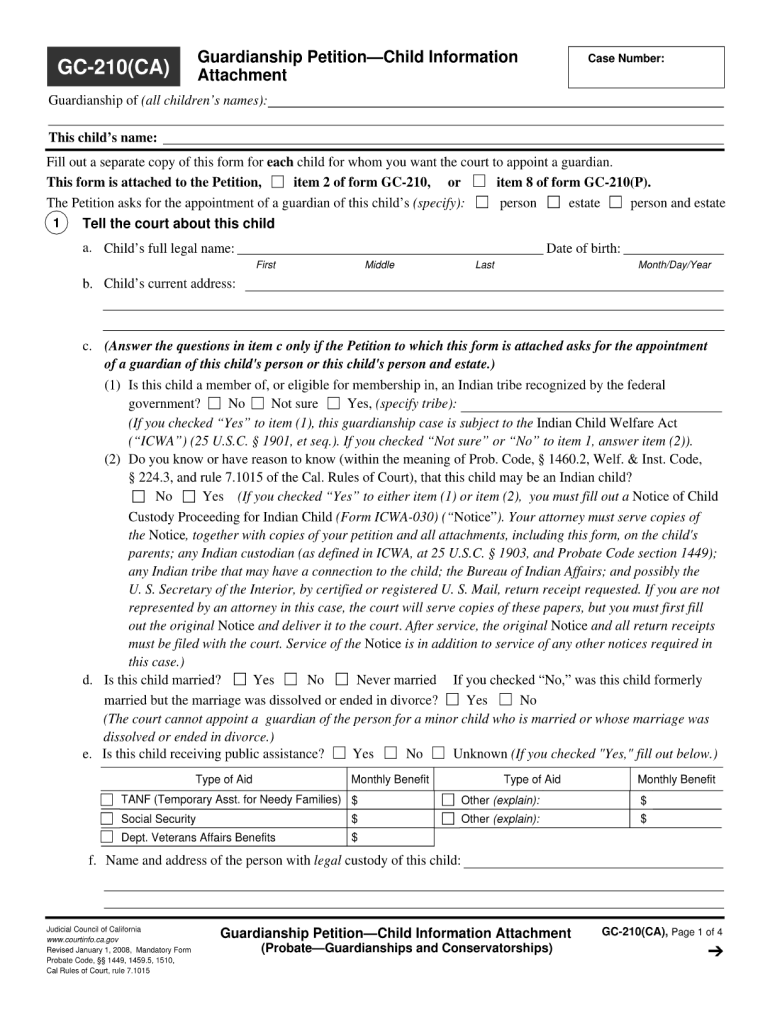
CA GC-210(CA) 2008 free printable template
We are not affiliated with any brand or entity on this form

Fill out
Complete the form online in a simple drag-and-drop editor.

eSign
Add your legally binding signature or send the form for signing.

Share
Share the form via a link, letting anyone fill it out from any device.

Export
Download, print, email, or move the form to your cloud storage.
Why pdfFiller is the best tool for your documents and forms


End-to-end document management
From editing and signing to collaboration and tracking, pdfFiller has everything you need to get your documents done quickly and efficiently.
Accessible from anywhere
pdfFiller is fully cloud-based. This means you can edit, sign, and share documents from anywhere using your computer, smartphone, or tablet.
Secure and compliant
pdfFiller lets you securely manage documents following global laws like ESIGN, CCPA, and GDPR. It's also HIPAA and SOC 2 compliant.
What is CA GC-210(CA)
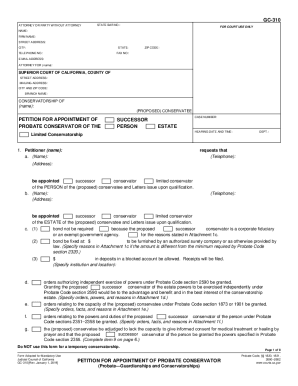
The CA GC-210CA is a form used by individuals and entities to declare certain legal claims in California, serving as an official document necessary for specific legal proceedings.
pdfFiller scores top ratings on review platforms




Who needs CA GC-210(CA)?
Explore how professionals across industries use pdfFiller.

CA GC-210(CA) is needed by:
-
California residents involved in legal disputes
-
Legal professionals representing clients in California
-
Individuals filing claims in California courts
-
Parties requiring documentation for legal claims in civil matters
-
Organizations participating in California legal processes
Comprehensive Guide to CA GC-210(CA)
What is the CA GC-210CA?
The CA GC-210CA is a crucial legal form utilized within California's legal framework, designed for specific legal proceedings. This form allows individuals or entities to formally communicate important information related to their case. Its significance lies in ensuring compliance with California's legal requirements, making it essential for those involved in legal matters.
Purpose and Benefits of the CA GC-210CA
The primary purpose of the CA GC-210CA is to streamline formal legal processes, offering clear documentation that aids in legal clarity. Key benefits of using this form include:
-
Facilitating compliance with state regulations.
-
Providing legal clarity and documentation for proceedings.
-
Potentially reducing costs associated with legal failures or delays.
This form proves particularly crucial in situations such as filing for appeals or providing evidence in court cases, helping users navigate the complexities of the legal system.
Eligibility Criteria for the CA GC-210CA
To utilize the CA GC-210CA, certain eligibility criteria must be met. Individuals or entities eligible to use this form typically include:
-
Parties involved in legal proceedings in California.
-
Attorneys representing clients in court cases.
Users should be aware of any restrictions or special considerations. Ensuring eligibility before attempting to complete the form can prevent delays and ensure compliance.
How to Fill Out the CA GC-210CA Online
Filling out the CA GC-210CA online can be accomplished easily through pdfFiller. The steps to fill the form digitally include:
-
Access pdfFiller and select the CA GC-210CA form.
-
Complete each key field with the required information.
-
Review the completed form to ensure accuracy.
Utilizing pdfFiller enhances the experience with its user-friendly interface while ensuring secure handling of sensitive information.
Common Errors and How to Avoid Them While Filling CA GC-210CA
When completing the CA GC-210CA, users may encounter common pitfalls. To avoid errors, consider the following tips:
-
Double-check all entries for accuracy.
-
Confirm that all required fields are filled out completely.
-
Review the completed form before submission for any oversights.
This attention to detail can significantly reduce the chances of submission delays or rejections.
Submission Methods for the CA GC-210CA
Once the CA GC-210CA is completed, it can be submitted through various methods, including:
-
Online submission via pdfFiller.
-
Mailing the form to the relevant court.
-
In-person submission at the designated office.
Each submission method has specific requirements, including potential fees, so it is essential to check the guidelines beforehand.
What Happens After You Submit the CA GC-210CA?
After submitting the CA GC-210CA, users can expect a review process. Important information includes:
-
Feedback timelines may vary based on the court's workload.
-
Confirming receipt of the form can typically be done online or through direct contact.
-
Next steps depend on the nature of the legal matter and the court's response.
Staying informed of the review process will help users understand the timeline and potential outcomes.
Security and Compliance When Dealing with the CA GC-210CA
Users can trust that their sensitive information is safe while using pdfFiller. The platform employs robust security measures, including:
-
256-bit encryption to protect user data.
-
Compliance with regulations such as GDPR and HIPAA.
Utilizing secure platforms minimizes the risk of unauthorized access, giving users confidence when filling the CA GC-210CA.
How pdfFiller Enhances Your Experience with the CA GC-210CA
pdfFiller offers several key features that simplify the form completion experience, such as:
-
Easy editing and completion of the CA GC-210CA.
-
eSigning capabilities for quick document finalization.
-
Case studies illustrating successful completion of similar legal forms.
Choosing pdfFiller ensures a secure, efficient, and user-friendly experience during the entire process.
Ready to Get Started with Your CA GC-210CA?
Take action today by visiting pdfFiller to sign up or log in for immediate assistance with filling out the CA GC-210CA. The platform offers user-friendly features and ample support to streamline your document management needs.
How to fill out the CA GC-210(CA)
-
1.Start by visiting pdfFiller and logging into your account or creating a new one.
-
2.Use the search bar to find 'CA GC-210CA' and click on it to open the form.
-
3.Familiarize yourself with the layout of the form and the available tools on the pdfFiller interface.
-
4.Collect any necessary information such as your name, case details, and legal assertions you wish to include in the form.
-
5.Begin filling in the required fields by clicking on each box and typing the corresponding information.
-
6.Ensure that all sections are filled out accurately and completely, using pdfFiller’s error detection features as a guide.
-
7.Review the form thoroughly to check for any mistakes or missing information.
-
8.Utilize the preview function to see how the final document will appear before submission.
-
9.Once satisfied, choose the option to save your completed form, or download it in your preferred format.
-
10.Follow the instructions provided by pdfFiller to submit the form electronically or print it for physical submission.

Who is eligible to fill out the CA GC-210CA form?
The CA GC-210CA form is typically for California residents involved in legal disputes or claims. This includes individuals, their legal representatives, and entities participating in specific legal actions.
What is the submission method for the CA GC-210CA?
You can submit the CA GC-210CA form electronically through platforms like pdfFiller or print it for submission to the appropriate California court, depending on your case requirements.
What supporting documents are required with the CA GC-210CA?
While specific supporting documents aren't outlined in the metadata, generally, you may need supporting evidence related to your claim, such as identification, proof of residency, and any relevant court documentation.
Are there common mistakes to avoid when filling out the CA GC-210CA?
Common mistakes include not filling out all required fields, providing incorrect information, and failing to review the form before submitting. It's crucial to double-check entries and ensure completeness.
What are the deadlines for submitting the CA GC-210CA form?
Deadlines depend on the specific legal context in which you're filing the form. Always verify with local court rules to ensure timely submission to avoid delays in your case.
How long does processing take for the CA GC-210CA?
Processing times can vary widely based on the California court's workload and the specifics of the case. Generally, it can take a few weeks, but you should contact the court for precise timelines.
What should I do if I encounter issues while filling out the form?
If you experience issues while using pdfFiller, refer to their support resources or contact customer service. It's important to resolve any technical issues before finalizing your submission.
CA GC-210(CA) Form Versions
Related Content
Related Forms



Get the latest insights from our blog


If you believe that this page should be taken down, please follow our DMCA take down process
here
.
This form may include fields for payment information. Data entered in these fields is not covered by PCI DSS compliance.