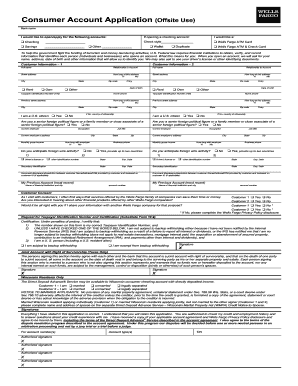
What is direct deposit form wells fargo?

A direct deposit form from Wells Fargo is a document that allows account holders to authorize the electronic transfer of funds into their Wells Fargo account. With direct deposit, individuals can have their paychecks, government benefits, or other recurring income automatically deposited into their account without the need for physical checks or manual deposits.

What are the types of direct deposit form wells fargo?

Wells Fargo offers various types of direct deposit forms to meet different needs. These include: - Payroll Direct Deposit: Used by employers to deposit employees' salaries directly into their Wells Fargo account. - Government Benefits Direct Deposit: Allows individuals to receive government benefits, such as Social Security or veterans' benefits, directly into their Wells Fargo account. - Tax Refund Direct Deposit: Enables taxpayers to have their tax refunds deposited directly into their Wells Fargo account.

Payroll Direct Deposit
Government Benefits Direct Deposit
Tax Refund Direct Deposit

How to complete direct deposit form wells fargo

Completing a direct deposit form with Wells Fargo is a simple process. Here are the steps to follow: 1. Obtain a direct deposit form from Wells Fargo. You can find it on their official website or request a form from your local branch. 2. Fill in your personal information, including your full name, address, and contact details. 3. Provide your Wells Fargo account number and routing number. These can be found on your checks or by logging into your Wells Fargo online banking account. 4. Indicate the type of direct deposit you wish to set up, such as payroll, government benefits, or tax refunds. 5. Sign and date the form to authorize the direct deposit. 6. Submit the completed form to your employer, government agency, or tax authorities as required.

01
Obtain a direct deposit form
02
Fill in your personal information
03
Provide your account and routing number
04
Indicate the type of direct deposit
05
Sign and date the form
06
Submit the completed form

pdfFiller empowers users to create, edit, and share documents online. Offering unlimited fillable templates and powerful editing tools, pdfFiller is the only PDF editor users need to get their documents done.
Video Tutorial How to Fill Out direct deposit form wells fargo

Thousands of positive reviews can’t be wrong

Read more or give pdfFiller a try to experience the benefits for yourself
5.0
PDF Filler Review From forms, to contracts and or agreements I constantly have t...
PDF Filler Review From forms, to contracts and or agreements I constantly have to fill out documents and then sign them. Your software facilitates these for me in addition to protecting them in a pdf format. I enjoy using your software portal and it solves 99% of my problems. The only issue that comes up from time to time is that when certain large vendors send me a form to fill out and I return it to them they do not recognize it. They want me to use Adobe instead, which I do not care for. I wish there was a way to save the finished document as if it were compatible with Adobe.
Harold B.
4.0
Very usable It was easy to get started and the options were not too hard to loca...
Very usable It was easy to get started and the options were not too hard to locate erasing is only left and right, the replace text field is not easy to use and it could be easier to just email a copy of a doc
Bo G.
5.0
Easy to use & Quick My business is all about paperwork.
Easy to use & Quick My business is all about paperwork. Everything is time sensitive and I could not get things done without PDFfiller. I use it daily. The ease of use is so important to me. I don't have time to learn difficult programs. Easy to upload docs from anywhere, rearrange pages, make corrections, save as PDF and save or email. You can name your files and go back to them when needed. The dashboard is easy to navigate. I have used this software for years and they are always improving and adding new features. I have had trouble uploading an occasional document but customer service fixed the issue each time. Sometimes my document is too large which is frustrating, they have a size limit. Also, a document with signatures from another software company (e-sign) sometimes don't come thru.
Maureen C.

Questions & answers

You can usually find deposit slips at the back of your checkbook or at the counter of your local bank branch. If you can't find one in either of those places, you can ask for one at the teller window at your bank.
Wells Fargo ATMs will total your cash and check deposits right on the screen without the need for envelopes or deposit slips.
To order new blank deposit slips, call 1-800-TO-WELLS (1-800-869-3557) or sign on to Wells Fargo Online and Order Checks and Deposit Tickets.
Setting up direct deposit is easy. Check with your employer's payroll office, you may be able to set up your direct deposit through an online portal.
A direct deposit authorization form authorizes a third party, usually an employer for payroll, to send money to a bank account. Commonly, an employer requesting authorization will require a voided check to ensure that the account is valid.
3. Collect and Input Employee Information. Usually, direct deposit authorization forms are signed by employees soon after they are hired.