







What is Attendance Record Template Excel?

The Attendance Record Template Excel is a tool used to track and record attendance for various purposes. It helps organizations keep accurate records of employee attendance, which is crucial for payroll, performance evaluations, and compliance purposes.
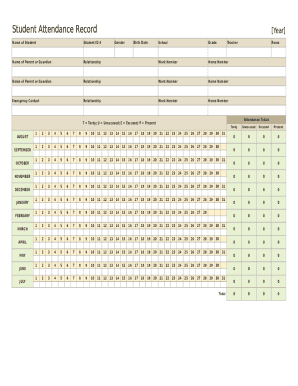
What are the types of Attendance Record Template Excel?

There are several types of Attendance Record Template Excel available, including daily attendance templates, monthly attendance templates, and annual attendance templates. Each type serves different purposes and can be customized to meet specific needs.

Daily Attendance Template
Monthly Attendance Template
Annual Attendance Template

How to complete Attendance Record Template Excel

Completing an Attendance Record Template Excel is a simple process that involves entering the necessary information accurately. Here are the steps to complete the template:

01
Download the preferred Attendance Record Template Excel from a reliable source.
02
Open the template in Microsoft Excel or a similar spreadsheet program.
03
Enter the relevant details such as employee names, dates, and attendance status.
04
Save the completed template for future reference or printing.

pdfFiller empowers users to create, edit, and share documents online. Offering unlimited fillable templates and powerful editing tools, pdfFiller is the only PDF editor users need to get their documents done.


Video Tutorial How to Fill Out Attendance Record Template Excel

Thousands of positive reviews can’t be wrong

Read more or give pdfFiller a try to experience the benefits for yourself
5.0
Great resource This looks like a great source.
Great resource This looks like a great source. My situation become more complicated than anticipated and I had the need for an attorney. Otherwise, this would have worked great.
Cheryl C.
5.0
I do a lot of forms for people and businesses and this app/website is a very goo...
I do a lot of forms for people and businesses and this app/website is a very good tool necessity for what I do.
Christopher B
5.0
A safe way to fill forms
I wish they had an option for screenshare set up support. Though it took awhile to learn, we are so grateful for what it's allowed our company to do!
Stephanie

Questions & answers

Clockify is the latest free attendance tracker that helps you track work time and employee attendance. See who was present, when, what they worked on, and how long. Start tracking time — It's Free!
Those who only want to track attendance use a biometric system or a punch clock. But companies that evaluate attendance and performance during the day use a time tracking software. This method makes it possible not only to track attendance, but also allows to monitor employee work at the computer.
How to Make an Attendance Sheet in Excel Download the student attendance tracker template for Excel. Open the file and click on the Blank Student Attendance tab at the bottom of the sheet. Enter the information for the spreadsheet cells at the top of the template:
How to Create an Attendance Sheet in Apple Numbers Identify the Purpose of your Attendance Sheet. Determine the Expected Number of People. Make your Attendance Sheet Interesting. Create a New Spreadsheet in Apple Numbers. Add the Column and Row Headers. Format the Cells. Print or Export your Attendance Sheet.
in your meeting controls. Select More actions, then select Download attendance list to download the current attendance info as a CSV file that you can open in Excel. Look for the file in your device's Downloads folder.
A free solution to track employee time is with a timesheet. If you keep it digital, you can use a template in Excel that easily calculates everything for you. If you go the hardcopy route, you can print physical timesheets for employees to use.