Form preview

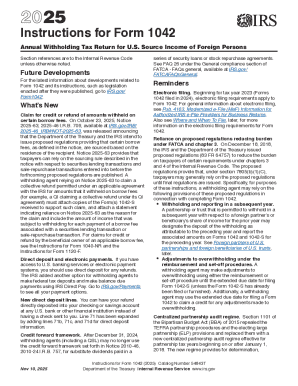
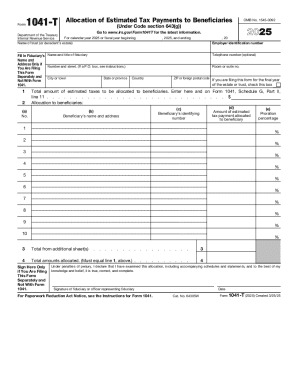
IRS 1042-T 2023 free printable template


Get Form
pdfFiller is not affiliated with IRS
Screenshot
Screenshot
Screenshot

Get, Create, Make, and Sign IRS 1042-T

Edit your IRS 1042-T online
Type text, complete fillable fields, insert images, highlight or blackout data for discretion, add comments, and more.
Screenshot
Add your legally-binding signature
Draw or type your signature, upload a signature image, or capture it with your digital camera.
Screenshot
Share your form instantly
Email, fax, or share your IRS 1042-T via URL. You can also download, print, or export forms to your preferred cloud storage service.
Screenshot

Instructions and Help about IRS 1042-T

How to edit IRS 1042-T

To edit the IRS 1042-T tax form, you can utilize pdfFiller’s editing tools. Start by uploading your form to the platform. Once uploaded, you can adjust text, add or remove fields, or incorporate electronic signatures as needed. After making the necessary changes, save and download the updated version for your records.

How to fill out IRS 1042-T

To properly fill out the IRS 1042-T, follow these steps:
01
Access the IRS 1042-T form online or via pdfFiller.
02
Enter your taxpayer identification details in the designated sections.
03
List each payment recipient, including their name, address, and taxpayer identification number (TIN).
04
Provide information on the types of income and amounts paid to each recipient.
05
Review the completed form for accuracy before submission.

About IRS 1042-T 2023 previous version

What is IRS 1042-T?

IRS 1042-T is a tax form used by withholding agents and foreign embassies to report income subject to withholding. It serves as a summary of the forms 1042-S, detailing the amounts paid to foreign individuals or entities. This form ensures transparency and compliance with U.S. tax regulations regarding non-resident payments.

Who needs the form?

IRS 1042-T must be filed by U.S. withholding agents, including banks, businesses, and other organizations that pay income to foreign individuals or entities. If you are making payments such as interest, dividends, rents, or royalties to foreign persons, you are required to submit this form along with the corresponding 1042-S forms for each recipient.

Components of the form

The IRS 1042-T includes several key components that require careful completion. These components are as follows:
01
Withholding Agent Information: Name, address, and TIN of the withholding agent.
02
Summary of Payments: Aggregate amounts paid to foreign recipients.
03
Recipient Details: Names, addresses, and TINs of the foreign persons who received payments.
04
Certification Information: Signature of the withholding agent confirming the accuracy of the information.

What information do you need when you file the form?

When filing the IRS 1042-T, it’s essential to gather specific information. You will need details about the payment recipients, including their names, addresses, and TINs. Additionally, you will collect the total amounts paid to each recipient and the type of income that was paid. Ensuring accuracy in this data is crucial to avoid penalties and ensure compliance.

What is the purpose of this form?

The purpose of IRS 1042-T is to report certain payments made to foreign persons or entities that may be subject to U.S. tax withholding. This form summarizes the data provided on the various IRS 1042-S forms issued to individual recipients. Filing this form helps the IRS track withholding amounts and verify compliance with tax obligations for foreign recipients.

When am I exempt from filling out this form?

You may be exempt from filling out IRS 1042-T if your payments fall under certain exclusions. For instance, payments made to U.S. citizens or residents do not require this form. Additionally, certain payments that are exempt from withholding, such as scholarships for foreign students, are also excluded from reporting requirements under the 1042-T.

What are the penalties for not issuing the form?

Failure to issue IRS 1042-T can result in significant penalties for withholding agents. The IRS imposes fines based on the lateness of the filing, the seriousness of the failure, and whether the failure was intentional. If you neglect to file or file late, you may be subject to fines ranging from $50 to $270 per form, with maximum penalties reaching $1.5 million per calendar year.

Is the form accompanied by other forms?

Yes, IRS 1042-T is typically accompanied by IRS 1042-S forms. While 1042-T serves as a summary of all 1042-S forms, each 1042-S must be filed for every payment made to foreign individuals or entities. Therefore, complete both forms for accurate reporting and compliance.

Where do I send the form?

The IRS 1042-T form should be mailed to the address specified on the form instructions. Generally, this includes the address for the appropriate processing center, which can depend on the withholding agent's location and whether the submission is being sent with a payment or not. Be sure to check the latest IRS guidelines for the most accurate mailing information.

FAQ about IRS 1042-T

If you find mistakes in your IRS 1042-T after submission, you can submit a corrected version of the form. Ensure that you indicate the changes clearly to avoid confusion with the IRS. Keep in mind that you should also maintain records of any corrections for future reference.

To verify the status of your IRS 1042-T, you can contact the IRS directly or check their online tracking system if applicable. Be prepared to provide necessary details such as your name, tax identification number, and any reference numbers associated with your submission.

Common errors when submitting IRS 1042-T include incorrect taxpayer identification numbers, omitting required information, and failing to sign the form. Double-check all entries and consult IRS guidelines to enhance accuracy before filing.


See what our users say
Trust Seal
Trust Seal
Trust Seal
Trust Seal
Trust Seal
Trust Seal
Trust Seal
Trust Seal
Rate free form
4.7
satisfied
48 votes

How to Fill Out Small Business Tax Forms Online with pdfFiller

Struggling with your Schedule C or not sure how to file business taxes as a sole proprietor, LLC, or self-employed professional? This step-by-step pdfFiller tutorial walks you through completing IRS Schedule C quickly and accurately — no printing, no scanning, no stress. Whether you're handling small business tax deductions, tracking self-employed taxes, or preparing your full business tax return, pdfFiller makes it simple right in your browser.

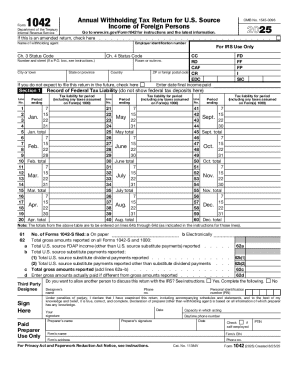
Related Forms

If you believe that this page should be taken down, please follow our DMCA take down process here .
This form may include fields for payment information. Data entered in these fields is not covered by PCI DSS compliance.