
Last updated on
Oct 2, 2026
Get the free Donation Receipt Tax Record Form
We are not affiliated with any brand or entity on this form

Fill out
Complete the form online in a simple drag-and-drop editor.

eSign
Add your legally binding signature or send the form for signing.

Share
Share the form via a link, letting anyone fill it out from any device.

Export
Download, print, email, or move the form to your cloud storage.
Why pdfFiller is the best tool for your documents and forms


End-to-end document management
From editing and signing to collaboration and tracking, pdfFiller has everything you need to get your documents done quickly and efficiently.
Accessible from anywhere
pdfFiller is fully cloud-based. This means you can edit, sign, and share documents from anywhere using your computer, smartphone, or tablet.
Secure and compliant
pdfFiller lets you securely manage documents following global laws like ESIGN, CCPA, and GDPR. It's also HIPAA and SOC 2 compliant.
What is Donation Receipt
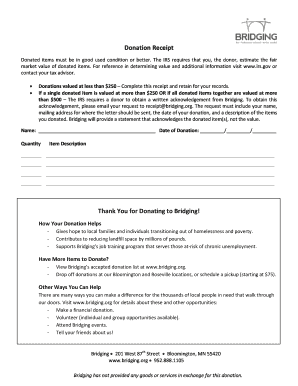
The Donation Receipt Tax Record Form is a document used by donors to officially record their charitable donations for tax deduction purposes.
pdfFiller scores top ratings on review platforms




Who needs Donation Receipt?
Explore how professionals across industries use pdfFiller.

Donation Receipt is needed by:
-
Individual donors making charitable contributions
-
Nonprofit organizations requiring donation documentation
-
Accountants managing clients' tax records
-
Tax professionals assisting with tax deductions
-
Individuals tracking their charitable giving
-
Volunteers involved with charitable organizations
Comprehensive Guide to Donation Receipt
What is the Donation Receipt Tax Record Form?
The Donation Receipt Tax Record Form serves as a critical document for individuals wishing to claim tax deductions on charitable contributions. This form allows donors to formally acknowledge the donations they make to organizations like Arms of Hope, reinforcing its significance for tax deduction purposes.
This tax deduction form is essential for documenting charitable contributions, giving donors a reliable reference for their financial records. Proper use of this form is crucial for ensuring that all donations are accurately reported come tax season.
Purpose and Benefits of Using the Donation Receipt Tax Record Form
Completing the Donation Receipt Tax Record Form clarifies tax deduction eligibility for donors, making it easier to understand the benefits associated with charitable giving. Additionally, this form ensures that donors maintain proper record-keeping, providing reassurance regarding their contributions and how they will impact their tax filings.
-
Clarifies eligibility for tax deductions, enhancing understanding of benefits.
-
Facilitates organized record-keeping for future reference.
-
Provides peace of mind regarding contributions and tax compliance.
Key Features of the Donation Receipt Tax Record Form
The Donation Receipt Tax Record Form includes various fillable fields that capture essential donor information. These fields may include the donor's name, address, phone number, donation value, and donation date, enabling comprehensive tracking of contributions.
-
Fillable fields include personal and donation information.
-
Instructions are provided for correctly filling out the form.
-
The layout of the form emphasizes organization and clarity for users.
Who Needs the Donation Receipt Tax Record Form?
This form is particularly beneficial for donors to non-profit organizations like Arms of Hope, where itemized tax deductions might be applicable. The Donation Receipt Tax Record Form is crucial for both individual and corporate donors to substantiate their charitable contributions.
In circumstances that demand precise documentation for tax deductions, utilizing this form can simplify the process and ensure compliance with tax regulations.
How to Fill Out the Donation Receipt Tax Record Form Online
To effectively complete the Donation Receipt Tax Record Form online, follow these step-by-step instructions:
-
Access the form via pdfFiller's platform.
-
Fill in each field, ensuring that personal and donation details are accurate.
-
Review the form thoroughly for any errors or omissions.
-
Submit the completed form through your preferred method.
Accuracy in reporting donation values and details is vital to avoid issues with tax filings.
Submission Methods and Important Deadlines
There are several ways to submit the Donation Receipt Tax Record Form, which include both email and traditional mail. Understanding the deadlines related to tax submissions is crucial for ensuring timely filing to avoid penalties.
-
Submit the form via email or conventional mail.
-
Keep track of important tax submission deadlines.
-
Plan ahead to ensure that your form is submitted on time.
Security and Privacy Considerations
When handling the Donation Receipt Tax Record Form, security is paramount. pdfFiller employs robust security measures such as 256-bit encryption and is compliant with GDPR regulations, ensuring that personal information remains protected.
Donors should be aware of best practices for maintaining their privacy while filling out this form. If personal data is compromised, take immediate action to secure that information.
Using pdfFiller for Your Donation Receipt Tax Record Form
Utilizing pdfFiller enhances the experience of filling out the Donation Receipt Tax Record Form. The platform offers numerous benefits such as auto-saving drafts and easy accessibility from any device, making the form selection and submission process seamless.
Getting started with pdfFiller is straightforward, guiding users through the steps needed to efficiently manage their tax record form.
Sample of a Completed Donation Receipt Tax Record Form
For guidance on completing the Donation Receipt Tax Record Form, refer to a sample that illustrates how a filled-out form appears. This example will highlight key areas of the form, providing annotations and instructions that can assist users in accurately completing their own forms.
Take Action with Your Donation Receipt Tax Record Form
Timely completion of the Donation Receipt Tax Record Form is essential for maximizing tax benefits. Leveraging pdfFiller can lead to a smooth and efficient process for donors. Explore additional resources available on pdfFiller’s platform to fully support your charitable donation documentation needs.
How to fill out the Donation Receipt
-
1.Access the Donation Receipt Tax Record Form on pdfFiller by visiting the site and searching for the form name. Click on the appropriate link to open the form in the pdfFiller interface.
-
2.Once the form is open, navigate the interface to locate the fillable fields such as Name, Address, City, and State. Click on each field to input your information easily.
-
3.Gather all necessary information before starting, including your personal details, the value of your donations, and the donation date. Have the amounts and organization details within reach.
-
4.Begin filling in your personal information in the designated fields. Enter your Name, Address, and other required contact details accurately.
-
5.Input the Donation Value as thoroughly as required. Provide totals in the Total $ field and ensure all calculations align with your donations.
-
6.Review the completed form to confirm there are no errors. Make sure all fields are filled correctly to avoid any issues.
-
7.Once reviewed, save the form on pdfFiller. Click the save button to store your document in a safe location.
-
8.You can also download the form as a PDF file for your records or submit it electronically through pdfFiller as instructed on the platform.

Who needs to fill out the Donation Receipt Tax Record Form?
The Donation Receipt Tax Record Form should be filled out by individual donors who wish to keep track of their charitable contributions for tax deduction purposes, as well as nonprofit organizations documenting these donations.
Are there any eligibility requirements to use this form?
There are no specific eligibility requirements. Any donor making charitable contributions can use the Donation Receipt Tax Record Form to keep accurate records for their personal tax filings.
How do I submit the completed form?
You can submit the completed Donation Receipt Tax Record Form via email to your tax preparer, print a copy for your records, or keep it saved on pdfFiller for easy access during tax season.
What information do I need to gather before completing the form?
Before filling the form, gather your personal details, including your name, address, and contact information, as well as the value of your donations and the relevant dates.
What are common mistakes to avoid when filling out this form?
Common mistakes include forgetting to complete all required fields, entering incorrect donation values, or failing to save or print the completed form. Always double-check for accuracy.
How long should I keep this form after filling it out?
It's advisable to keep the Donation Receipt Tax Record Form for at least three years, as this is the typical period during which the IRS can audit your tax return.
Can I use this form for multiple donations?
Yes, you can use the Donation Receipt Tax Record Form to document multiple donations. Just list each donation separately with the correct values on the form.
Related Forms




Related Catalogs
Get the latest insights from our blog


If you believe that this page should be taken down, please follow our DMCA take down process
here
.
This form may include fields for payment information. Data entered in these fields is not covered by PCI DSS compliance.