Free Basic Invoice Word Templates

Get eSignatures done in a snap

Prepare, sign, send, and manage documents from a single cloud-based solution.

What are Basic Invoice Templates?

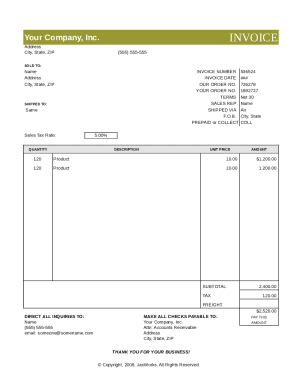
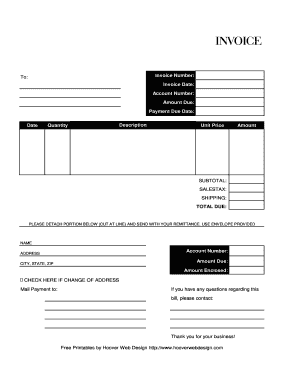
Basic invoice templates are pre-made documents that users can utilize to create professional invoices for their business transactions. These templates typically include fields for the company's information, client details, invoice number, items or services provided, costs, and payment terms.

What are the types of Basic Invoice Templates?

There are several types of basic invoice templates that users can choose from based on their specific needs. Some common types include:

Standard Invoice Template
Service Invoice Template
Sales Invoice Template
Freelance Invoice Template
Consultant Invoice Template

How to complete Basic Invoice Templates

Completing basic invoice templates is easy and straightforward. Follow these simple steps to fill out an invoice template accurately:

01
Enter your company's name and contact information at the top of the template.
02
Include the recipient's details, such as name, address, and contact information.
03
Fill in the invoice number, date, and payment terms.
04
List the items or services provided along with their costs.
05
Calculate the total amount due and include any additional information or notes.
06
Verify all details are accurate before sending the invoice to the client.

pdfFiller empowers users to create, edit, and share documents online. Offering unlimited fillable templates and powerful editing tools, pdfFiller is the only PDF editor users need to get their documents done.

Video Tutorial How to Fill Out Basic Invoice Templates

Thousands of positive reviews can’t be wrong

Read more or give pdfFiller a try to experience the benefits for yourself
5.0
PDF filler is a very useful bit of software.
PDF filler is a very useful bit of software. The support is also wonderful and available 24/7 . I needed a PDF filler for one project and forgot to cancel the trial subscription. PDF filler support cheerfully refunded my money when requested. They certainly seem to strive for happy customers.
Michael R
4.0
Excellent customer service -- quick response time and great problem-solving abil...
Excellent customer service -- quick response time and great problem-solving ability. I found the PDFFiller app itself to be a little cumbersome to use. I'd hoped it would allow me to do what ***** does but for less money, but it was more like *********
Kate B
5.0
Easy to navigate, loads quickly.
What do you like best? Easy to navigate, loads quickly. I usually don't have a lot of time in the field to wait for loading. What do you dislike? Once I was proficient in the navigation, I was good. What problems are you solving with the product? What benefits have you realized? I get a fast turnaround on documents that need signed. I can also verify that the documents have been signed while out in the field.
Consultant in Information Services

Questions & answers

What should be included in an invoice? 1. ' Invoice' A unique invoice number. Your company name and address. The company name and address of the customer. A description of the goods/services. The date of supply. The date of the invoice. The amount of the individual goods or services to be paid.
How To Invoice Without A Company A Professional Header. Your business name or full name should be at the top of the invoice, bold and easy to read. Client Contact Information. As you advance, you will need to specify to whom you send the payment invoices. Invoice Details. A Smoother Way To Invoice.
If you own or are a partner for more than one business, you may invoice yourself for services rendered. For example, your construction business contracts work from your house painting business — now you need an invoice to document the transaction and keep track of payments.
It includes the cost of the products purchased or services rendered to the buyer. Invoices can also serve as legal records, if they contain the names of the seller and client, description and price of goods or services, and the terms of payment.
Once both sides agree to the invoice, it becomes a binding contract. That means that the customer must pay the invoice, but only after the vendor has satisfied all of terms spelled out on the invoice.
To make an invoice, you'll need to create a professional document that outlines the services you complete for your clients, provides contact details for both your business and your client's business, and includes the amount owed for your work and the invoice due date.