Modify NDA For Free

Drop document here to upload
Select from device
Up to 100 MB for PDF and up to 25 MB for DOC, DOCX, RTF, PPT, PPTX, JPEG, PNG, JFIF, XLS, XLSX or TXT

Last updated on Sep 10, 2026

Modify NDA

Modify your NDA quickly and easily using pdfFiller’s browser-based editing tools, ensuring all changes are legally binding.

What is Edit Mode for NDAs?

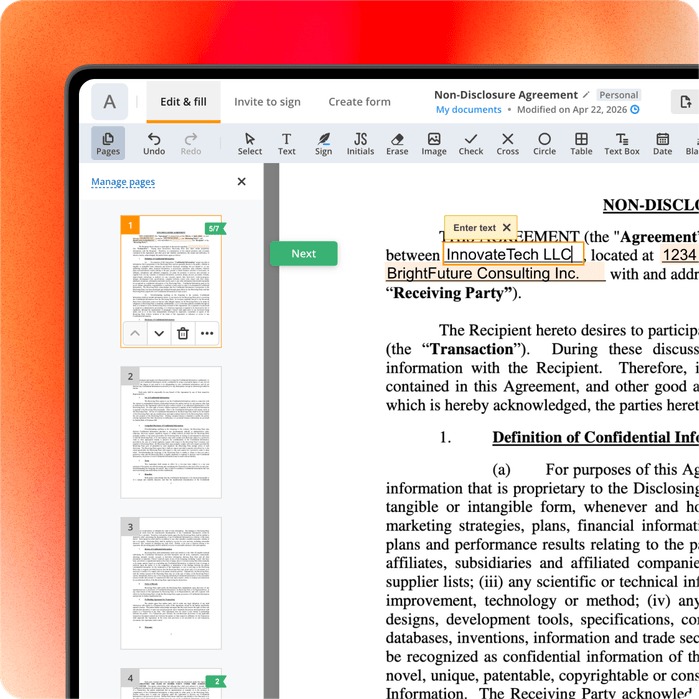
Edit Mode is a feature that allows you to modify NDA documents directly without the need for conversion. By clicking the Edit button, you can access the document editing tools where you can make direct text modifications. This process eliminates the complexities often associated with traditional PDF editors, making it easier for small and medium-sized businesses to manage their legal documents efficiently. You can modify NDA terms as needed, ensuring that your agreements remain up-to-date and relevant.

Why Modify an NDA?

It is essential to modify an NDA to ensure that the terms reflect current business practices and legal requirements. Outdated agreements can lead to misunderstandings or legal issues. By regularly updating your legal documents, you maintain compliance and protect your business interests. Modifying an NDA helps you adapt to changes in your business environment, ensuring that all parties are aware of their obligations and rights.

How to Access Edit Mode for NDAs

  • Open your NDA document in pdfFiller.
  • Locate the Edit button, typically found at the top of the interface.
  • Click the Edit button to enter Edit Mode.
  • Ensure your document is in an editable format; PDFs are supported.
  • Confirm that your web browser is compatible with pdfFiller.
  • Once in Edit Mode, you can start modifying the NDA as needed.

Editing Existing Text in Your NDA

To modify NDA text, simply click on the section you wish to edit. You can navigate through the text easily, making changes as necessary. After making your edits, ensure you save the changes to keep your updated document. This straightforward process allows you to maintain the integrity of your agreements without complicated editing processes.

Adding New Text Blocks to Your NDA

When you need to insert new text into your NDA, identify the location where you want to add the content. Use the text insertion tools available in Edit Mode to place new text blocks. You can also format the new text to match the existing document style. After adding the text, remember to save your changes to ensure they are included in the final document.

Removing Text from Your NDA

To modify an NDA by removing unnecessary text, select the text you wish to delete. Confirm the deletion to ensure that the changes are intentional. This process helps keep your document concise and relevant, avoiding any potential confusion that could arise from outdated or irrelevant information.

Using the Whiteout Tool for Corrections

The Whiteout tool in pdfFiller allows you to modify NDA documents by covering up text that needs correction. This tool differs from the Blackout tool, which permanently removes text. The Whiteout function is useful for making corrections while retaining the original document's structure. Use this tool when you need to correct specific terms or clauses without altering the entire document.

Formatting Options for Your NDA

pdfFiller offers various text formatting options for your NDA. You can choose different font styles, adjust sizes, and align text as needed. These formatting features ensure that your document looks professional and meets your business requirements. Utilizing these options can enhance the readability and presentation of your NDA.

Find and Replace in Your NDA

To efficiently modify NDA text, use the Find and Replace function. This tool allows you to search for specific terms and replace them with new text quickly. This feature saves time compared to manual searching, ensuring that all instances of a term are updated consistently throughout the document.

Editing Native vs. Scanned NDAs

Editing capabilities differ between native and scanned NDAs. Native PDFs can be modified directly in pdfFiller, while scanned documents may require OCR (Optical Character Recognition) to convert images into editable text. Understanding these differences is crucial for effective document management, as it impacts how you modify NDA content.

How Does pdfFiller Compare?

Adobe Acrobat offers comprehensive editing features but requires software installation, which can complicate the setup process for small businesses. Foxit provides fast editing capabilities but may lack some advanced features necessary for more complex NDA modifications. Nitro is good for collaboration but can be pricey for small businesses, making it less accessible for those on a budget.

Try most popular PDF tools

Discover a full set of tools to handle any document task.

Edit PDFs

Make quick PDF edits online.

Sign

Add legally binding signatures.

Merge

Combine multiple PDFs.

Request signatures

Send a document for signing.

Convert

Transform PDFs into other formats.

Rearrange

Change the order of pages.

Share

Send PDFs for review or editing.

Compress

Reduce PDF file sizes.

How to edit PDFs with pdfFiller

1. Upload or create

The online PDF editor that has it all

  • Edit PDFs without workarounds Quickly add, erase, replace, or reformat text in PDFs without converting files back and forth or using clunky desktop software. Our editor works on any device, allowing you to fill out forms and make edits wherever you are.
  • Add legally binding signatures Sign PDFs directly in the editor—no extra eSignature tools needed. Add your signature or initials after editing a contract or agreement and send it out to sign.
  • Make a lasting impression with your PDFs Add images, logos, tables, and watermarks to maintain a professional look of your documents on any device. Draw lines and arrows, insert checkmarks and shapes, or draw freehand to make quick markings or organize information.
  • Annotate and collaborate Highlight important data, redact sensitive details, add sticky notes, and exchange comments for speedy document reviews. Share files instantly to request edits, feedback, or approval—no need for email attachments.
  • Create fillable PDF forms Turn static PDFs into interactive fillable forms anyone can complete online. Drag and drop text boxes, signature fields, dropdowns, and checkboxes, then share your form via a link or publish it on your website.
  • Split, merge, and rearrange Edit and reorganize your PDFs in one place. Split a large PDF into bite-sized docs or merge separate files into one comprehensive document. Need a smaller file size? Compress your document with just one click!

Who needs this?

Explore how professionals across industries use pdfFiller to edit PDFs.

Education

Educators and administrators use pdfFiller to edit lesson plans, sign permission slips, and collaborate on curriculum updates. Create fillable forms for enrollment or evaluations, and organize PDFs with ease, all on one platform.

  • Lesson plans
  • Permission slips
  • Enrollment forms
  • Course registration forms
Education
  • G2 — Users Most Likely To Recommend
  • G2 — Grid Leader in Small-Business
  • G2 — High Performer
  • G2 — Regional Leader
  • G2 — Easiest To Do Business With
  • G2 — Best Meets Requirements
  • G2 — Best Support

pdfFiller scores top ratings on review platforms

pdfFiller is rated 4.6 out of 5 stars across 1,000+ G2 reviews.

It is a great option to find the right form you need, plus the fulfill option give you a professional look.
Virgilio A
Allows me to assign unique page numbers in a pdf that has multiple page documents merged into one pdf
Richard R
I am very grateful for this software that came into my life just as I needed it. It is easy to use and I love how it saves my work automatically so I do not LOSE it. Some many times with website document editors online, I have been been disappointed after working for hours on a form, to have it just disappear. NOT HERE. Every single time the system has gotten disconnected due to WIFI issues at my home or because the PDF filler webpage needed to refresh, ALL MY WORK was SAVED. Love it.
Virginia Maria L
Easy to use, and perfect for amending and adjusting documents
Anonymous Customer
i love it, it makes filling and signing docs so much easiers and faster.
Anonymous Customer
excellent professional customer service
Philip Weir

Edit PDFs with an all-in-one solution

Try easy-to-use tools for all your document management needs.

pdfFiller workspace for creating, filling and managing PDF forms

PDF editing is just the beginning

More than a PDF editor

Watch our PDF editor in action

Check out a quick video tutorial that shows how to edit any file into an editable PDF in three easy steps.

FAQs

If you can't find what you're looking for, please contact us anytime!

To modify an NDA using pdfFiller, simply upload your document to the platform, click on the 'Edit' option, and make the necessary changes. You can add or remove clauses, adjust dates, and include additional parties as needed. pdfFiller’s intuitive interface allows for easy text editing and document customization. For best results, ensure that you review the modified NDA for compliance with legal standards before sharing it. Utilizing pdfFiller’s document automation features can streamline this process, allowing for quick adjustments without compromising security.

When modifying an NDA with pdfFiller, your document is protected by advanced security protocols, including encryption and secure cloud storage. This ensures that sensitive information remains confidential throughout the editing process. pdfFiller complies with industry standards for data protection, making it a reliable choice for legal teams and remote professionals. Always verify that your document is shared only with authorized users to maintain its integrity. Additionally, consider using password protection for extra security when sending modified NDAs.

Yes, pdfFiller allows for real-time collaboration when modifying an NDA. You can invite team members or legal advisors to review and suggest changes directly within the document. This feature enhances communication and ensures that all parties are aligned before finalizing the agreement. To collaborate effectively, utilize the comment and annotation tools available in pdfFiller. This not only speeds up the modification process but also ensures that all feedback is documented and easily accessible.

When modifying an NDA for cross-platform compatibility, ensure that the document format is universally accessible, such as PDF. pdfFiller automatically optimizes your NDA for various devices and operating systems, making it easy for all parties to access and review the document. Additionally, check that any hyperlinks or embedded elements function correctly across different platforms. This consideration is crucial for remote professionals who may be using diverse devices. Always test the document on multiple platforms before finalizing it.

To ensure that your modified NDA complies with legal standards, start by consulting legal templates available in pdfFiller or seeking advice from a legal professional. pdfFiller provides a range of templates that can be customized to meet specific legal requirements. After making modifications, review the document thoroughly for any legal jargon or clauses that may need adjustment. Additionally, consider using pdfFiller’s eSignature feature to ensure that all parties legally sign the modified NDA, reinforcing its validity.

Using pdfFiller to modify an NDA offers several advantages over traditional methods, including speed, convenience, and enhanced security. Unlike paper-based processes, pdfFiller allows for instant edits, electronic signatures, and easy sharing, which significantly reduces turnaround time. Moreover, the platform’s cloud-based nature means you can access and modify your NDA from anywhere, making it ideal for remote professionals. Additionally, pdfFiller’s built-in security features protect sensitive information, ensuring that your modifications are secure and compliant with legal standards.

Yes, pdfFiller provides a feature to track changes made to an NDA, allowing you to see a history of edits and modifications. This is particularly useful for legal teams and remote professionals who need to maintain a clear record of document revisions. To utilize this feature, simply enable the change tracking option when editing your NDA. This transparency not only aids in compliance but also fosters trust among all parties involved. Always review the change log before finalizing the document to ensure all modifications are accurate.

Transforming businesses with pdfFiller

Check out these success stories.

I was happy to do this for patients, but I simply didn't have 30–60 minutes to fill out each form. It was a true waste of resources to do it that way, and as a surgeon, my time is better spent in patient care, which was often delayed.

Marshall Orthopaedics

One tool. Every document task.

One workflow shouldn’t take five tools

Start free trial