Send NDA For Free

Drop document here to upload
Select from device
Up to 100 MB for PDF and up to 25 MB for DOC, DOCX, RTF, PPT, PPTX, JPEG, PNG, JFIF, XLS, XLSX or TXT

Last updated on Sep 10, 2026

Send NDA

Send NDAs quickly and securely using pdfFiller's multi-channel delivery options.

What Sharing and Delivery Tools Do in pdfFiller

pdfFiller offers a user-friendly interface that simplifies the process of sending NDAs. With its multi-channel delivery options, you can send documents via email, SMS, fax, USPS, or shareable links. All your sent documents are organized in the Sent folder, allowing you to track their status easily. This system ensures that you can manage your document sharing efficiently, making it easier to send NDAs and other important files. The built-in e-signature feature guarantees that your documents are signed securely and legally, enhancing the overall document sharing experience.

Sending a Document via Email

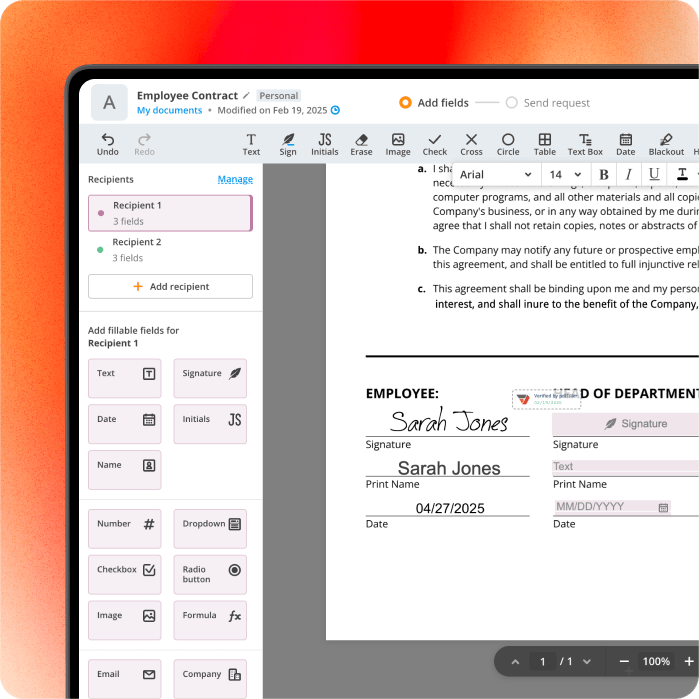
To send an NDA via email, start by selecting the completed document in pdfFiller. Click on the 'Send via Email' option and enter the recipient's email address. You can also choose from a variety of NDA templates to ensure your document meets your needs. Once sent, you can track the email delivery status in the Sent folder, which notifies you when the recipient has opened the document. This streamlined email delivery process ensures that your NDAs reach their intended recipients quickly and securely.

Sending a Document via SMS or Text Message

To send an NDA via SMS, select the document and choose the 'Send via SMS' option. Enter the recipient's phone number to deliver the NDA directly to their mobile device. The SMS delivery process is straightforward, and you can track the status of your sent messages in the Sent folder. This secure delivery method is ideal for quick communications, ensuring that your NDAs are received promptly.

Sending a Document via Fax

Sending an NDA via fax is easy with pdfFiller. After selecting your document, click on 'Send via Fax' and enter the recipient's fax number. Once sent, you can confirm receipt by checking the Sent folder for the fax status. This method is particularly useful for businesses that still rely on fax communications, ensuring that your NDAs are delivered efficiently.

Sending a Document via USPS Physical Mail

If you prefer to send an NDA via USPS, pdfFiller can print and mail the document on your behalf. Simply select the 'Send via USPS mail' option, enter the recipient's postal address, and your NDA will be on its way. You can track the delivery status through the Sent folder, providing peace of mind that your document is en route. This option is great for those who need a physical copy of the NDA delivered securely.

Sharing a PDF Online via Link

To share an NDA online, generate a shareable link using pdfFiller. This allows recipients to view the document without needing a pdfFiller account. Simply select the 'Share Online' option, and you'll receive a link that you can send via email or message. This electronic signing method is efficient and ensures that your NDAs are accessible to all necessary parties.

Sharing a PDF for Collaboration

With pdfFiller's Share for Collaboration feature, you can invite co-editors to work on your NDA. To do this, select the document and click on 'Share for Collaboration.' Enter the email addresses of your collaborators, and they will receive an invitation to edit the document. This document sharing feature allows for real-time collaboration, making it easier to finalize NDAs quickly.

Bulk Sending Documents to Multiple Recipients

For small businesses needing to send NDAs to multiple recipients, pdfFiller offers a bulk send feature. You can upload a list of email addresses and select the NDA to send. This process saves time and ensures that all recipients receive their documents simultaneously. Managing your recipient lists is straightforward, allowing you to keep track of who has received the NDA.

Tracking Sent Documents in the Sent Folder

pdfFiller's Sent folder provides an organized view of all your sent NDAs. You can easily check the delivery status of each document, including whether it has been opened or signed. This feature is particularly useful for freelancers who need to keep track of their document submissions. By using the Sent folder, you can ensure that all your NDAs are accounted for and follow up as needed.

Summary and Next Steps

In summary, pdfFiller offers various methods to send NDAs, including email, SMS, fax, USPS, and online sharing. Each method is designed to be user-friendly and efficient, ensuring that your documents are delivered securely. Whether you are a small business or a consultant, you can easily manage your NDA sending process with pdfFiller. Start sending your NDAs today and experience the convenience of digital document management.

How Does pdfFiller Compare?

Adobe Acrobat offers extensive PDF editing features, but lacks the multi-channel delivery options pdfFiller provides. Tradeoff: More complex interface.

DocuSign is known for its e-signature capabilities, but can be costly for small businesses compared to pdfFiller. Tradeoff: Limited document templates.

Smallpdf provides basic PDF tools, but does not support the same level of document sharing and collaboration as pdfFiller. Tradeoff: Fewer features for business needs.

Try most popular PDF tools

Discover a full set of tools to handle any document task.

Edit PDFs

Make quick PDF edits online.

Sign

Add legally binding signatures.

Merge

Combine multiple PDFs.

Request signatures

Send a document for signing.

Convert

Transform PDFs into other formats.

Rearrange

Change the order of pages.

Share

Send PDFs for review or editing.

Compress

Reduce PDF file sizes.

How to sign a document online?

Upload

Signing and editing documents has never been easier

  • Edit and sign in one place Quickly eSign documents after reviewing or editing — no need to juggle tools and move files back and forth. Get your PDFs done fast with all the tools you need at your fingertips.
  • Easy sharing & collaboration After signing a document, share it instantly with clients and stakeholders for review, editing, or comments. To request signatures from other parties, add fillable fields and send the document for signing.
  • Mobile-ready solution Easily edit, sign, and send your documents from anywhere, even on the go. pdfFiller is entirely cloud-based, so you can manage documents effectively from your computer, smartphone, or tablet.
  • Legally binding & secure Sign contracts and agreements following global eSignature laws, including ESIGN, UETA, eIDAS, and GDPR. With HIPAA, PCI DSS, SOC 2 Type II, and other compliance standards, pdfFiller works for any industry.

Who needs this?

Explore how professionals use pdfFiller to sign documents.

Healthcare

Healthcare professionals use pdfFiller to simplify document signing, from patient consent forms to medical record requests. They can easily request, approve, and share signed documents with patients, staff, or suppliers, saving time and improving communication.

  • Patient consent forms
  • Prescription forms
  • Lab test requisition forms
  • Referral and consultation forms
Healthcare
  • G2 — Users Most Likely To Recommend
  • G2 — Grid Leader in Small-Business
  • G2 — High Performer
  • G2 — Regional Leader
  • G2 — Easiest To Do Business With
  • G2 — Best Meets Requirements
  • G2 — Best Support

pdfFiller scores top ratings on review platforms

pdfFiller is rated 4.6 out of 5 stars across 1,000+ G2 reviews.

Nice very easy to navigate but a little expensive
Leesa T
This is my first time using this product. It was easy to follow. I would like to learn other aspects of PDFfille
Barry A
Very easy to use. Have saved me so much time. Saves time by not having to re-type documents and I can just add in names on pre-typed forms. It has been instrumental for changing contracts and names on documents I think, if it isn't in place, a way to be able to use it on your mobile device. Most often, I'm on the go and things have to be changed or modified. This could be huge for a busy person like me.
Kevin T.
great fillable forms great fillable forms. easy save and email. would recommend for all small businesses.
courtney koonce
Form was easy to complete. Form was easy to complete
Rebecca Mason
WORKS GOOD LITTLE DIFFICULT TO USE WEN… WORKS GOOD LITTLE DIFFICULT TO USE WEN TRYING TO COMPLETE DOCS WITHIN SETTINGS BUT ITS NOT BAD I DO LOVE THE FEATURES THAT ARE AVAILABLE...
stephanie koehler

eSign documents with a trusted, all‑in‑one solution

Try easy-to-use tools for all your document management needs.

pdfFiller workspace for creating, filling and managing PDF forms

Why sign documents with pdfFiller?

Ease of use

Watch pdfFiller eSignatures in action

Check out a quick video tutorial that shows how to create and place your signature or send a document for signing.

FAQs

If you can't find what you're looking for, please contact us anytime!

To securely send an NDA using pdfFiller, simply upload your document to the platform, fill in the necessary details, and utilize the eSignature feature. This ensures that your NDA is not only sent quickly but also securely, as pdfFiller employs advanced encryption protocols. After uploading, you can easily add signers and send the document directly via email. For added security, consider enabling password protection on your NDA before sending it, ensuring that only authorized individuals can access it.

Using pdfFiller to send NDAs offers several advantages over traditional methods, including enhanced security, speed, and convenience. Unlike mailing physical copies, pdfFiller allows for instant document delivery, reducing turnaround time significantly. Additionally, the platform's built-in security protocols, such as encryption and audit trails, provide peace of mind that your sensitive information is protected. For remote professionals and legal teams, this means less time managing paperwork and more time focusing on critical tasks.

Yes, you can customize your NDA before sending it through pdfFiller. The platform allows you to edit text, add logos, and insert specific clauses tailored to your needs. This flexibility ensures that your NDA meets the unique requirements of your agreement. To customize, simply upload your template, use the editing tools to make necessary changes, and then save your document. This feature is especially useful for SMEs looking to maintain a professional appearance while ensuring all legal bases are covered.

If your recipient has trouble accessing the NDA you sent via pdfFiller, first ensure that they received the email with the link to the document. If they did, advise them to check their spam folder or try accessing the link from a different browser or device. If issues persist, you can resend the NDA or provide them with a direct download link. Additionally, consider using pdfFiller's support resources or chat feature for immediate assistance, ensuring that your recipient can access the document without delay.

pdfFiller ensures the confidentiality of your NDA through robust security measures, including end-to-end encryption and secure cloud storage. When you send an NDA, the document is encrypted during transmission and while at rest, protecting it from unauthorized access. Furthermore, pdfFiller complies with industry-standard security protocols, making it a reliable choice for legal teams and remote professionals. To enhance confidentiality, you can also set expiration dates for your NDA links, ensuring that access is limited to a specific timeframe.

Yes, pdfFiller provides tracking features that allow you to monitor the status of your NDA after sending it. You can see whether the document has been viewed, signed, or if any actions are pending. This tracking capability is invaluable for legal teams and remote professionals who need to ensure timely responses. To access this feature, simply navigate to your document dashboard and select the NDA in question. This transparency helps you manage your agreements effectively and follow up as needed.

With pdfFiller, you can create and send various types of NDAs, including unilateral, mutual, and employee NDAs. The platform offers customizable templates that cater to different scenarios, ensuring you can draft an agreement that meets your specific needs. To create an NDA, choose a template, fill in the relevant details, and make any necessary edits. This versatility makes pdfFiller an excellent choice for SMEs and legal teams looking to streamline their document management process.

What businesses achieve with pdfFiller

Discover how you can benefit too.

pdfFiller allows us to tap into additional markets and sell business we might not otherwise have sold because of the speed and ease with which we can produce the forms.

Scaturro Insurance Agency LLC

One tool. Every document task.

One workflow shouldn’t take five tools

Start free trial