Convert Word to PDF and eSign PDF for MSFT For Free

Drop document here to upload
Select from device
Up to 100 MB for PDF and up to 25 MB for DOC, DOCX, RTF, PPT, PPTX, JPEG, PNG, JFIF, XLS, XLSX or TXT
Note: Integration described on this webpage may temporarily not be available.

Last updated on Sep 18, 2026

Convert Word to PDF and eSign PDF for MSFT

Convert Word documents to PDF and eSign them easily with pdfFiller.

What is the Word to PDF Conversion Tool?

The Word to PDF conversion tool allows you to convert Word documents to PDF format effortlessly. This tool is ideal for creating shareable documents that maintain their formatting across different devices. Additionally, it supports eSigning, ensuring legal compliance for your documents. With this conversion tool, you can manage your documents efficiently without dealing with complex technical jargon.

Why Convert Word to PDF?

Converting Word files to PDF offers several advantages. First, it preserves formatting across devices, ensuring that your document looks the same no matter where it is viewed. Second, PDF format guarantees compatibility with various platforms, making it easier to share documents with others. Finally, converting to PDF enhances document security and integrity, protecting your content from unauthorized changes.

How to Access the Conversion Tool

  • Open the Done dropdown menu in pdfFiller.
  • Navigate to the All Tools dashboard to find the conversion tool.
  • Use the More menu for document-level conversion options.

Steps to Convert Word to PDF

  • Upload your Word document by selecting it from your device.
  • Select the 'Convert to PDF' option from the available tools.
  • Download the converted PDF file to your device for use.

Supported Output Formats

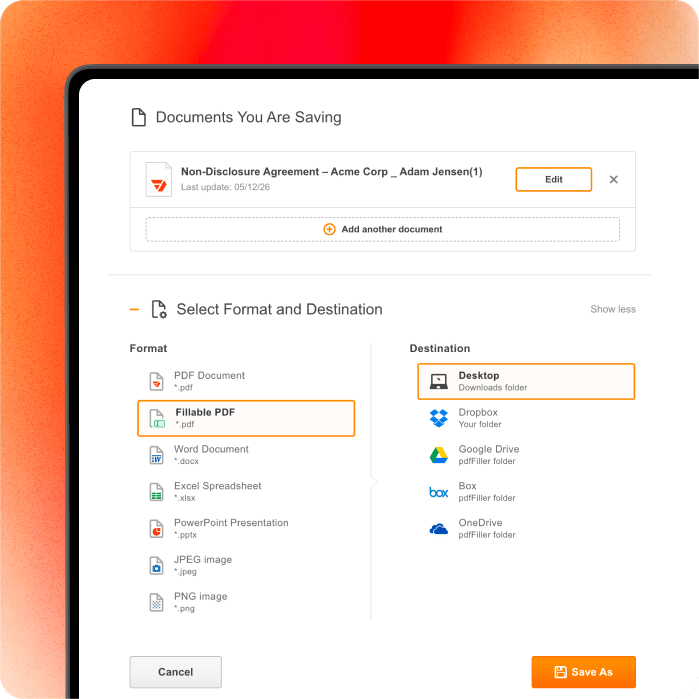
The primary output format for conversion is PDF (.pdf). Additionally, you can convert documents into other formats such as Word, Excel, and images. Be aware that plan-tier restrictions may apply, limiting the formats available based on your subscription level.

Input File Types for Conversion

You can convert various file types, including Word documents (.doc, .docx), Excel spreadsheets, and PowerPoint presentations. The tool also accepts image files such as .jpg and .png, ensuring a wide range of document formats can be processed.

What to Expect from Converted Files

When converting files, layout fidelity may vary based on the complexity of the original document. Text editability in PDFs is limited, meaning some formatting may not be preserved. Additionally, OCR limitations apply to scanned documents, which may affect the accuracy of text recognition in the converted files.

Comparison with Other Export Methods

Using the 'Save As' function in Word differs significantly from using the conversion tool. While 'Save As' may create a PDF, it often compresses the document, potentially losing quality. In contrast, the conversion tool maintains the integrity of your document. Furthermore, compression methods can lead to reduced file size but may compromise quality, making the conversion tool a more reliable option.

Industry-Specific Scenarios for Conversion

In the legal field, converting Word documents to PDF is essential for filing court documents, ensuring they are tamper-proof and easily shareable. For business proposals, a PDF format presents a professional appearance, making it easier to impress potential clients. In academia, students can submit assignments in PDF format, which maintains formatting and prevents alterations by others.

Browser and Device Compatibility

The conversion tool works on all major browsers, ensuring accessibility for users. It is compatible with both Mac and Windows operating systems, allowing for flexibility in usage. Additionally, mobile access is available without the need for installation, enabling users to convert documents on the go.

Security and Data Handling

pdfFiller manages document security through a server-side conversion process, ensuring that your files are not stored on local devices. Data encryption measures are in place to protect your information during the conversion process. Furthermore, pdfFiller complies with privacy standards, providing peace of mind when handling sensitive documents.

Next Steps After Conversion

After converting your document, you can eSign the PDF using pdfFiller's built-in tools. Sharing the converted document is straightforward, allowing you to send it via email or other platforms. Additionally, integration with other tools is available, streamlining your document management process.

How Does pdfFiller Compare?

Adobe Acrobat offers comprehensive features but at a higher cost; pdfFiller provides essential tools at a fraction of the price.

Smallpdf features a user-friendly interface but lacks advanced features; pdfFiller combines ease of use with robust functionality.

Nitro is good for team collaboration but requires installation; pdfFiller is entirely web-based with no setup needed.

Try most popular PDF tools

Discover a full set of tools to handle any document task.

Edit PDFs

Make quick PDF edits online.

Sign

Add legally binding signatures.

Merge

Combine multiple PDFs.

Request signatures

Send a document for signing.

Convert

Transform PDFs into other formats.

Rearrange

Change the order of pages.

Share

Send PDFs for review or editing.

Compress

Reduce PDF file sizes.

How to convert your PDF?

1. Upload your document

All-in-one PDF converter: Convert, edit, sign, and manage documents

  • Convert and edit docs in one place Upload your document, make quick edits online, and save it as a PDF, text document (DOCX), spreadsheet (XLSX), image (JPEG/PNG), or presentation (PPTX).
  • Equip yourself with powerful PDF tools Edit PDFs online almost as easily as Word documents. Add text, adjust formatting, replace content, insert images, and more.
  • eSign and send documents Sign documents on your own or send them to others for signatures, whether a single recipient or an entire group.
  • Annotate & collaborate Highlight important data, redact sensitive details, add sticky notes, and exchange comments in your PDFs. Then, instantly send documents for review or editing.
  • Collect data without chasing people down Create fillable PDF forms and let others complete them from any device. Publish forms online or share them via a direct link to capture data and signatures.
  • Store files securely in the cloud Organize your documents and templates in secure cloud storage and access them from anywhere. pdfFiller follows strict security regulations to help safeguard your data.

Who needs this?

Explore how professionals across industries use pdfFiller to convert PDFs online.

Real Estate

Real estate agents and brokers rely on pdfFiller to edit and annotate brochures, lease agreements, and contracts. They can easily convert documents to formats like JPEG, PDF, DOCX, or XLSX for quick sharing and signature collection.

  • Property listing brochures
  • Lease agreements
  • Sales contracts
  • Property management forms
Real Estate
  • G2 — Users Most Likely To Recommend
  • G2 — Grid Leader in Small-Business
  • G2 — High Performer
  • G2 — Regional Leader
  • G2 — Easiest To Do Business With
  • G2 — Best Meets Requirements
  • G2 — Best Support

pdfFiller scores top ratings on review platforms

pdfFiller is rated 4.6 out of 5 stars across 1,000+ G2 reviews.

MY EXPERIENCE WAS EASY AND FAST WHICH VERY IMPORTANT
NOLITA M
So far, I have enjoyed the convenience of being able to access forms and documents as needed for my business maters.
Sandra K. K
Easy to use once I learned the system. I would recommend to anyone.
Donna S
The interface & intuitive simplicity are good.
Michael S
Paul helped me a lot with changing my… Paul helped me a lot with changing my subscription plan.Thank you, Paul!
Iacob Dumitru
Very satisfied with PDFfiller. simple and easy to use. exactly what i've looking for
Hellebuyck

Convert documents with a trusted solution

Try easy-to-use tools for all your document management needs.

pdfFiller workspace for creating, filling and managing PDF forms

Why convert documents with pdfFiller?

More than a PDF converter

Watch our PDF converter in action

Check out a quick video tutorial that shows how to convert any file into an editable PDF in three easy steps.

FAQs

If you can't find what you're looking for, please contact us anytime!

To convert a Word document to PDF and eSign it using pdfFiller, simply upload your Word file to the platform. Once uploaded, select the 'Convert to PDF' option, which will transform your document into a PDF format. After conversion, you can easily add your electronic signature by clicking on the 'eSign' feature. This process ensures that your document maintains its formatting and is secure for sharing. For best results, ensure that your Word document is properly formatted before conversion to avoid any layout issues.

pdfFiller employs robust security protocols, including 256-bit SSL encryption, to protect your documents during the conversion and eSigning process. When you convert Word to PDF and eSign PDF for MSFT, your files are securely stored in the cloud, ensuring that only authorized users can access them. Additionally, pdfFiller complies with industry standards for data protection, making it a reliable choice for remote professionals and legal teams who require secure document management. Always verify that your documents are shared only with trusted recipients to enhance security.

Yes, pdfFiller is designed for cross-platform compatibility, allowing you to convert Word to PDF and eSign PDF for MSFT on any device with internet access. Whether you are using a desktop, tablet, or smartphone, you can seamlessly manage your documents. This flexibility is particularly beneficial for remote professionals who need to work on the go. To ensure a smooth experience, make sure your browser is up to date and that you have a stable internet connection.

If your converted PDF does not look right after converting from Word, check the original document for complex formatting, such as tables or images, which may not translate perfectly. pdfFiller's conversion tool works best with standard text and simple layouts. If issues persist, try adjusting the formatting in your Word document before conversion. Additionally, you can use pdfFiller's editing tools post-conversion to make necessary adjustments, ensuring your document meets your expectations before eSigning.

Yes, pdfFiller offers document automation features that can streamline the process of converting Word to PDF and eSigning. By using templates and workflows, you can set up automated processes for frequently used documents, saving time and reducing manual errors. This is particularly useful for SMEs and legal teams that handle multiple documents regularly. To set up automation, explore the 'Templates' section in pdfFiller and create a workflow that suits your needs.

Using pdfFiller for eSigning offers several advantages over traditional methods, including speed, convenience, and enhanced security. Unlike physical signatures that require printing, signing, and scanning, pdfFiller allows you to eSign documents directly online, saving time and resources. Additionally, electronic signatures are legally binding and can be tracked for verification, making them ideal for remote professionals and legal teams. For best practices, always ensure that your eSignature complies with local regulations to maintain its validity.

To ensure your eSigned PDFs are compliant with legal standards, use pdfFiller's built-in compliance features, which adhere to regulations such as eIDAS and ESIGN Act. When you convert Word to PDF and eSign PDF for MSFT, pdfFiller provides an audit trail that records the signing process, including timestamps and IP addresses, which can be crucial for legal verification. Always review the compliance requirements specific to your industry to ensure that your documents meet all necessary legal criteria.

What businesses achieve with pdfFiller

Discover how you can benefit too.

Other software options offering customized branding have really extreme pricing. Compared to the monthly costs of PandaDoc, we are now saving unbelievable amounts of money.

B2B Services Message Direct

One tool. Every document task.

One workflow shouldn’t take five tools

Start free trial