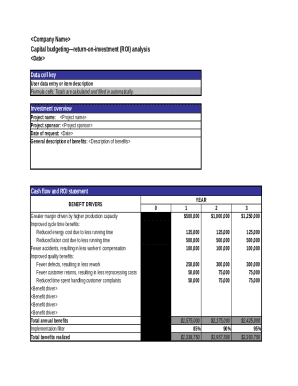
What is Roi Analysis Template?
ROI Analysis Template is a tool used to evaluate the return on investment of a particular project or initiative. It helps in measuring the profitability and efficiency of an investment by comparing the gains or benefits with the costs incurred.
What are the types of Roi Analysis Template?
There are several types of ROI Analysis Templates that are commonly used:
Simple ROI Template
Break-even Analysis Template
Net Present Value Template
Payback Period Template
How to complete Roi Analysis Template
Completing an ROI Analysis Template is a straightforward process. Here are the steps to follow:
01
Gather all the necessary data including costs and benefits of the investment
02
Calculate the return on investment using the formula: ROI = (Gain from Investment - Cost of Investment) / Cost of Investment * 100
03
Analyze the results and determine the profitability of the investment based on the calculated ROI
pdfFiller empowers users to create, edit, and share documents online. Offering unlimited fillable templates and powerful editing tools, pdfFiller is the only PDF editor users need to get their documents done.
Video Tutorial How to Fill Out Roi Analysis Template
Thousands of positive reviews can’t be wrong
Read more or give pdfFiller a try to experience the benefits for yourself
Questions & answers
How do you write a ROI analysis?
The formula for ROI is typically written as: ROI = (Net Profit / Cost of Investment) x 100. ROI = [(Financial Value - Project Cost) / Project Cost] x 100. Expected Revenues = 1,000 x $3 = $3,000. Net Profit = $3,000 - $2,100 = $900. ROI = ($900 / $2,100) x 100 = 42.9% Actual Revenues = 1,000 x $2.25 = $2,250.
How to do ROI analysis in Excel?
How to calculate ROI in Excel Open Excel. Open Microsoft Excel using your computer. Label cells. Enter the investment amount. Enter the financial gain from your investment. Input the formula. Change to a percentage.
How do I create a ROI spreadsheet?
How To Calculate ROI in Excel With Net Income Open Excel and Create a New Workbook. Label the Cells. Enter the Content Investment. Enter the Sales From Content. Calculate the Amount of Gain or Loss. Enter the ROI Formula. Convert ROI to a Percentage. Repeat the Steps.
What does an ROI analysis look like?
An ROI analysis analyzes a company or asset's performance over a specific period of time to determine its potential profitability. For example, an investor might measure the growth of a particular cryptocurrency over the year to determine if it's a good time to invest in it.