What is Home Budget Workbook?
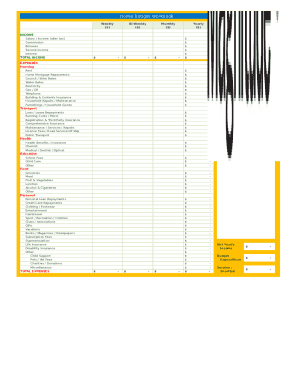
A Home Budget Workbook is a tool that helps individuals track and manage their finances. It typically includes sections for income, expenses, savings, and other financial resources.
What are the types of Home Budget Workbook?
There are several types of Home Budget Workbooks available, including: traditional pen and paper worksheets, digital spreadsheets, online budgeting tools, and mobile apps.
traditional pen and paper worksheets
digital spreadsheets
online budgeting tools
mobile apps
How to complete Home Budget Workbook?
To successfully complete a Home Budget Workbook, follow these steps:
01
Gather all your financial information including income sources, bills, expenses, and savings goals.
02
Fill in the appropriate sections of the workbook with accurate figures and data.
03
Regularly update the workbook to track your financial progress and make adjustments as needed.
pdfFiller empowers users to create, edit, and share documents online. With unlimited fillable templates and powerful editing tools, pdfFiller is the only PDF editor users need to get their documents done.
Video Tutorial How to Fill Out Home Budget Workbook
Thousands of positive reviews can’t be wrong
Read more or give pdfFiller a try to experience the benefits for yourself
Questions & answers
What is the 50 30 20 rule of budgeting worksheet?
Monthly 50/30/20 budget worksheet. Keep your monthly budget and savings on track and on target with the 50/30/20 approach. Designate 50% of your income to needs (mortgage/rent, utilities, car payments), 30% to wants (travel, concerts, fashion splurges) and 20% goes directly to your savings account(s) and debts.
What is the 75 15 10 rule?
for anybody with any amount of money. so for every dollar you make, you can spend 75 cents. then 15 cents is the minimum that you can invest, and 10 cents is the minimum that you save.
What is a 50 30 20 budget example?
By Melissa Green | Citizens Bank Staff One of the most common percentage-based budgets is the 50/30/20 rule. The idea is to divide your income into three categories, spending 50% on needs, 30% on wants, and 20% on savings.
How do you distribute your money when using the 50-20-30 rule?
By Melissa Green | Citizens Bank Staff One of the most common percentage-based budgets is the 50/30/20 rule. The idea is to divide your income into three categories, spending 50% on needs, 30% on wants, and 20% on savings.
What is the 70% rule to plan your budget?
The 70-20-10 rule holds that: 70 percent of your after-tax income should go toward basic monthly expenses like housing, utilities, food, transportation, and personal living expenses. 20 percent should be saved or put into investments, leaving 10 percent for debt repayment.
How do I create a budget sheet for my home?
How to create a budget spreadsheet Choose a spreadsheet program or template. Create categories for income and expense items. Set your budget period (weekly, monthly, etc.). Enter your numbers and use simple formulas to streamline calculations. Consider visual aids and other features.